EN8
Brewing Coffee
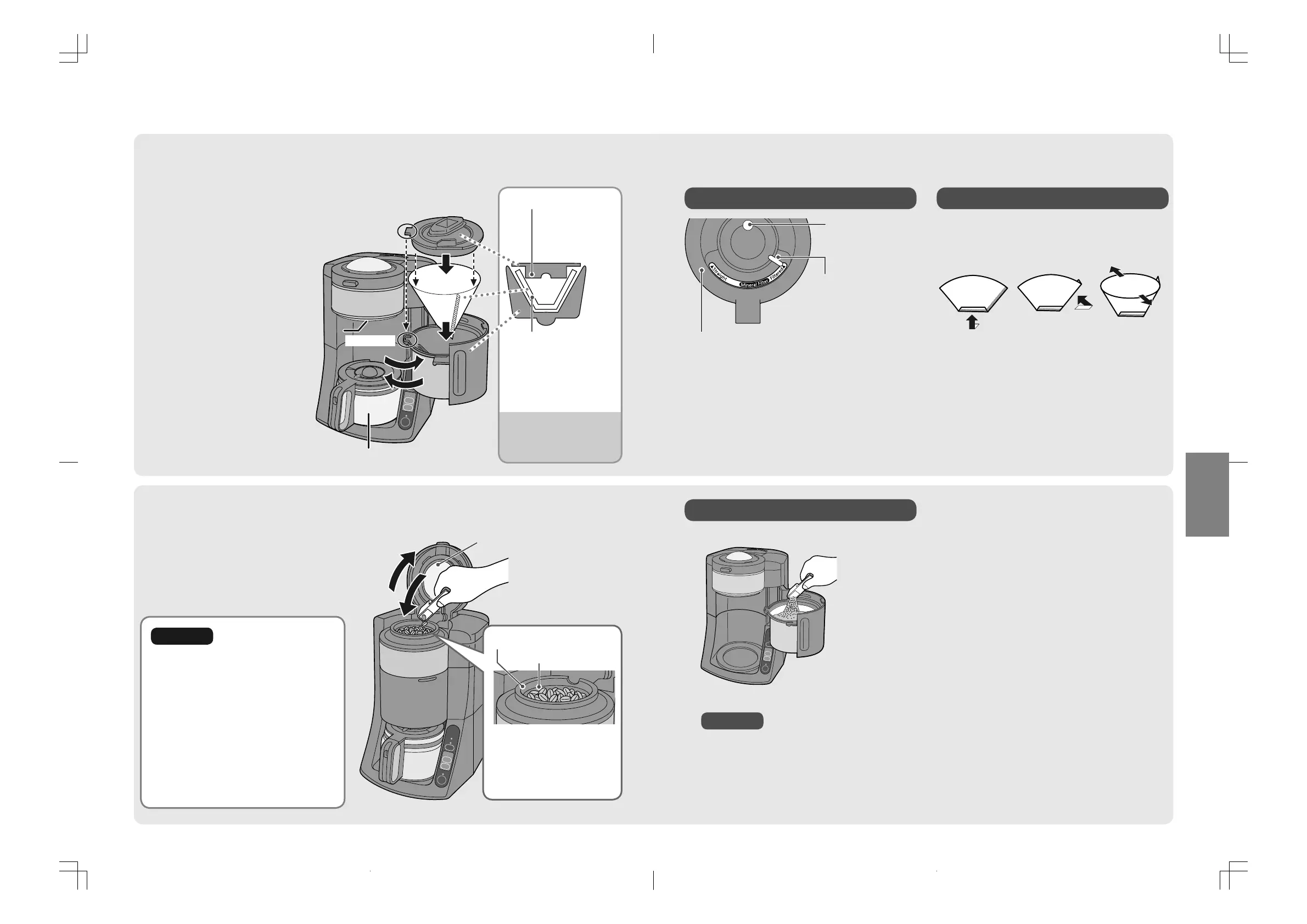
Insert the coffee beans to the bean hopper.
■
■
˛#
Open the bean hopper lid.
˛$
Insert the coffee beans.
˛%
Close the lid.
Inside of the lid
●
Wipe inside of the lid, bean hopper
or mesh filter when it is wet before
use. (Some coffee beans remain
inside the bean hopper.)
●
Do not use the moist coffee
beans
*
. It stops the operation after
Indicating by beep sounds and
lamps. (P. EN17)
*
Beans which is not easily broken by
pushing with spoon.
Place the glass jug on the warming plate after
setting the paper filter to the basket.
Paper filter
Insert a paper filter
while touching the side
walls and bottom of
the basket after folding
paper filter. (P. EN9)
˛#
Open the basket.
˛$
Attach the mesh filter.
(P. EN13)
˛%
Remove the basket lid
and place the paper
filter.
˛&
Place the basket lid.
Adjust the convex
part of lid and the
concave part of
basket.
˛(
Close the basket.
˛)
Place the glass jug on
the warming plate.
Convex part
Concave part
●
Incorrect setting may
cause overflow of
coffee liquid.
˛#
˛$
˛%
%
Basket lid
Be sure the bottom
of basket lid is
attached to the
inside of paper filter.
Caution
˛$
˛&
˛#
˛(
˛)
Be sure not to exceed
the limit line on the inside
of the bean hopper.
( It may cause remaining
beans by clogging.)
Limit line
Bean hopper
NC-TSC500.indb8NC-TSC500.indb8 2016/08/0913:54:572016/08/0913:54:57
EN9
English
˛#
Open the basket.
˛$
Place the ground to the paper filter.
˛%
Close the basket.
˛#
Hold the
bottom part.
˛$
Hold the
side.
˛%
Open
the filter
completely.
Mineral filter
Glass jug lid
Sourness adjusting lever
●
If choose “Filtered”,
brewed coffee goes
through the mineral
filter to make a mild
coffee.
( It is not addition to
the mineral ingredient.)
How to adjust your coffee taste (Sourness)
How to fold the paper filter
Notice
Using the ground
*
*
Ground : pre-ground coffee beans
●
Use the medium grind coffee for the paper filter.
●
Never insert the ground to the bean hopper.
( Coffee liquid may overflow from the bean hopper during
brewing and it may cause malfunction.)
●
Place the basket lid correctly.
●
Make sure to close the bean hopper lid and basket.
It will not start with beeping sound even press the button when close those incorrectly.
(P. EN16)
NC-TSC500.indb9NC-TSC500.indb9 2016/08/0913:54:582016/08/0913:54:58
100121875_NC-TSC500_tori
Refine_16-08-09 14:44:19
Refine_0009_NC-TSC500.p1.pdf
Refine_16-08-09 14:44:30
Refine_0008_NC-TSC500.p1.pdf
5 16-08-09 15:30:28


 To Next Page