- 12 -
How to Operate
PROGRAM MEMORY
Model No. NE-17723 (1300 memory):
1 digit input = 0 to 9, 2 digit input = 00 to 99, 3 digit input = 000 to 999 and A00 to C99
Other models (30 memory): A0 to C9 *For A settings, you do not need to press Shift (A/B/C) pad.
To change the number of memory digits:
Press “Start” + “0” while the door is open.1.
Press the number of digits you want to set. (1 digit=1, 2 digits=2, 3 digits=3)2.
Press “Prog”.3.
Note: The Digital Display Window illustration here is Model No. NE-17723.
The Digital Display Window differs for other models.
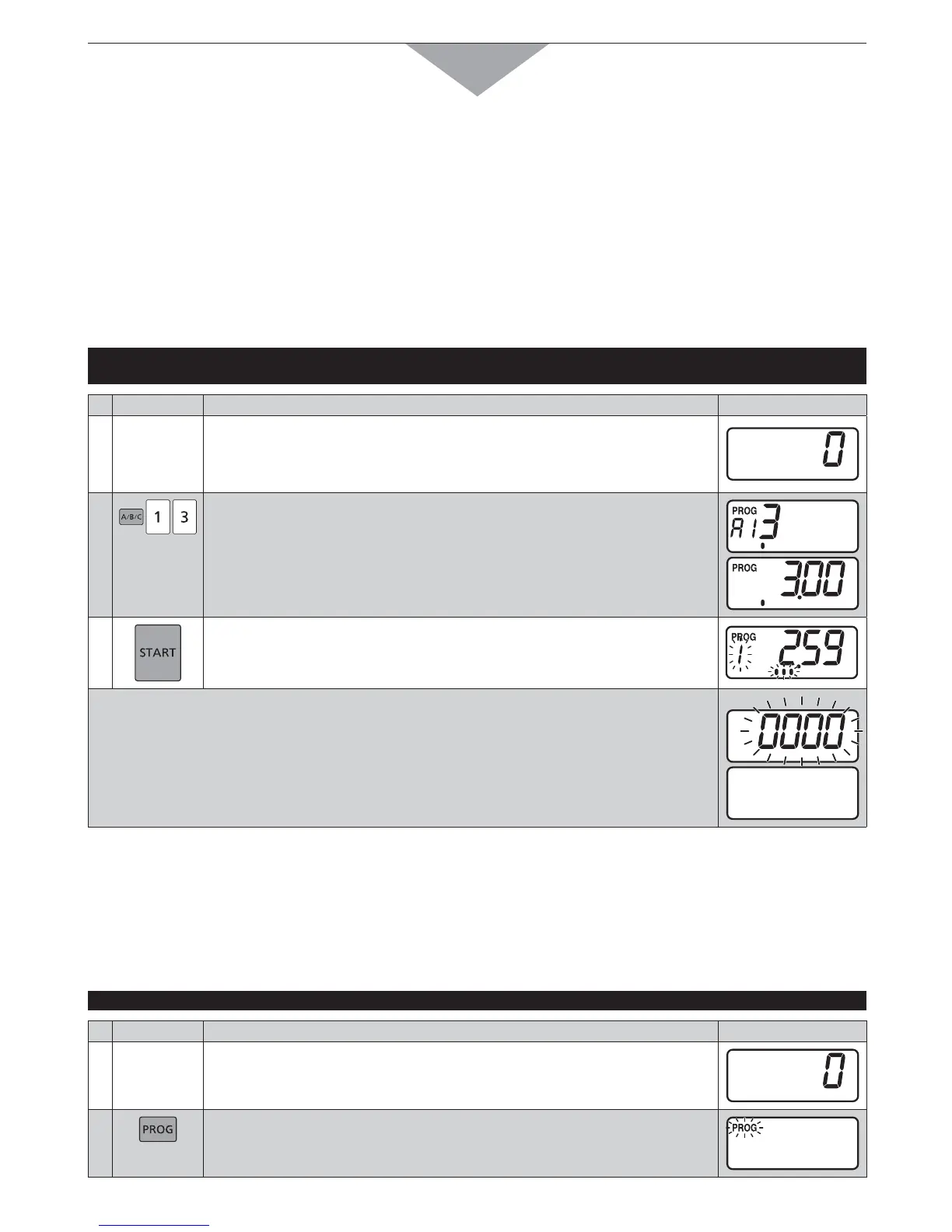
B. PROGRAMMED HEATING
)N0ROGRAM5NLOCK-ODE
Example: To select Number/Memory pads “1” and “3” at A side in which your desired heating program
(at HIGH power for 3 min., single stage heating) is set
PAD INSTRUCTION
DIGITAL DISPLAY WINDOW
1
Place food inside the oven and close the door.
The oven lamp will turn on and “0” will appear.
Note: While “0” appears, operation is available. 1 minute after the door is
closed, “0” will disappear.
2
Press Shift (A/B/C) pad, the desired Number/Memory pads “1” and
“3”.
The currently programmed information will be indicated.
Note: All models except Model No. NE-1772 display the memory number
and time.
3
Press Start pad.
The oven lamp will turn on and heating will start. The heating time will
count down.
s 7HENALLTIMEEXPIRESBEEPTONEWILLSOUNDANDHEATINGWILLSTOP4HEOVENLAMPWILLTURN
off. “0000” will blink until the door is opened. 1 minute later, cooling fan will stop.
s /PENTHEDOORANDTAKETHEFOODOUT4HEOVENLAMPWILLTURNON
s #LOSETHEDOOR4HEOVENLAMPWILLTURNOFFMINUTELATER$IGITAL$ISPLAY7INDOWWILLGO
blank.
)N0ROGRAM,OCK-ODE
Just press the desired Number/Memory pad. Heating will automatically start without pressing Start pad.
For Double (or Triple) Quantity heating:
Press Double (or Triple) Quantity pad before pressing the desired Number/Memory pad.
C. PROGRAMMING NUMBER/MEMORY PADS — single stage heating —
THE OVEN CAN NOT BE PROGRAMMED WHEN PROGRAM LOCK IS ACTIVATED! (See pages 14-15)
Example: To program cooking at DEFROST power for 1 minute into Number/Memory pads “1” and “5” at A side
PAD INSTRUCTION
DIGITAL DISPLAY WINDOW
1
Open the door and leave it open.
The oven lamp will turn on, and “0” will appear.
2
Press Prog pad.
“PROG” will start to blink.




 To Next Page