- 19 -
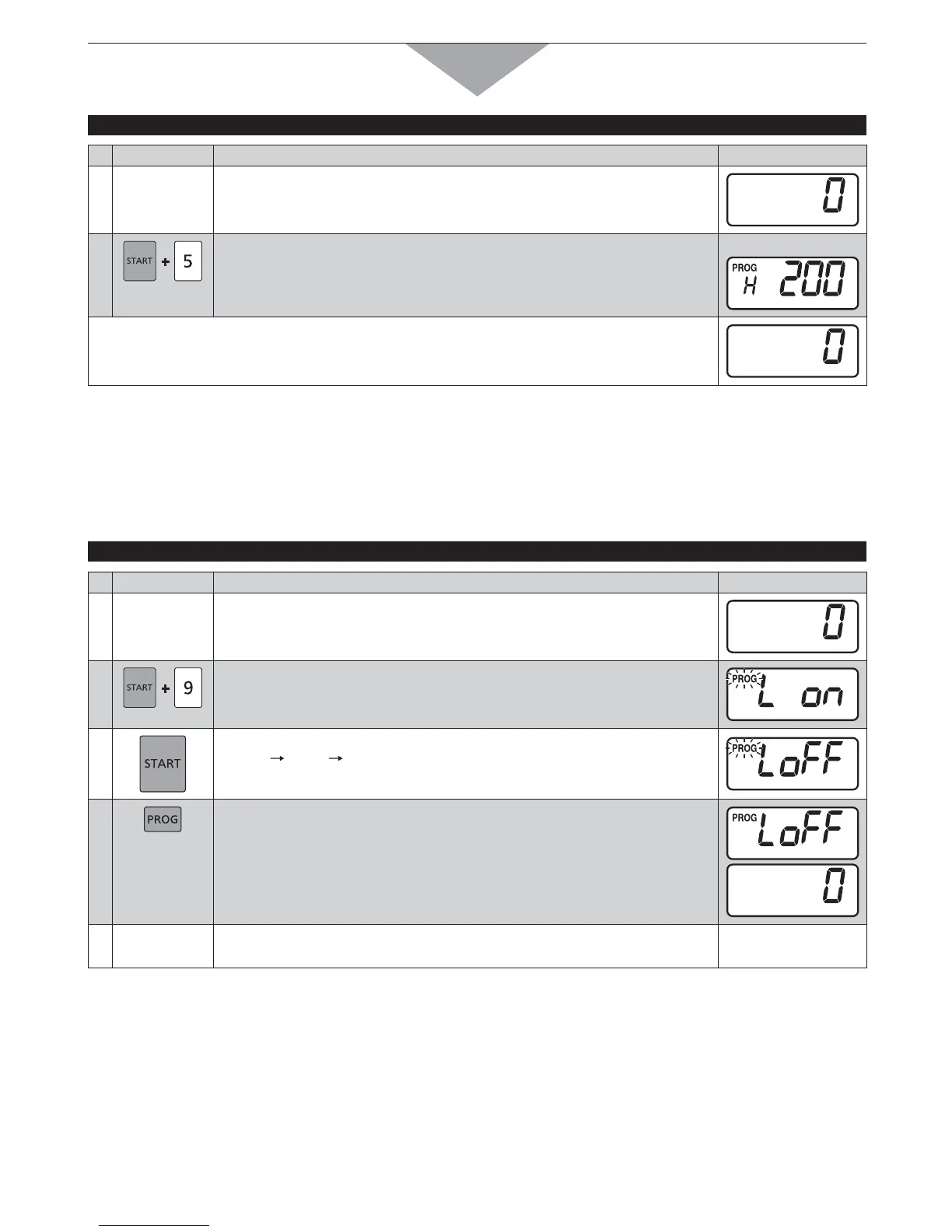
Example: To display the filter cleaning alarm counter
PAD INSTRUCTION
DIGITAL DISPLAY WINDOW
1
Open the door and leave it open.
The oven lamp will turn on, and “0” will appear.
2
While pressing Start pad, press Number/Memory pad “5”.
The cumulative total cooking time elapsed since the last time it was
cleared is displayed.
e.g.
s SECONDSLATERhvWILLAPPEAR
J. OVEN LAMP
THE OVEN CAN NOT BE PROGRAMMED WHEN PROGRAM LOCK IS ACTIVATED! (See pages 14-15)
/VEN,AMPSETTINGSWHENTHEDOORISOPEN
Example: To turn Oven Lamp settings OFF
PAD INSTRUCTION
DIGITAL DISPLAY WINDOW
1
Open the door and leave it open.
The oven lamp will turn on, and “0” will appear.
2
While pressing Start pad, press Number/Memory pad “9”.
“PROG” will start to blink.
The previously set Oven Lamp settings are displayed.
3
Press Start pad.
“on”
“oFF” “on” is repeated each time the pad is pressed.
4
Press Prog pad.
“PROG” will stop blinking, and the Oven Lamp settings will appear for
3 seconds.
Then “0” will appear.
To proceed to Step 5, press Start pad before “0” is displayed
after Step 4.
How to Operate
Continue




 To Next Page