16
Using the Delay/ Stand Feature
The Delay/Stand Pad is used as a timing pad either before, during or after a cooking program (up
to 9 hours). When the Delay/Stand Pad is selected with a time, there is no microwave power in the
oven during this time.
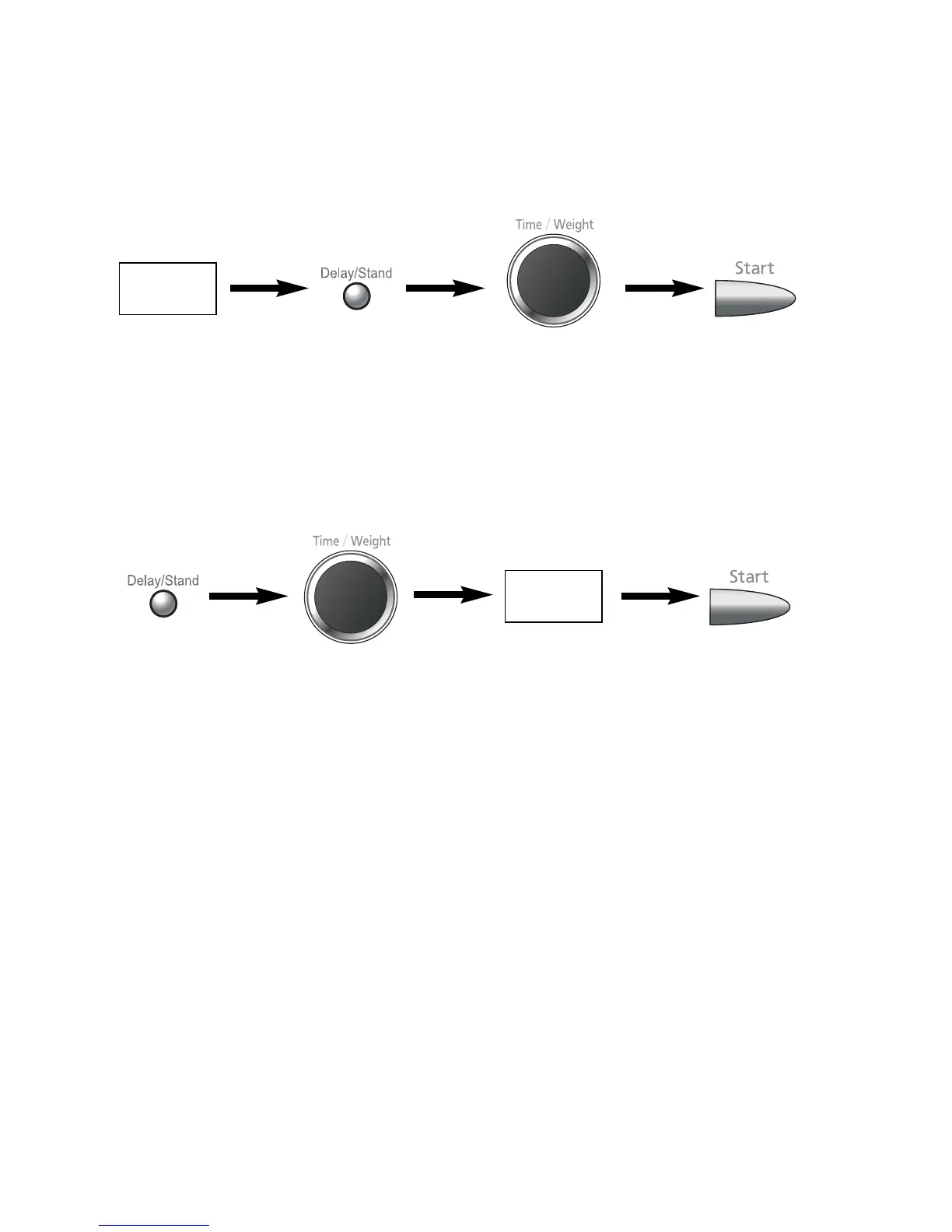
1. To Set a Standing Time:
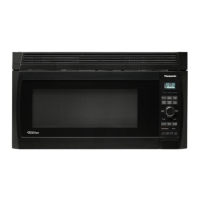
2. To Set a Delay Start:
N.B.
1. If the oven door is opened during the stand or delay time, the time in the display window will
continue to count down.
2. Delay Start cannot be used before an Auto Program.
Power level
&
Time
G
Set the desired
Cooking
Program, by
selecting power
level and time
required.
G
Then Press
the Stand
Pad.
G
Set desired standing
time using the
Time/Weight Dial (max
9hrs). An “H” will appear
in the display to denote
hours.
G
Press Start Pad.
Cooking program
will commence
after which the
standing time will
count down.
G
Set Delay time using
the Time/Weight Dial
(max 9hrs). An “H” will
appear in the display to
denote hours.
G
Set the complete
cooking program,
by entering power
level and time
required.
G
Press Start Pad.
Delayed time will
count down then
the cooking
program will start.
Power level
&
Time
G
Press the
Delay Pad



 To Next Page