16
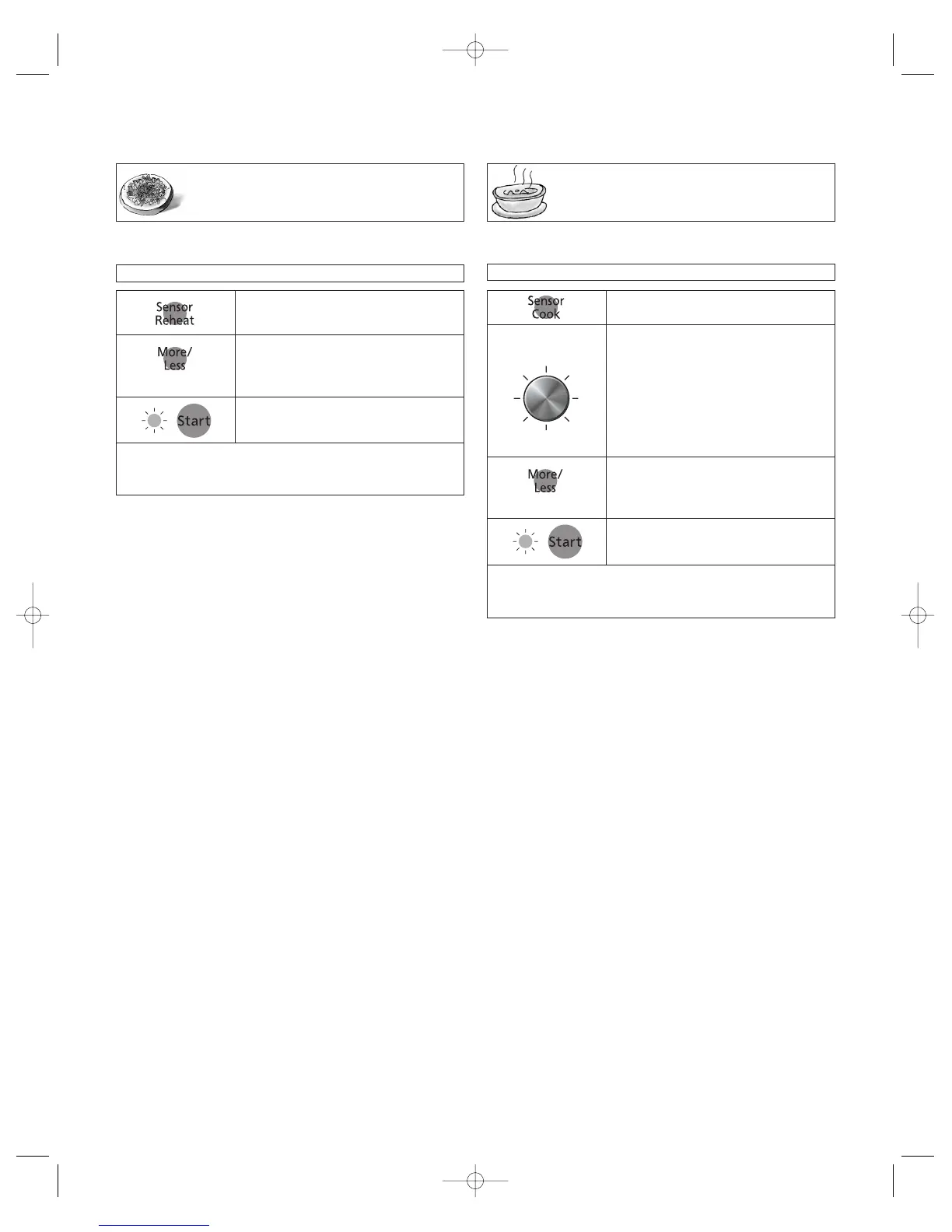
Sensor Reheat
Feature
Example: To reheat a plate of food
1.
• Press Sensor Reheat.
2.
•(see More/Less Feature)
(☛ page 13)
3.
Cooking is complete when 5 beeps sound. (When steam is
detected by the Genius Sensor and 2 beeps sound, the
remaining cooking time will appear in the display window.)
• Press Start.
➤ Cooking starts.
NOTE:
Casseroles - Add 3 to 4 tablespoons of liquid, cover with lid or
vented plastic wrap. Stir when time appears in the display win-
dow.
Canned foods - Empty contents into casserole dish or serving
bowl, cover dish with lid or vented plastic wrap. After reheating,
let stand for a few minutes.
Plate of food - Arrange food on plate; top with butter, gravy,
etc. Cover with lid or vented plastic wrap. After reheating, let
stand for a few minutes.
DO NOT USE SENSOR REHEAT:
1. To reheat bread and pastry products. Use manual power
and time for these foods.
2. For raw or uncooked foods.
3. If oven cavity is warm.
4. For beverages.
5. For frozen foods.
This sensor feature allows you to reheat food without setting
time. The oven simplifies programming.
Sensor Cook
Feature
This sensor feature allows you to cook food without setting
time. The oven simplifies programming.
For the best results with the GENIUS SENSOR,
follow these recommendations.
BEFORE Reheating/Cooking:
1. The room temperature surrounding the oven should be
below 35° C (95° F).
2. Food weight should exceed 110 g (4 oz.).
3. Be sure the glass tray, the outside of the cooking containers
and the inside of the microwave oven are dry before placing
food in the oven. Residual beads of moisture turning into
steam can mislead the sensor.
4. Cover food with lid, or with vented plastic wrap. Never use
tightly sealed plastic containers—they can prevent steam
from escaping and cause food to overcook.
DURING Reheating/Cooking:
DO NOT open the oven door until the end of cooking or 2
beeps sound. Doing so will cause inaccurate cooking since the
steam from food is no longer contained within the oven cavity.
If 2 beeps sounds, the remaining cooking time will begin to
count down. The oven door may be opened to stir, turn, or
rearrange foods.
AFTER Reheating/Cooking:
All foods should have a stand time.
Example: To cook a 300 g (10 oz.) Frozen Entrée
1.
• Press Sensor Cook.
3.
• (see More/Less Feature)
(☛ page 13)
4.
Cooking is complete when 5 beeps sound. (When steam is
detected by the Genius Sensor and 2 beeps sound, the
remaining cooking time will appear in the display window.)
• Press Start.
➤ Cooking starts.
Optional
Automatic features are provided for your convenience. If results are not suitable to your individual preference or if serving size is
other than what is listed on page 17, please refer to page 12 for manual cooking.
Optional
2.
• Select the desired category number
using the Sensor Menu Select Dial.
Sensor Menu Dial
Rotate



 To Next Page