EasyManua.ls Logo

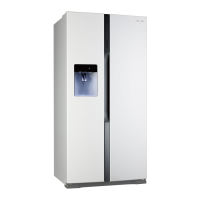
Panasonic NR-B53V1 - Service Manual

Panasonic NR-B53V1
83 pages
Print Icon
To Next Page IconTo Next Page
Loading...
© 2009 Panasonic Co., Ltd. All rights reserved.
Unauthorized copying and distribution is a violation
of law.
Order Number PHARW1003003CE
Refrigerator-Freezer
Model No. NR-B53V1
Product Color X: Stainless
Destination E: Europe Continental, B: U.K.
TABLE OF CONTENTS
PAGE PAGE
1 Safety Precautions----------------------------------------------- 2
2 Specifications ----------------------------------------------------- 5
3 General/Introduction -------------------------------------------- 7
4Features------------------------------------------------------------- 8
5 Technical Descriptions ----------------------------------------17
6 Location of Controls and Components ------------------25
7 Installation Instructions ---------------------------------------28
8 Test Mode ----------------------------------------------------------38
9 Service Mode -----------------------------------------------------39
10 Troubleshooting Guide ----------------------------------------45
11 Disassembly and Assembly Instructions ---------------52
12 Maintenance-------------------------------------------------------66
13 Dimensions ------------------------------------------------------- 69
14 Schematic Diagram -------------------------------------------- 71
15 Exploded View and Replacement Parts List ----------- 72

Table of Contents

Other manuals for Panasonic NR-B53V1

Questions and Answers

  • T
    Taylor GilbertAug 19, 2025
    What to do if my Panasonic NR-B53V1 is not cooling?
    • C
      Cindy CookAug 20, 2025
      Your Panasonic refrigerator may not be chilling or freezing due to several reasons. First, ensure that the doors are completely closed. Check if the set temperature is too high or if the refrigerator is exposed to direct sunlight or placed near a heating appliance. Make sure there is enough space around the refrigerator for ventilation and that food items aren't packed too tightly. Frequent opening and closing of the doors can also affect cooling. Verify that the refrigerator is not in Holiday Mode or Super Freeze Mode. Also, remember that placing warm food inside can temporarily raise the temperature, and during colder seasons, the refrigerator might seem like it's not chilling effectively.
  • C
    Charles SpencerAug 22, 2025
    Why is the compressor in my Panasonic Refrigerator running for a long time?
    • L
      Lori CookAug 22, 2025
      If the compressor in your Panasonic refrigerator is running for a long time, it could be due to several reasons. When the refrigerator is first plugged in, the compressor runs longer to cool down the interior. Check if the refrigerator is in Super Freeze Mode. Frequent door openings, incompletely shut doors, tightly packed food, or high room temperature can also cause this. Additionally, placing many food items inside at once will require the compressor to run longer.
  • J
    Julie WilliamsAug 23, 2025
    How to get rid of bad smell in Panasonic NR-B53V1?
    • C
      Crystal FryeAug 25, 2025
      If there's a smell inside your Panasonic refrigerator, it might be due to food items with strong odors that weren't sealed properly. Make sure to store such items in sealed containers or on the sealed case door shelf. Also, odors can stick to the interior surfaces of the refrigerator, so try wiping them down with a soft cloth dipped in lukewarm water.
  • T
    Tammy NewtonAug 26, 2025
    Why is my Panasonic NR-B53V1 Refrigerator not making ice?
    • M
      Mr. Adrian YatesAug 26, 2025
      If your Panasonic refrigerator is not making ice, first ensure that the main water supply line is turned on and the water service hose is properly connected. Also, check if the refrigerator is powered on and if the automatic ice maker switch is in the ON position.
  • K
    Kyle Decker Jr.Aug 27, 2025
    Why is no water coming out of my Panasonic Refrigerator?
    • E
      Elizabeth KingAug 28, 2025
      If no water is coming out of your Panasonic refrigerator, check if the main water supply line has been turned on and if the water service hose is properly connected. Also, ensure that the refrigerator is powered on and that the correct icon is displayed on the Ice/Water dispenser panel.
  • M
    Matthew MortonAug 30, 2025
    Why is there condensation in my Panasonic NR-B53V1?
    • W
      Wayne CookAug 30, 2025
      Condensation can form in your Panasonic refrigerator and drawers because the fridge maintains high humidity to keep food fresh. This may occur especially when the door is opened and closed frequently or not shut completely. Wipe off the condensation using a dry cloth.
  • J
    Joyce JordanAug 31, 2025
    Why is food freezing in my Panasonic NR-B53V1?
    • M
      Mark MorrisonSep 1, 2025
      If food is freezing in your Panasonic refrigerator, the set temperature might be too low. Also, avoid placing food that freezes easily at the back of the fridge, as this area is the coldest.
  • J
    Jay PriceSep 2, 2025
    What to do if no ice comes out of Panasonic NR-B53V1?
    • D
      Dr. Zachary Kelly IISep 3, 2025
      If no ice is coming out of your Panasonic refrigerator, check if the refrigerator is powered on and if the correct icon is displayed on the Ice/Water dispenser panel. Ensure there is ice in the icebox and that the ice is not clumped together. If the ice is clumped, remove it from the icebox and the ice shooter.
  • J
    Joseph DaySep 5, 2025
    Why can't I use the control panel on my Panasonic Refrigerator?
    • J
      Jesus SanchezSep 5, 2025
      If the controls on the control panel of your Panasonic refrigerator cannot be operated, check if the refrigerator is powered on and if it has been set to Child Lock.
  • T
    Tara BeanSep 6, 2025
    What are the unusual sounds from my Panasonic Refrigerator?
    • C
      collinhardinSep 6, 2025
      It's normal to hear some noises when your Panasonic refrigerator starts or stops. Some sounds are due to refrigerant flowing back to the compressor, or to differences in air pressure between the inside and outside of the refrigerator.

Summary

Safety Precautions

Safety Precautions

General instructions for preventing accidents during work and ensuring product safety.

Specifications

Specifications

Detailed technical specifications of the refrigerator, including dimensions and electrical ratings.

General;Introduction

Flow of Refrigerant

Diagram illustrating the refrigerant flow path within the refrigerator system.

Features

Inverter Technology

Explanation of the inverter compressor technology and its benefits for performance.

Vacuum Insulation Panel

Details on the vacuum insulation panel for enhanced energy efficiency and insulation.

Functions

Explanation of various operational functions like Super Freeze and Eco Mode.

Technical Descriptions

Temperature control for each compartment

Details on how the freezer and refrigerator compartment temperatures are controlled.

FC Defrost Control

Explanation of the automatic defrost cycle for the freezer compartment.

Compressor Rotational Speed Control

How compressor speed is adjusted based on temperature.

Location of Controls and Components

Display and Control Panel

Overview of the refrigerator's main control panel and its indicators.

Components

Detailed labeling and identification of all internal and external refrigerator components.

Installation Instructions

Choosing the right location

Criteria for selecting an appropriate installation site for the appliance.

Connecting the refrigerator to the water supply

Steps for connecting the appliance to a water source for the dispenser.

Installing the refrigerator

Steps for physically positioning, securing, and leveling the unit.

Getting started

Setting the temperature

How to adjust the temperature settings for different compartments.

How to use the Ice;Water dispenser

Instructions for dispensing water and ice from the unit.

Test Mode

Compulsion FC Defrost Mode

Procedure to manually initiate the freezer defrost cycle for testing.

Change the Rotation Speed of Compressor

Method to adjust the compressor's rotational speed for testing.

Service Mode

Self-Diagnosis Control

How to activate and interpret the self-diagnosis mode for identifying issues.

Instruction of Self Diagnosis Display Code

Table detailing error codes, symptoms, and check points.

Troubleshooting Guide

FC and PC not cooling at all. [Compressor does not run.]

Step-by-step guide for diagnosing cooling issues when the compressor is not running.

No ice comes out. [No ice in the ice box.]

Troubleshooting steps for issues related to ice production or dispensing.

Water Supply System and Hose Connection

Information on the water supply system and proper hose connections.

Disassembly and Assembly Instructions

Disassembly of Door Panel PCB

Steps to remove the printed circuit board from the refrigerator door panel.

Disassembly of Control PCB, Inverter PCB and Supply Cord

Procedures for removing the main control and inverter PCBs and power cord.

Disassembly of Doors

Detailed instructions for removing and reattaching the refrigerator doors.

Maintenance

Removing and re-installing

Instructions for removing and re-installing shelves, drawers, and other internal parts.

Cleaning and Maintenance

Guidelines for cleaning the interior, exterior, and control panels.

Changing the water purifying filter

Step-by-step guide for replacing the water filter.

Dimensions

Outside

External dimensions of the refrigerator unit.

Inside

Internal dimensions and layout of the refrigerator and freezer compartments.

Schematic Diagram

Schematic Diagram

Detailed electrical schematic showing all components and their connections.

Exploded View and Replacement Parts List

Exploded View 1

Visual breakdown of refrigerator components with reference numbers.

Replacement Parts List 1

List of replaceable parts with part numbers and quantities.

Exploded View 2

Visual breakdown of freezer compartment components with reference numbers.

Replacement Parts List 2

List of replaceable parts for the freezer compartment.

Exploded View 3

Visual breakdown of PC compartment components with reference numbers.

Replacement Parts List 3

List of replaceable parts for the PC compartment.

Exploded View 4

Visual breakdown of various components with reference numbers.

Replacement Parts List 4

List of replaceable parts including compressors and motors.

Packing Exploded View

Diagram showing the packing materials used for the appliance.

Packing Material Parts List

List of all packing materials and their part numbers.

Panasonic NR-B53V1 Specifications

General IconGeneral
BrandPanasonic
ModelNR-B53V1
CategoryRefrigerator
LanguageEnglish

Related product manuals