8
Operation
To use all features
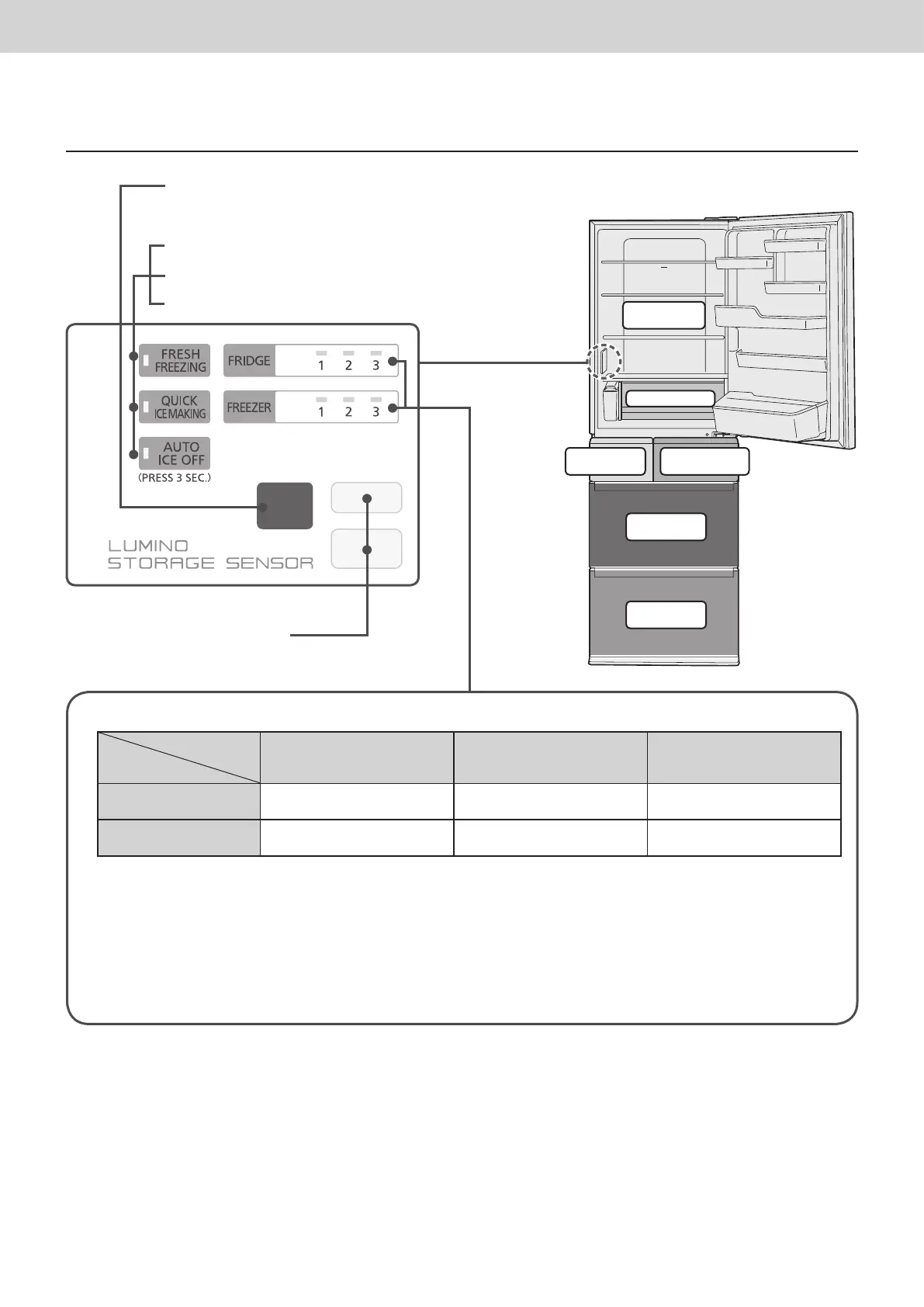
Control panel
Notice indicator (P. 19)
• Occurrence of abnormality, demo mode.
Storage sensor (P. 9, P. 24)
• The sensor automatically detects the change
in the storage amount.
FRESH FREEZING (P. 11)
QUICK ICE MAKING (P. 13)
AUTO ICE OFF (P. 13)
■
Temperature setting and a guide of temperature
Temperature
setting
Button
1 2
3
FRIDGE
Approx. 2 °C ~ 3 °C higher
than “ 2 ”
Approx. 3 °C ~ 6 °C
Approx. 2 °C ~ 3 °C lower
than “ 2 ”
FREEZER
Approx. 2 °C ~ 3 °C higher
than “ 2 ”
Approx. -18 °C ~ -20 °C
Approx. 2 °C ~ 3 °C lower
than “ 2 ”
(These are rough indications for when the ambient temperature is 30 °C, there is no food in the refrigerator and the
interior temperatures have stabilized. The temperatures may differ depending on the ambient temperature, food storage
state, door opening/closing and other usage conditions.)
Normally, use the refrigerator with the temperature set to “ 2 ”.
(If the temperature control of the freezer compartment or refrigerator compartment is set to other than “ 2 ”,
ECO NAVI does not operate.)
●
Please see “Display” (P. 22) when the temperature setting lamp is flashing.
●
Do not subject the control panel to a strong impact, or hit it with a hard object.
(The surface may be cracked or scratched.)
●
Settings at time of purchase.
Refrigerator
compartment
Fresh Freezing
compartment
Chilled room
Ice
compartment
Freezer
compartment
Vegetable
compartment



 To Next Page