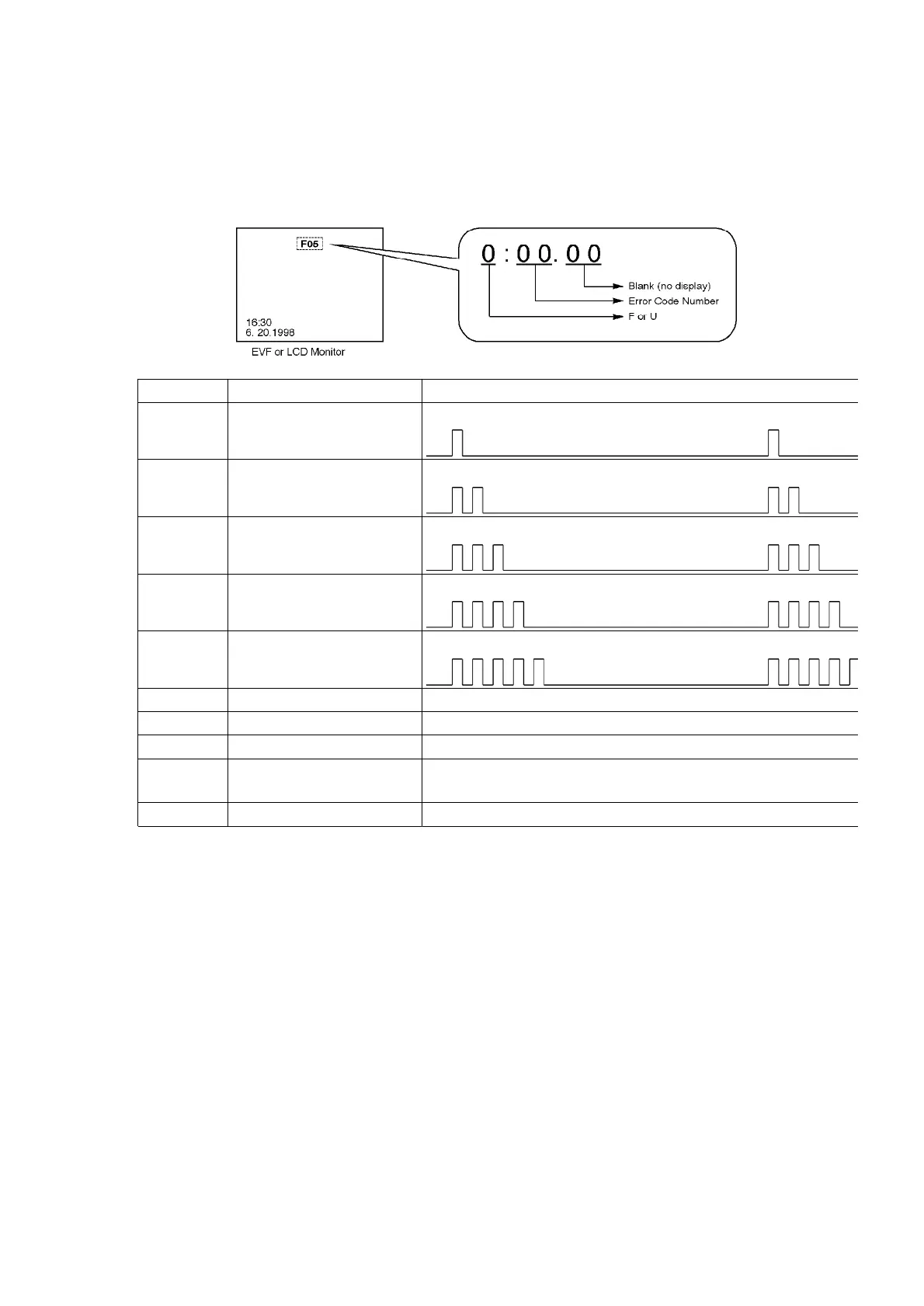
3.4. Service Mode
When undesirable conditions occurred, the error code is displayed on the EVF or LCD Monitor.
Also, the Camera LED is flashed according to the error code as follows.
DISPLAY CONDITION POWER OFF TIMING / POWER LED FLASHING
F01 T-Reel Lock After 1 minute flashing the LED
F02 S-Reel Lock After 1 minute flashing the LED
F03 Unloading Lock After 1 minute flashing the LED
F04 Loading Lock After 1 minute flashing the LED
F05 Cylinder Lock After 1 minute flashing the LED
F31 Data Transmission Error Not turning OFF
F51 Focus Motor Lock Not turning OFF / Power LED is flashed at 1 Hz timing
F52 Zoom Motor Lock Not turning OFF / Power LED is flashed at 1 Hz timing
U10 Dew Detection After 18 seconds flashing the LED / Power LED is flashed
timing
U11 Head Clogging Not turning OFF
3.5. How to replace the Lithium Battery
(Procedure)
1. Remove the RS232C C.B.A. from Rear Jack Unit. (Refer to
Disassembly Procedures)
2. Unsolder the Lithium Battery "VL2020/1HF" and then replace the
new one. (See Fig. B1)
7



 To Next Page