46
6 Search for the edit end
point on the playback
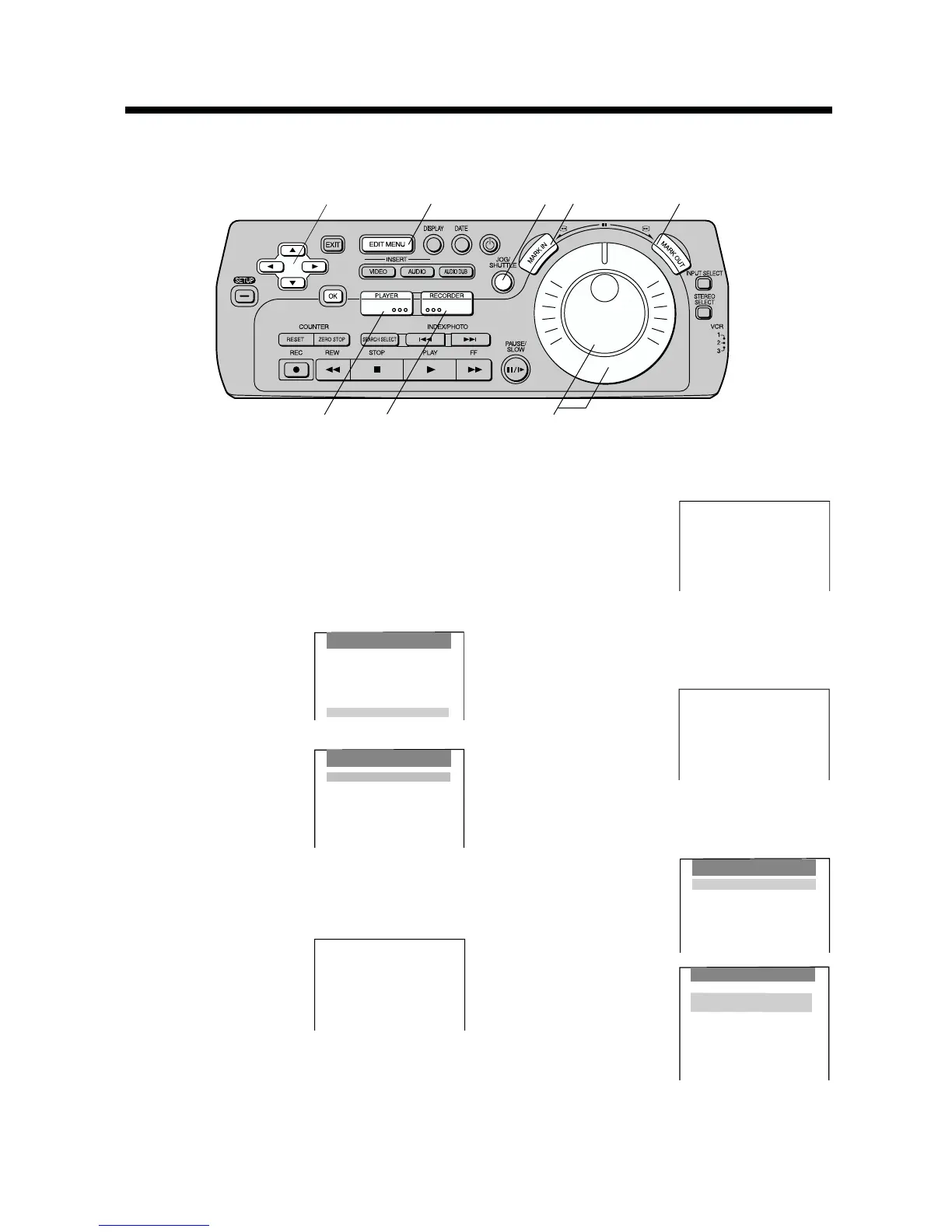
unit and press MARK
OUT.
7 Press RECORDER and JOG/SHUTTLE.
≥The picture from the recording VCR appears on
the screen.
8 Search for the edit start
point on the recording
VCR and press MARK
IN.
9 Press OK.
To check and change
programmes:
Select Confirm/Change
and then press OK.
≥ To confirm, change,
insert or erase editing
programmes, see
[R52–53].
≥ Programmes cannot
be inserted or erased
through the recording
unit.
Assemble
[Page1]
1
0h16m38s20f
In 0h16m38s20f
RECORDER ;
Programme Assemble
Preparations
≥ Confirm that the TV is on and the VCR viewing
channel is selected.
≥ Complete necessary connections and settings.
[R28–35]
Operations
1 Press EDIT MENU.
2 Press 34 (CURSOR)
to select Programme
Editing, and then press
OK.
3 Press 34(CURSOR) to
select Assemble, and
then press OK.
4 Press PLAYER and JOG/SHUTTLE.
≥ The picture from the playback unit appears on the
screen.
5 Search for the edit start
point on the playback
unit and press MARK
IN.
On Screen Display
Assemble
[Page1]
1
; PLAYER
0h16m38s20f
In 0h16m38s20f
Out h m s f
Assemble
[Page1]
1
; PLAYER
0h18m09s 13f
In 0h16m38s20f
Out 0h18m09s 13f
This function can be used to link together desired scenes on a tape.
This function can also be used to skip unnecessary scenes recorded on a tape and copy them onto a separate
tape.
Assemble
Confirm/Change
Insert a programme
Erase a programme
Preview
Start Assemble
Review
Timing Adjust
Confirm/Change
PLAYER [Page 1]
1 In 0h 16m 38s 20f
Out 0h 18m 09s 13f
2 In 0h 00m 01s 18f
1 Out 0h 01m 47s 22f
3 In h m s f
1 Out h m s f
4 In h m s f
1 Out h m s f
EDIT MENU
Copying
Video Insert
Audio Insert
AV Insert
Audio Dubbing
Programme Editing
Programme Editing
Assemble
Video Insert
Audio Insert
AV Insert
Audio Dubbing
Erase all programmes
DIGITAL VCR
1
4,7
5,8
6
4
5,6,8
7
2,3,10,11





 To Next Page