boss
LCD
Shield
Case
Unit
LCD Panel Ass'y
LCD
F.P.C.
LCD Backlight C.B.A.
LCD Case B
(L-3)
(L-3)
(L-3)
(L-4)
(L-4)
(L-3)
(L-2)
FP8102
Press
Bend
542
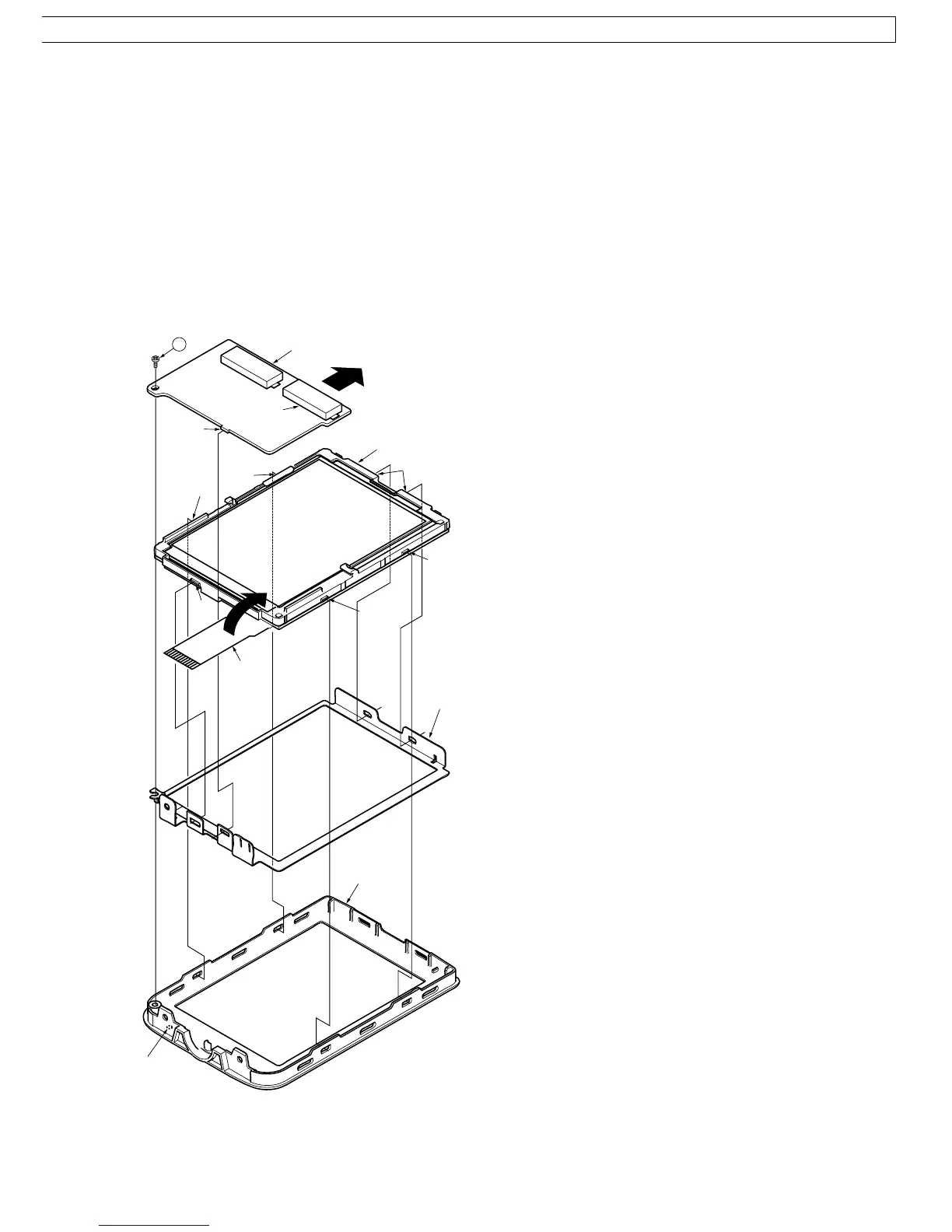
12.Installation of LCD Backlight C.B.A., LCD Panel Ass'y,
LCD Shield Case Unit, LCD Case B
Use extreme care regarding LEDs when handling the LCD
Backlight C.B.A.
Install in order shown below.
1) Install the LCD Panel Ass'y onto the LCD Shield Case
Unit with the 3 Locking Tabs (L-4) while carefully
bending the LCD F.P.C. at it's base so as not to damage
it.
2) Install the LCD Shield Case into the LCD Case B with
the 4 Locking Tabs (L-3).
3) Install the LCD Backlight C.B.A. onto the LCD Panel
Ass'y with the Locking Tab (L-2).
4) Tighten the Screw (542) while keeping the LCD Backlight
C.B.A. pressed toward the right. Then, connect the
Connector FP8102.
Fig. D12
49



 To Next Page