13
Connecting and Setting Up
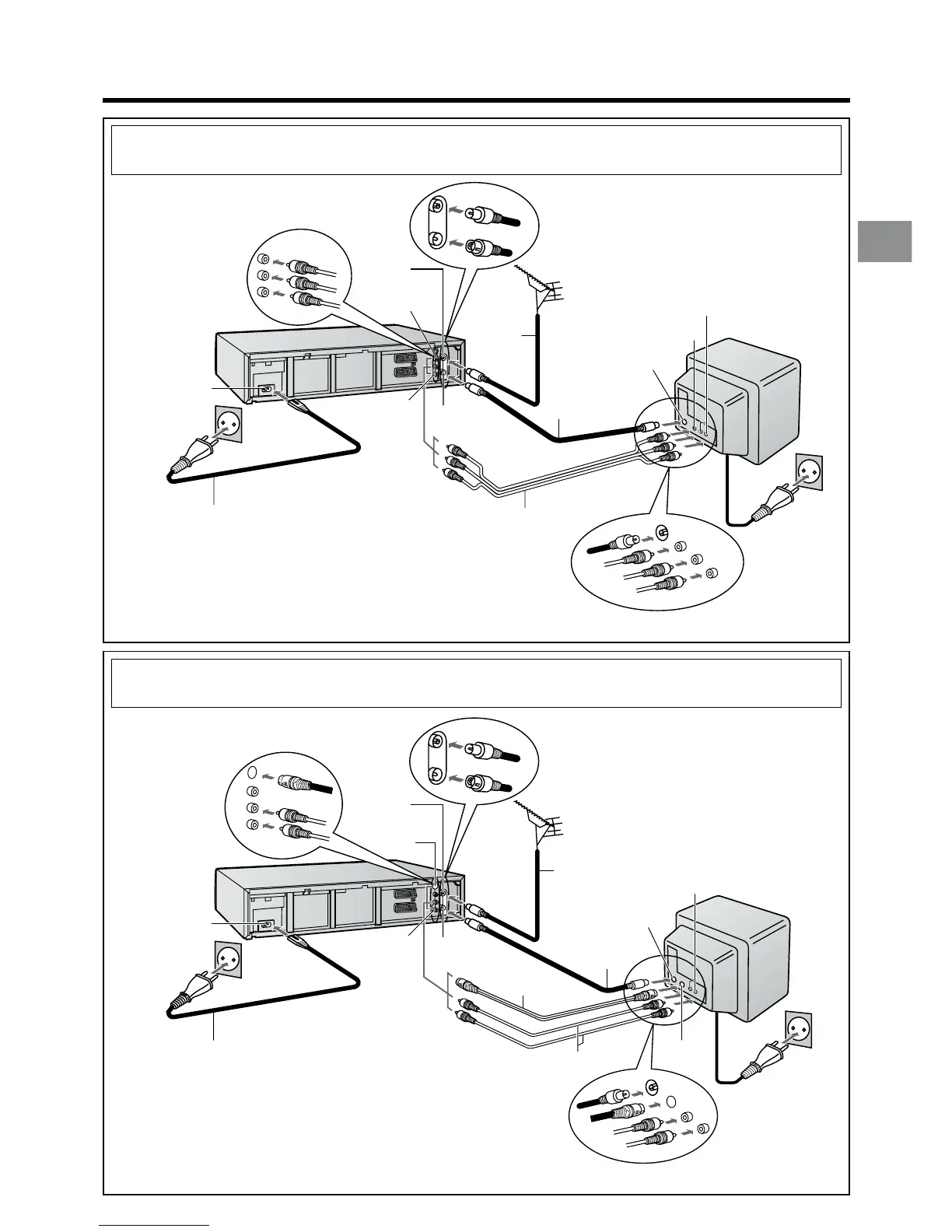
Aerial Input
socket
l
AC Input socket m
AC Mains lead
(supplied)
S-Video Output
socket
j
Aerial Output
socket
r
Audio Output
sockets
q
Aerial (not supplied)
Aerial lead
(not supplied)
Audio Input sockets
Aerial Input socket
S-Video
Input socket
To AC Mains socket
Audio cables (not supplied)
RF Coaxial cable
(supplied)
S-Video cable
(not supplied)
TV with S-Video
Input socket
(not supplied)
After completing the above connections, proceed to the Auto Setup page (Page 14).
or Method 4.
If you are connecting your VCR to a TV using S-Video cable, then follow the steps
below. (S-Video Connection)
or Method 3.
If you are connecting your VCR to a TV using AV cable, then follow the steps below.
Aerial (not supplied)
Aerial Input
socket l
Aerial lead
(not supplied)
TV (not supplied)
Aerial Output
socket
r
Aerial Input socket
To AC Mains socket
AC Mains lead
(supplied)
AV cable (not supplied)
RF Coaxial cable
(supplied)
Audio Input sockets
Video Output
socket
k
Video Input socket
AC Input socket m
After completing the above connections, proceed to the Auto Setup page (Page 14).
Audio Output
sockets
q




 To Next Page