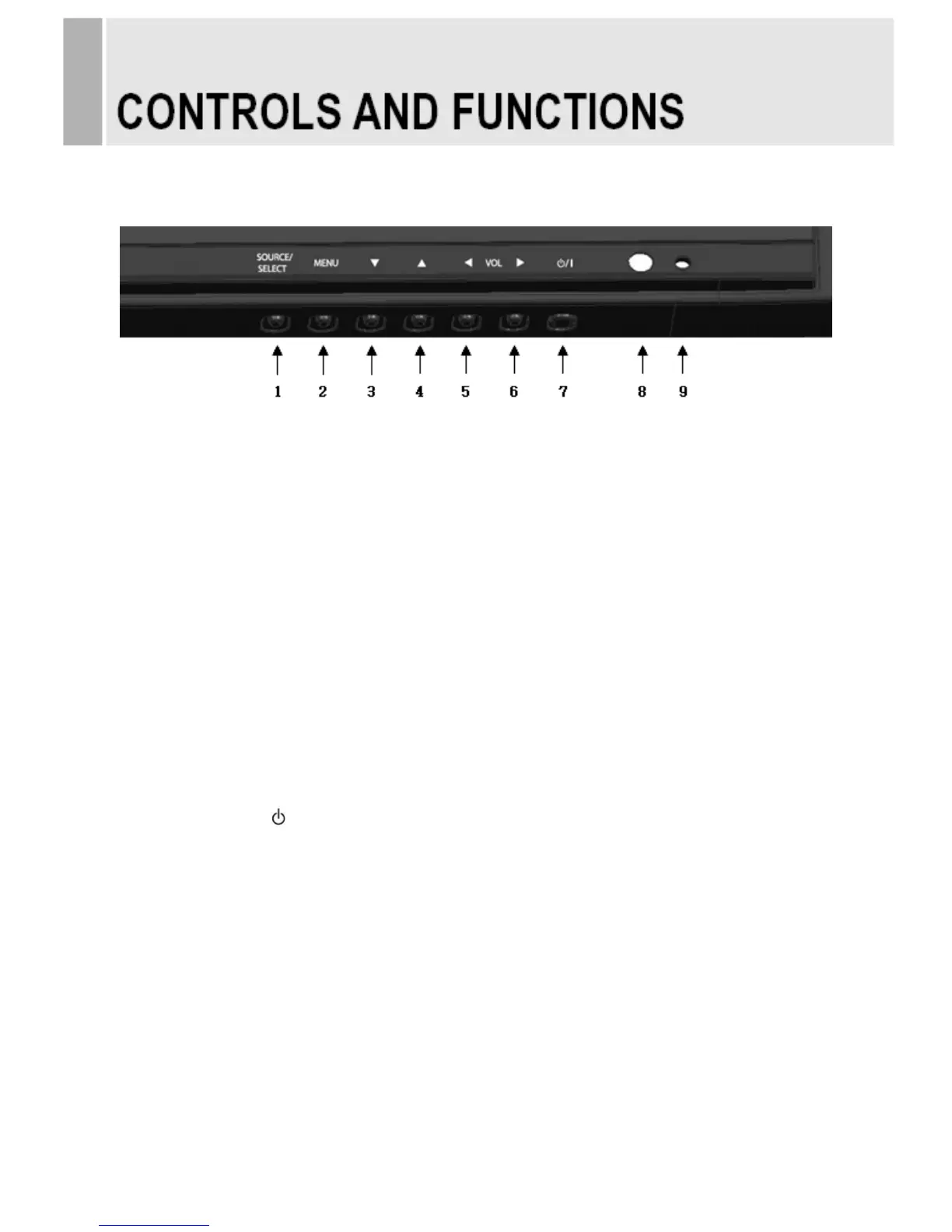
C. FRONT KEY CONTROL
1. SOURCE/SELECT
Select PC or video.
Select On Screen Display menu.
2. MENU
Activate and exit the On Screen Display.
3 / 4. ▼ / ▲
These buttons allow user to enter the sub-menu of the activated function.
The up(▲) button is HOLD function and stop the Trigger & Auto switching functions.
5 / 6. VOL / VOL
Adjust the volume and menu settings.
7. POWER ON/OFF(
/ I )
Turns the power ON or OFF. There will be a few seconds delay before the display appears.
8. IR Sensor
Remote controller sensor.
9. POWER LED
The power LED lights with green when the power is turned ON.
The power is turned off by pressing the power switch again and the power LED goes Red.
8 ……………………………………………………………………. INSTRUCTION MANUAL







 To Next Page