OSD MENU DESCRIPTION
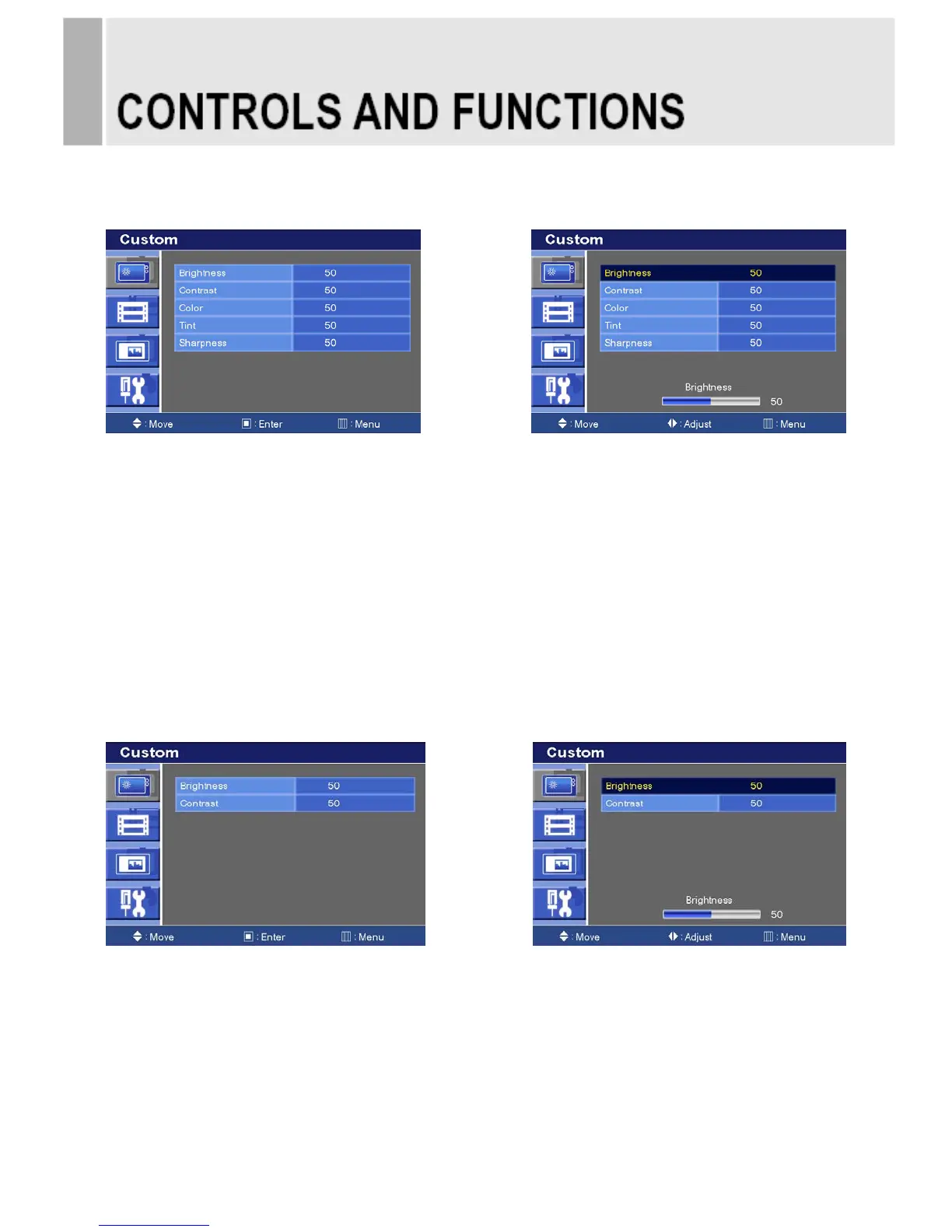
A: CUSTOM MENU (Only Video Input)
1) Press the MENU button and then press the up(▲) or down(▼) button to select the Custom.
2) Press the up(▲) or down(▼) button to select the sub menu.
3) Press the left(◀) or right(▶) button to adjust the picture setting.
4) Press the MENU button to save.
Brightness: Increase or decrease the intensity of the image.
Contrast: Increase or decrease the intensity (lightness or dimness) of the image.
Color: Increase or decrease the colour of the picture.
Tint: Increase or decrease the tint of the picture.
Sharpness: Increase or decrease the sharpness of the picture.
A: CUSTOM MENU (For HDMI, DVI & PC Input)
1) Press the MENU button and then press the up(▲) or down(▼) button to select the Custom.
2) Press the up(▲) or down(▼) button to select the sub menu.
3) Press the left(◀) or right(▶) button to adjust the picture setting.
4) Press the MENU button to save.
INSTRUCTION MANUAL ……………………………………………………………………. 9







 To Next Page