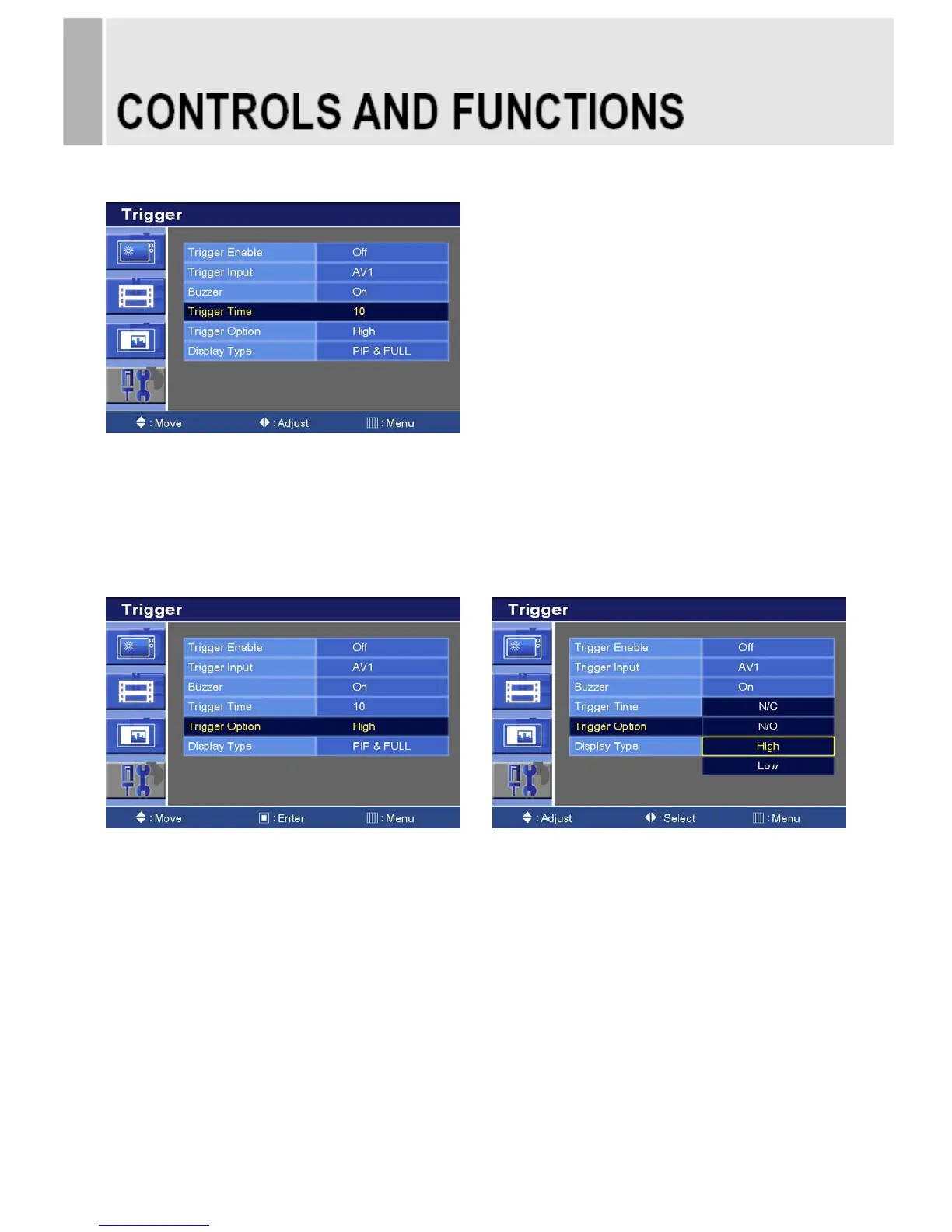
6-4. Trigger Time
1) Press the up(▲) or down(▼) button to select the Trigger Time.
2) Press left() or right() button to adjust Trigger Time setting.
3) Press the MENU button to save.
6-5 Trigger Option
1) Press the up(▲) or down(▼) button to select the Trigger Option.
2) Press the right() or SOURCE/SELECT button.
3) Press the up(▲) or down(▼) button to select the Trigger Option setting.
4) Press the Menu button to save.
N/C (Normal Closed): When Trigger cable is opened, Trigger function is activated.
N/O (Normal Opened): When Trigger cable is closed, Trigger function is activated.
High: When Trigger signal is high(2~5[V]), Trigger function is activated.
Low: When Trigger signal is low(0~0.6[V]), Trigger function is activated.
26 ……………………………………………………………………. INSTRUCTION MANUAL







 To Next Page