This document is an operating instructions manual for the Panasonic PT-CMZ50 LCD Projector, designed for commercial use. It covers preparation, basic operations, settings, function operation, maintenance, and technical specifications.
Function Description
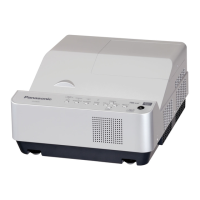
The Panasonic PT-CMZ50 is an LCD projector that projects still/moving image signals from video equipment and computers onto a screen. It utilizes a SOLID SHINE laser light source, enabling long-term operation. The projector supports various input signals, including HDMI, DIGITAL LINK, COMPUTER, NETWORK, and USB (for Memory Viewer). It can be controlled via a remote control, control panel, or external devices through LAN (wired or wireless with an optional module) and serial connections. The projector is designed for flexible installation, including desk/floor, ceiling, and wall mounting, and supports projection in all 360° directions. It also features multi-image projection capabilities for creating large, unified images from multiple projectors.
Size of Effective Display Area: 1.63 cm (0.64") x 3 (aspect ratio 16:10).
Number of Pixels: 2,304,000 pixels (1,920 x 1,200 dots).
Light Source: Laser diode.
Light Output: 5,200 lm (when [PICTURE MODE] is set to [DYNAMIC], [LIGHT POWER] is set to [NORMAL], and [SYSTEM DAYLIGHT VIEW] is set to [OFF]).
Contrast Ratio: 3,000,000:1 (when [PICTURE MODE] is set to [DYNAMIC], [DYNAMIC CONTRAST] is set to [1]).
Projection Lens: Fixed-focus lens, throw ratio 0.235:1.
Focal Length: 2.81 mm.
f/number: < 1.7.
Screen Size: 2.03 m (80") to 3.05 m (120") (aspect ratio 16:10).
Speaker: 4.0 cm, round, x 1, 10 W (monaural).
Operating Temperature: 0 °C (32 °F) to 45 °C (113 °F).
Operating Humidity: 20% to 80% (non condensation).
Power Requirements: 100 V - 240 V ~ (100 V - 240 V alternating current), 50 Hz/60 Hz (for other countries and regions); 110 V ~ (110 V alternating current), 60 Hz (for Taiwan).
Maximum Power Consumption: 325 W (310 W at 200 V - 240 V).
Standby Mode Power Consumption: Approx. 0.5 W ([ECO] mode), Approx. 18 W ([NORMAL] with [QUICK STARTUP] disabled), Approx. 51 W ([NORMAL] with [IN STANDBY MODE] [ON] and USB/DIGITAL LINK in use), Approx. 85 W ([NORMAL] with [QUICK STARTUP] enabled).
Acoustic Noise: 34 dB ([NORMAL] or [ECO] light power), 25 dB ([QUIET] light power).
Dimensions (W x H x D): 495 mm (19-1/2") x 176 mm (6-15/16") x 421 mm (16-9/16").
Weight: Approx. 9.5 kg (20.9 lbs.).
Laser Classification: Class 1 (IEC/EN 60825-1:2014), Risk group 2 (IEC 62471-5:2015).
Input Terminals:
<HDMI IN 1>, <HDMI IN 2>: HDMI x 2, HDCP compatible, Deep Color compatible, CEC supported.
: High-density D-Sub 15 p (female) x 1.
<DIGITAL LINK/LAN>: RJ-45 x 1, for network and DIGITAL LINK connections (HDBaseT™ compliant), PJLink (class 2) compatible, 100Base-TX, HDCP compatible, Deep Color compatible.
: RJ-45 x 1, for network connection, PJLink (class 2) compatible, 10Base-T/100Base-TX.
<USB (VIEWER/WIRELESS/DC OUT)>: USB connector (type A) x 1, for Memory Viewer function/Wireless module connection/power supply (DC 5 V, maximum 2 A).
: D-Sub 9 p x 1, RS-232C compliant, for computer control.
Output Terminals:
: HDMI x 1, CEC not supported.
Wireless LAN (with optional AJ-WM50 Series module): IEEE802.11b/g/n, 2.4 GHz band (1 to 11ch), data transfer speed up to 144 Mbps (11n), 54 Mbps (11g), 11 Mbps (11b), WPA2-PSK (AES) encryption.
Usage Features
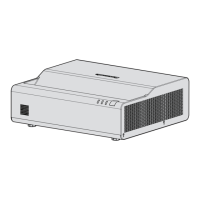
Short-Range Large Screen Projection: Achieves an 80-inch large screen projection at approximately 1 cm (13/32″) from the wall surface.
High Brightness: 5200 lm output allows for clear visibility even in well-lit environments.
Native WUXGA Resolution: Provides sharp and detailed images.
Flexible Setup: Equipped with powered focus and Digital Zoom Extender for easy installation. No lens protrusion for seamless integration into various spaces.
HDMI Output: Allows connection of multiple projectors for expanded display configurations.
Low Noise Design: Operates at 25 dB in [QUIET] mode, minimizing distraction.
Wide Aspect Ratio Support: Compatible with 21:9 and 27:9 aspect ratios for Microsoft Teams Rooms.
Optional Wireless Module: Enables easy collaboration through wireless LAN.
4K Signal Input Support: Accepts signals up to 4K/30p, which are then converted to 1,920 x 1,200 dots for projection.
Memory Viewer Function: Allows direct projection of still images (jpg/jpeg, bmp, png, gif, tif/tiff) from a USB memory device.
Network Input: Supports image transfer from computers and smart devices via LAN using Panasonic application software (Presenter Light, Wireless Projector for iOS/Android).
Web Control Function: Enables remote setting, adjustment, and status display of the projector via a web browser.
PJLink and Command Control: Supports PJLink protocol and serial control commands for integration into control systems.
HDMI CEC Function: Allows operation of CEC-compatible external devices using the projector's remote control and enables power on/off link operations.
Screen Adjustment: Features keystone, corner correction, and curved correction to correct image distortions.
Digital Zoom: Allows enlargement of projected images (for computer signals).
Presentation Timer: Includes a timer function for presentations.
Function Button: Assigns frequently used menu items as a shortcut button on the remote control.
Internal Test Patterns: Displays various test patterns for projector status confirmation and adjustment.
ECO Management: Settings to reduce power consumption and extend light source life, including [STANDBY MODE], [SIGNAL DETECTION], and [LIGHT POWER] adjustments.
Quick Startup: Reduces startup time when enabled.
Security Features: Password protection for projector access and network control, text display for security messages, and menu lock.
Multi Monitoring & Control Software: Supports monitoring and control of multiple display devices on an intranet.
Early Warning Software: Plug-in software for status monitoring and abnormality detection.
Logo Transfer Software: Allows transfer of custom startup logos to the projector.
Maintenance Features
Air Filter Unit: The projector includes an air filter unit that can be cleaned or replaced. The manual provides instructions for removal, washing, drying, and reattachment.
Filter Counter: Tracks the usage time of the air filter and displays a message when cleaning/replacement is due. The counter can be reset after maintenance.
Outer Case Cleaning: Instructions for wiping dirt and dust from the projector's outer case.
Projection Window Cleaning: Instructions for cleaning the projection window to maintain image clarity.
Internal Cleaning: Recommends professional cleaning inside the projector every 20,000 hours of usage to prevent dust accumulation and potential fire hazards.
Light Source Monitoring: Indicators for light source status and temperature to alert users to potential problems.
Self-Diagnosis Display: Provides alphanumeric symbols and details for errors/warnings, along with recommended actions.

 Need help?

 To Next Page
 General