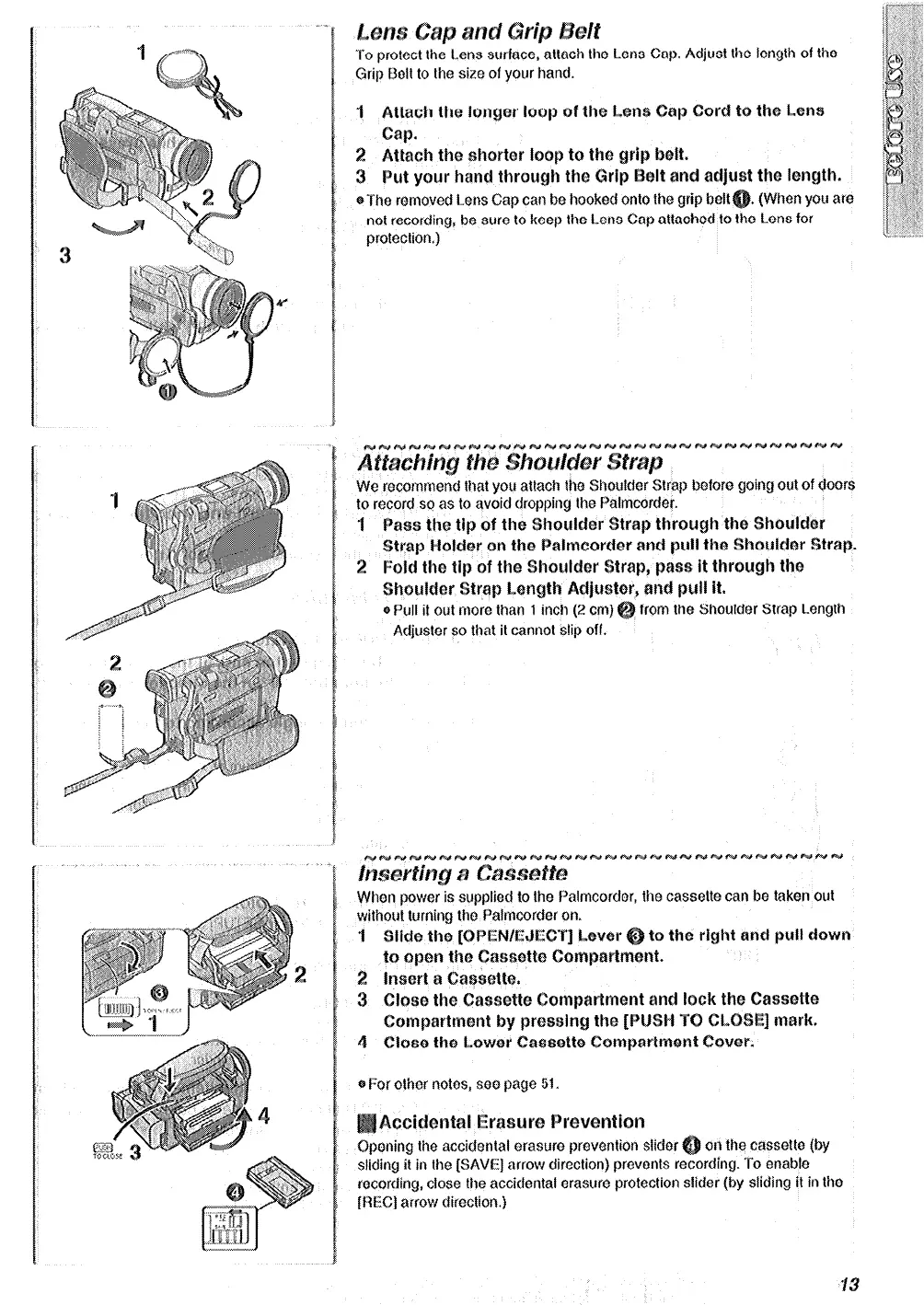
the Lens Cap. Adjust tho length of the
Grip Bolt to the size of your hand.
I Attach the longer loop of the Lens Cap Cord to the Lena
f&p.
2 Attach the shorter Imp to the grip b@lt.
3 Put ysur hand through the Grip
@It and metjust the length.
@The mmoved Lens Cap can ba hooked onto the grip
belt
not recording, ba sure to keep the Lens Cap attachad to the Lens for
protection.)
anti pull it.
Pull it out mom than 1 inch (2 cm)
from the Shoulder Stmp Length
Adjustor so that it cannot slip off.
gi For other notes, $00 page 51.
~~~i~~~t~l~~~~~~~ ~~~v~~ti~~
oning the accidantal erasure pravantion slidor
on the cassette (by
sliding it in the [SAVE] arrow direction) provonts mcording. To enable
recording, close the accidsntal orasuro protection slider (by sliding it in tho
[REC] arrow direction.)






 To Next Page