EasyManua.ls Logo

Panasonic RF-2200BS - Marker and FM Alignment; FM-IF and FM-RF Alignment

Panasonic RF-2200BS
15 pages
Print Icon
To Next Page IconTo Next Page
To Previous Page IconTo Previous Page
Loading...
0
|
di
mo
RK
ND
(uf
mo
mo
wr
mo
mo
sh
mo
rei
'
fo
Se
Se
e
fi
‘IVE
oe
es
Liz
Caro
Ss,
US
sy.
Band
Switch
|
oa
[Oe
Fig.
25
Cary
HI
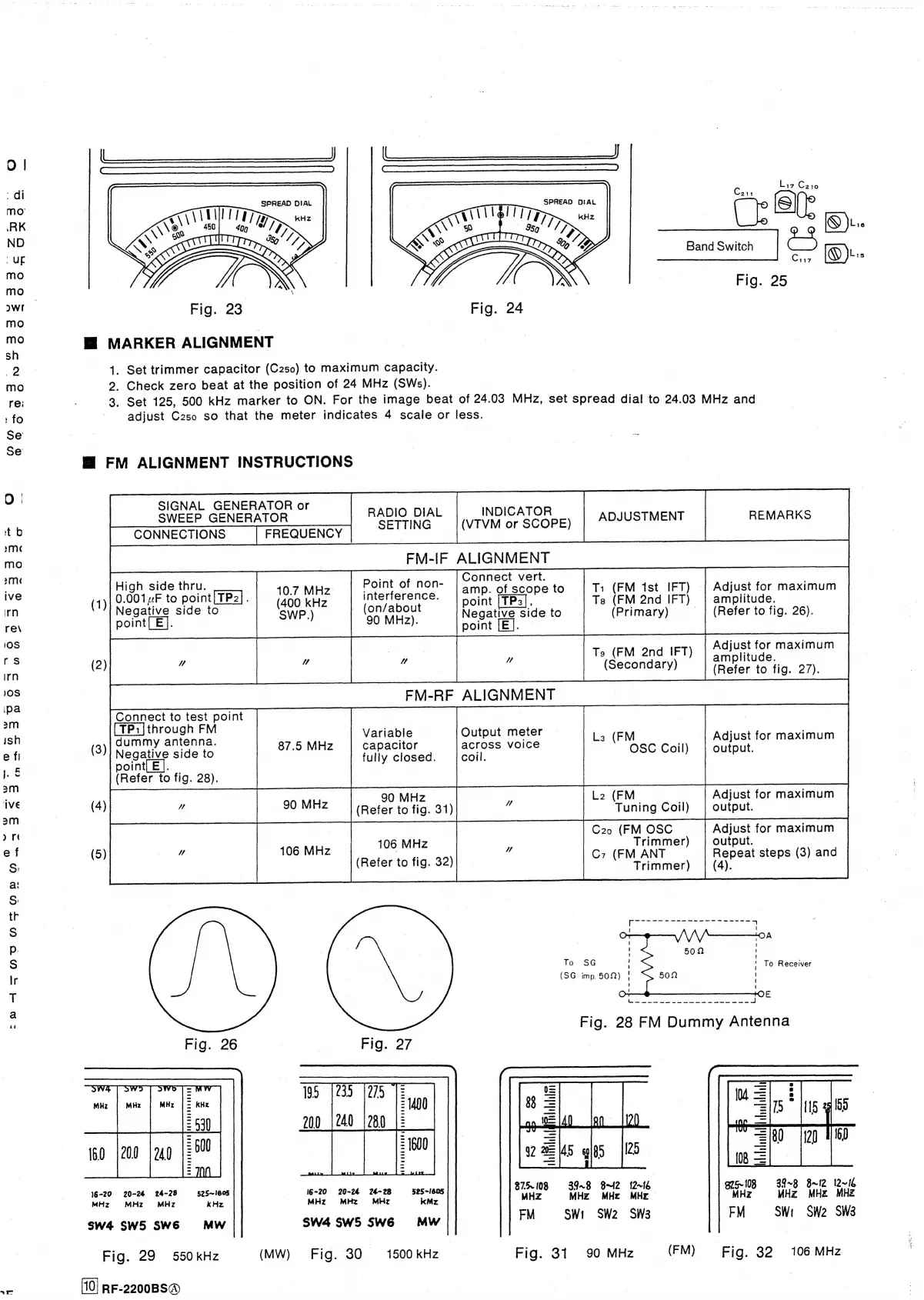
MARKER
ALIGNMENT
1.
Set
trimmer
capacitor
(C250)
to
maximum
capacity.
2.
Check
zero
beat
at
the
position
of
24
MHz
(SWs).
3.
Set
125,
500
kHz
marker
to
ON.
For
the
image
beat
of
24.03
MHz,
set
spread
dial
to
24.03
MHz
and
adjust
C250
so
that
the
meter
indicates
4
scale
or
less.
@
FM
ALIGNMENT
INSTRUCTIONS
Wee:
SEE
on,
of
RADIO
DIAL
INDICATOR
SETTING
|
(VTVM
or
SCOPE)
CONNECTIONS
FREQUENCY
ADJUSTMENT
REMARKS
Connect
vert.
High
side
thru.
40.7
MHz
Point
of
non-
|
2
|
:
;
p.
of
scope
to
T1
(FM
1st
IFT)
Adjust
for
maximum
(1)
Negative
to
point
[TPa]
.
(400
|
kez
enienedi
=
point
Ts
(FM
2nd
IFT)
|
amplitude.
pint
E
eee
Moet
TEL.
side
to
(Primary)
|
(Refer
to
fig.
26).
90
MHz).
point
[E|
(2)
Ts
(FM
2nd
IFT)
Ac
aa
(Secondary)
(Refer
to
fig.
27).
Connect
to
test
point
3
|
(TP1]through
FM
;
Variable
Output
meter
La
(FM
Adjust
for
maximum
dummy
antenna.
3
:
87.5
MHz
capacitor
across
voice
(3)
Soren
side
to
fully
closed.
Coll
OSC
Coil)
output.
(Refer
to
fig.
28).
L2
(FM
(4)
Tuning
Coil)
C20
(FM
OSC
Adjust
for
maximum
106
MHz
Trimmer)
output.
(5)
106
MHz
(Refer
to
fig.
32)
C7
(FM
ANT
Repeat
steps
(3)
and
g.
Trimmer)
(4).
To
SG
(SG
imp.
509)
200
iw
Zz
=
Ceeeeeaveneeds
g75-108
39~8
8B~I2
12~16
875-108
39.8
8612
12-16
eee
a
4
7
z
arte
MHz MHz
MHz
MH
MHz
MHz
MHz
MHZ
Fig.
29
550kHz
(MW)
Fig.
30
1500kHz
©
Fig.
31
90
MHz
(FM)
Fig.
32
106
MHz
RF-2200BS@