EasyManua.ls Logo

Panasonic RN-190 - Page 4

Panasonic RN-190
9 pages
Print Icon
To Next Page IconTo Next Page
To Previous Page IconTo Previous Page
Loading...
RN-190
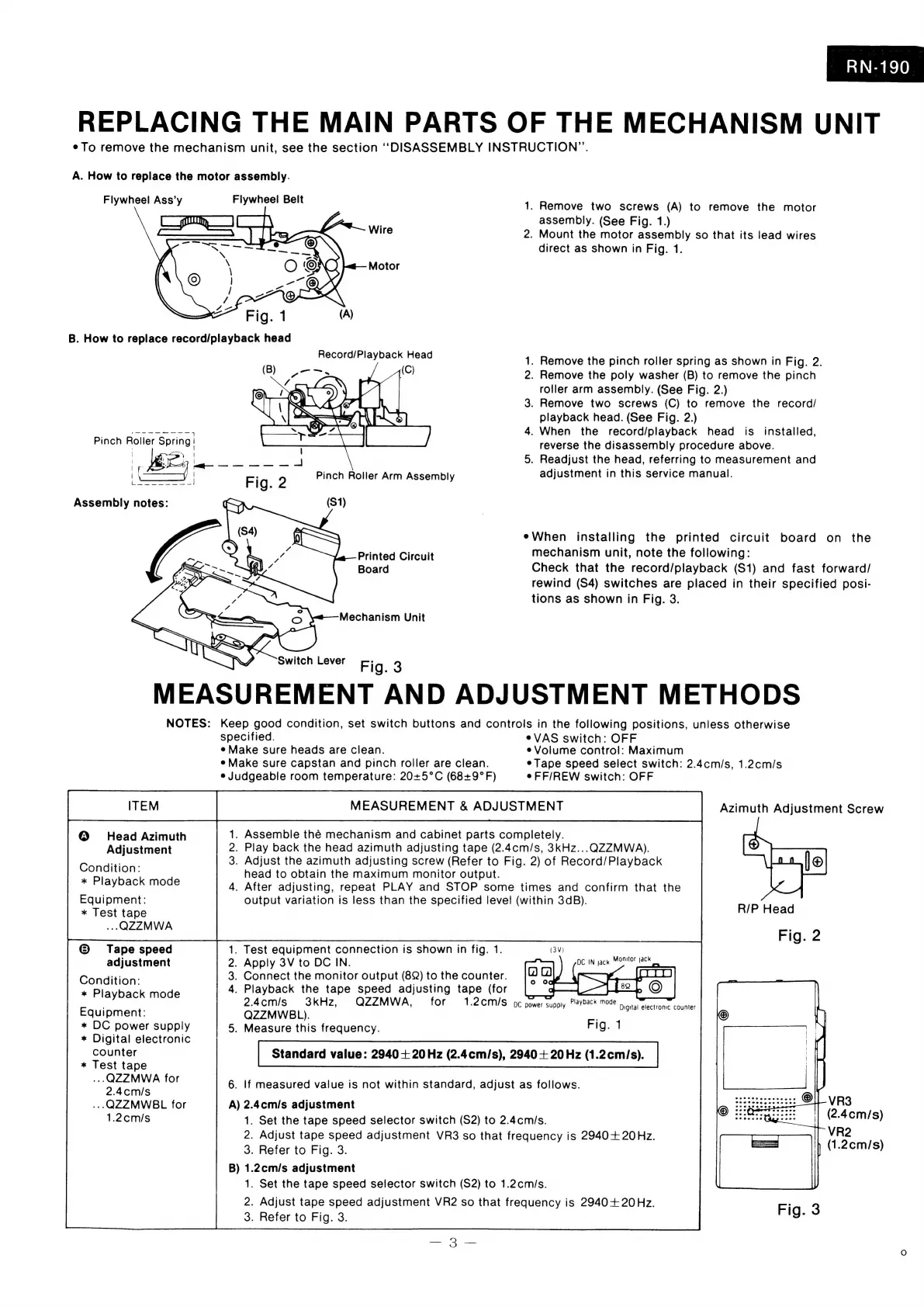
REPLACING
THE
MAIN
PARTS
OF
THE
MECHANISM
UNIT
¢To
remove
the
mechanism
unit,
see
the
section
“DISASSEMBLY
INSTRUCTION”.
A.
How
to
replace
the
motor
assembly.
Flywheel
Ass’y
Flywheel
Belt
1.
Remove
two
screws
(A)
to
remove
the
motor
assembly.
(See
Fig.
1.)
.
Mount
the
motor
assembly
so
that
its
lead
wires
direct
as
shown
in
Fig.
1.
Wire
2
Motor
B.
How
to
replace
record/playback
head
Record/Playback
Head
hm
.
Remove
the
pinch
roller
spring
as
shown
in
Fig.
2.
.
Remove
the
poly
washer
(B)
to
remove
the
pinch
roller
arm
assembly.
(See
Fig.
2.)
3.
Remove
two
screws
(C)
to
remove
the
record/
playback
head.
(See
Fig.
2.)
4.
When
the
record/playback
head
is_
installed,
reverse
the
disassembly
procedure
above.
5.
Readjust
the
head,
referring
to
measurement
and
adjustment
in
this
service
manual.
face
eta
ot
7
\
|
Pinch
Roller
Spring
|
a
eWhen
installing
the
printed
circuit
board
on
the
Printed
Circuit
mechanism
unit,
note
the
following:
Board
Check
that
the
record/playback
(S1)
and
fast
forward/
rewind
(S4)
switches
are
placed
in
their
specified
posi-
tions
as
shown
in
Fig.
3.
Mechanism
Unit
Switch
Lever
Fig.
3
MEASUREMENT
AND
ADJUSTMENT
METHODS
NOTES:
Keep
good
condition,
set
switch
buttons
and
controls
in
the
following
positions,
uniess
otherwise
specified.
eVAS
switch:
OFF
e
Make
sure
heads
are
clean.
e
Volume
control:
Maximum
e
Make
sure
capstan
and
pinch
roller
are
clean.
eTape
speed
select
switch:
2.4cm/s,
1.2cm/s
e
Judgeable
room
temperature:
20+5°C
(68+9°F)
eFF/REW
switch:
OFF
Azimuth
Adjustment
Screw
Head
Azimuth
.
Assemble
thé
mechanism
and
cabinet
parts
completely.
Adjustment
.
Play
back
the
head
azimuth
adjusting
tape
(2.4cm/s,
3kHz...QZZMWA).
e
a
_
Adjust
the
azimuth
adjusting
screw
(Refer
to
Fig.
2)
of
Record/Playback
11
(|
*
Playb
k
d
head
to
obtain
the
maximum
monitor
output.
ey
ay
RACK
MOR.
.
After
adjusting,
repeat
PLAY
and
STOP
some
times
and
confirm
that
the
Equipment:
output
variation
is
less
than
the
specified
level
(within
3dB).
*
Test
tape
R/P
Head
..
QZZMWA
;
:
Fig.
2
©
Tape
speed
.
Test
equipment
connection
is
shown
in
fig.
1.
adjustment
.
Apply
3V
to
DC
IN.
Condition:
.
Connect
the
monitor
output
(822)
to
the
counter.
*
Playback
mode
.
Playback
the
tape
speed
adjusting
tape
(for
:
2.4cm/s
3kHz,
QZZMWA,
for
1.2CM/S
oc
power
supply
Playback
mode
Equipment:
QZZMWBL).
*
DC
power
supply
.
Measure
this
frequency.
Fig.
1
*
Digital
electronic
counter
Standard
value:
2940+
20Hz
(2.4cm/s),
2940+
20Hz
(1.2cm/s).
*
Test
tape
bert
iee
for
6.
If
measured
value
is
not
within
standard,
adjust
as
follows.
..QZZMWBL
for
A)
2.4cm/s
adjustment
1.2cm/s
1.
Set
the
tape
speed
selector
switch
(S2)
to
2.4cm/s.
2.
Adjust
tape
speed
adjustment
VR3
so
that
frequency
is
2940+
20Hz.
3.
Refer
to
Fig.
3.
B)
1.2cm/s
adjustment
1.
Set
the
tape
speed
selector
switch
(S2)
to
1.2cm/s.
2.
Adjust
tape
speed
adjustment
VR2
so
that
frequency
is
2940+
20Hz.
3.
Refer
to
Fig.
3.
Digital
electronic
counter

Related product manuals