EasyManua.ls Logo

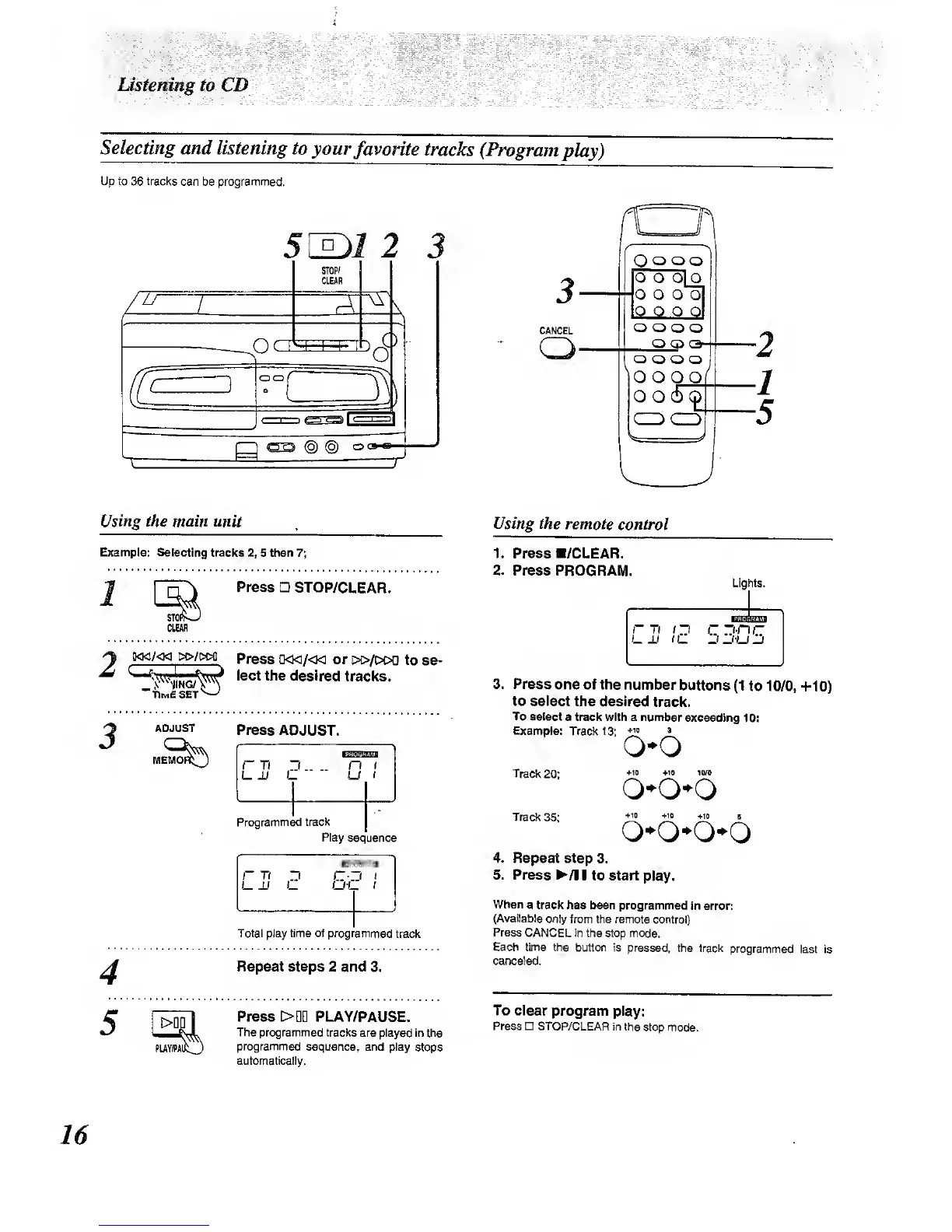
Panasonic RX-E300 - CD Program Play; Selecting Favorite Tracks (Program Play)

Panasonic RX-E300
36 pages
Print Icon
To Next Page IconTo Next Page
To Previous Page IconTo Previous Page
Loading...
lAstenmg to CD
Selecting
and listening to
your
favorite
tracks (Program
play)
Up to
36
tracks
can be programmed.
77
5[^1
2
STOP/
CLEAR
3
(o)
Co)
oc*-
3
CANCEL
Q
Q Q Q
o
o
oLo
o o o
o|
o o
o
o
Q
G
)
Q-
o
o o o
OOOO
o
o
5^
t/^iftg
£Af main unit
Example:
Selecting tracks
2, 5
then
7;
Press
STOP/CLEAR.
3
STOC
CLEAR
o«/<M
&c>/M>c
Press
a<Ki/<w or
i»/[>od to
ae-
^
v^^NiNG/^^^
^
lect the
desired tracks.
5
ADJUST
Press ADJUST.
r Ti 1
n
u
an
(
1
Programmed track
r
Tt
D
St
(
Total play time of programmed
track
Repeat steps
2 and 3.
Press
>DQ
PLAY/PAUSE.
The programmed tracks
are played in the
programmed
sequer^ce, and play
stops
automatically.
Using the
remote control
1. Press a/CLEAR.
2. Press
PROGRAM.
Lights.
3.
Press
one of the
number
buttons
(1
to
10/0,
+10)
to select
the desired
track.
To
select
a track with a number
exceeding
10:
Example:
Track 1
3;
*'">
^
Q*0
Track
20;
Track
35;
*n
+10 10/0
4^10
*it
+10
B
o-o*o*o
4.
Repeat step
3.
5. Press
^/l I to start
play.
When
a track has been
programmed
in error:
(Available
only from the remote
control)
Press
CANCEL In the
stop mode.
Each time the
button is pressed,
the track
programmed
last is
canceled.
To clear
program play:
Press STOP/CLEAR
in the
stop mode.
16

Other manuals for Panasonic RX-E300

Related product manuals