Listening to Tapes
Normal, chrome and metal tapes can b9 used.
The unit automatically identifies the type
of tape.
2 i(3 4S
DOLBY NR COUNTER
RESET
Oo
o
o
o
o
o o
o
o
o
oo
oo
CD
o o
o o
o o
o o
o o
o o
o o
oo
oo
CD
REV
MODE
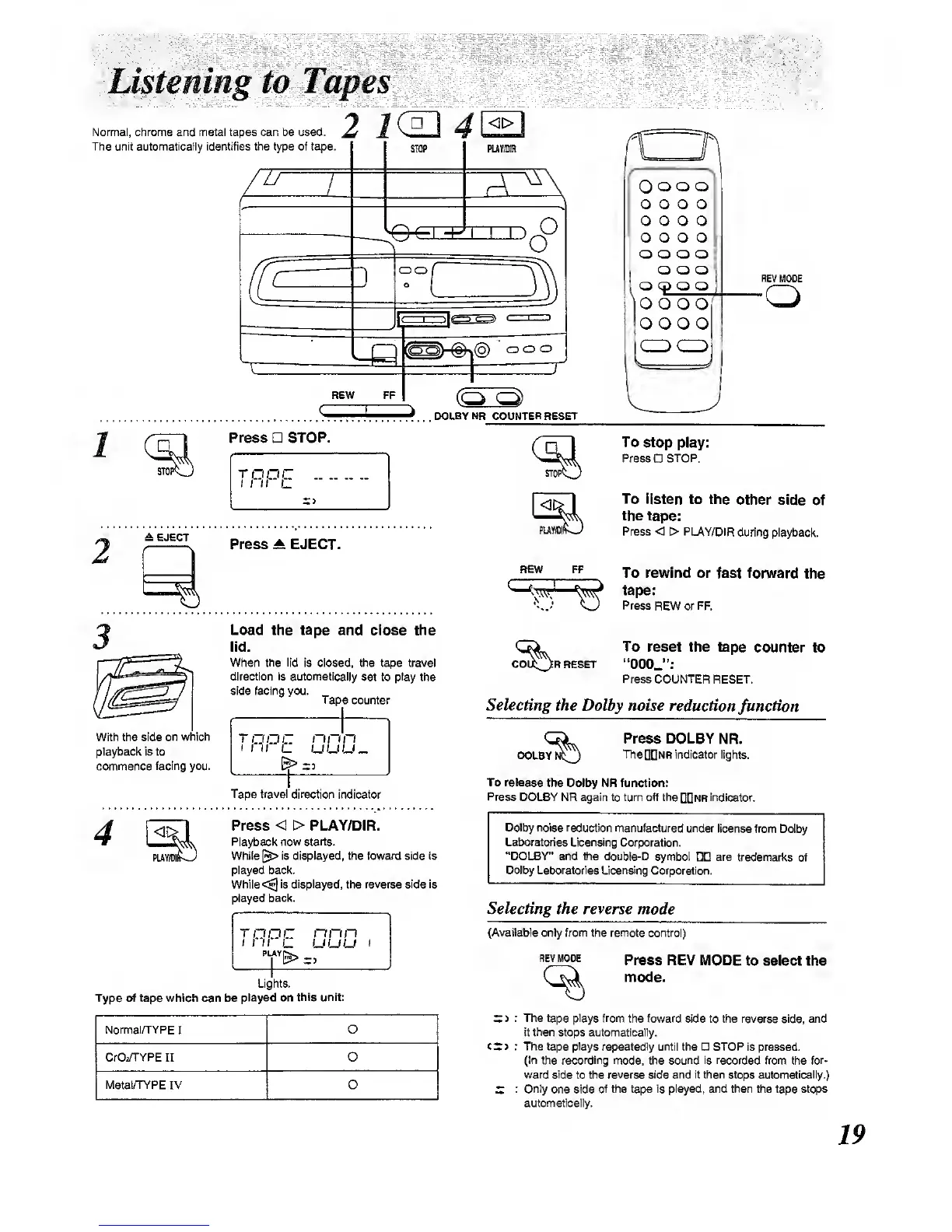
Press STOP.
raoc
±
EJECT
Press A EJECT.
PU'
REW FF
Load
the tape and close the
lid.
When
the lid
is closed, the tape travel
direction is
automaticalty
set to
play
the
side facing you.
Tape
counter
^^)rreset
To stop
play:
Press STOP.
To
listen to the
other side
of
the tape:
Press < > PLAY/DIR
during playback.
To
rewind
or fast forward
the
tape:
Press
REW or FF.
To
reset the tape
counter to
"OOOJ':
Press COUNTER
RESET.
Selecting
the Dolby noise reduction
function
With the side
on which
playback is to
commence
facing you.
TO
DC
nnn
uuu.
DOLBY
Press DOLBY
NR.
TheDDNR indicator lights.
Tape travel direction indicator
To release
the Dolby NR function:
Press
DOLBY NR again to turn off the
QQNft
indicator.
4
Press < > PLAY/DIR.
Pla^ack now
starts.
While
[«> is displayed, the foward side is
played back.
While
<^
is displayed,
the
reverse side Is
played
back.
Ddby noise reduction
manufacture under
license
from Dolby
Laboratories Licensing
Corporation.
"DOLBY" and the double-D
symbol
DD
are
trademarks of
DoJby Latx>ratories Licensing
Corporation.
raoc
nnn
i
ni
u uuu
I
Selecting
the reverse mode
Lights.
Type of tape which can be
played on
this unit:
(Available only from the remote control)
imVUODE
Press REV MODE
to select the
mode.
Normal/TYPE
I
O
CrOi^^PE II 0
MetamPE
IV 0
X>
: The tape plays from
the foward side
to
the reverse
sMe,
and
it then stops automatically.
CSJ
: The tape plays repeatedly until
the STOP is pressed.
(In the recording
mode, the
sound is recorded
from the
for-
ward side
to the
reverse side and it then stops automatically.)
S
: Only
one side
of the tape Is played, and thwi the tape stops
automatk:ally.



 To Next Page