EasyManua.ls Logo

Panasonic RX-E300 - Page 23

Panasonic RX-E300
36 pages
Print Icon
To Next Page IconTo Next Page
To Previous Page IconTo Previous Page
Loading...
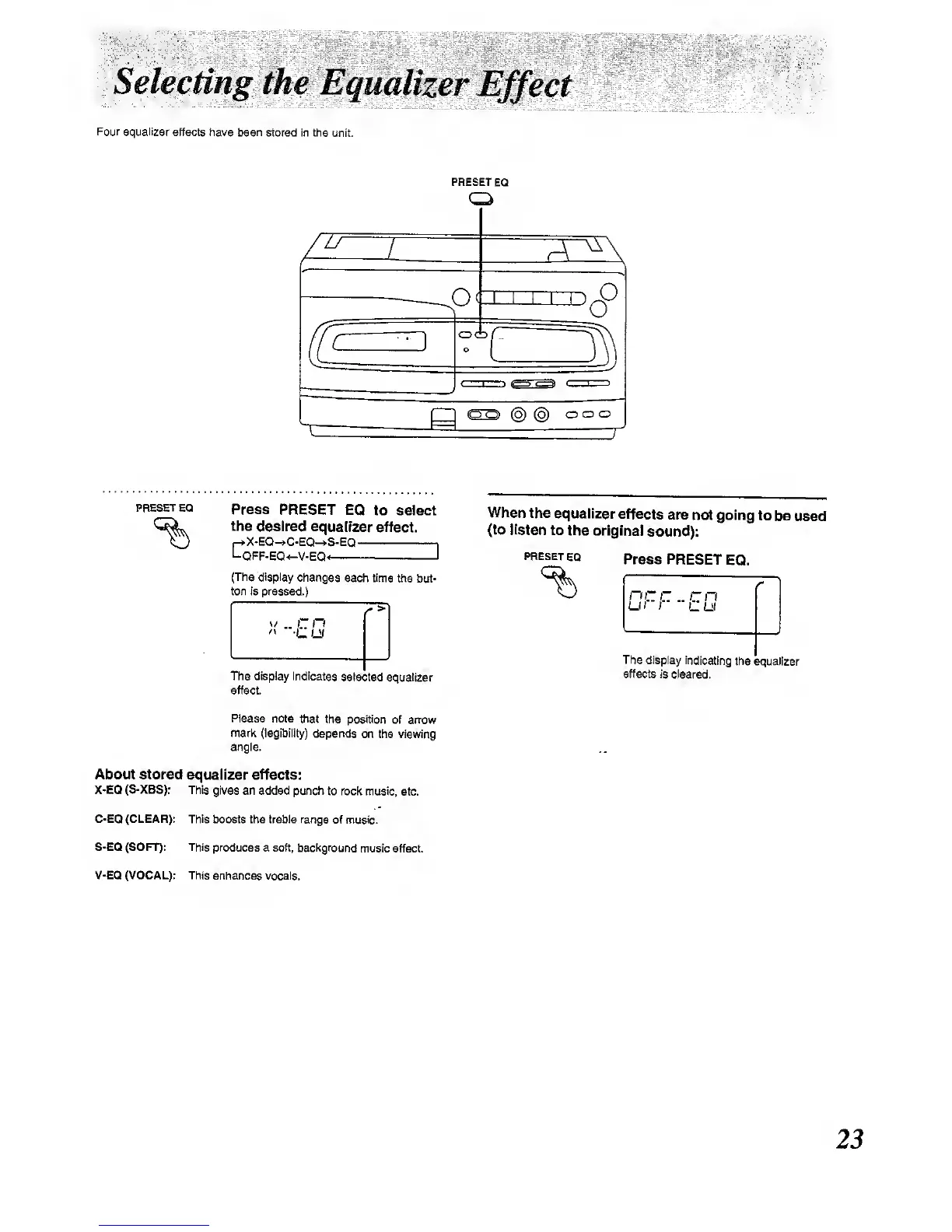
Four equalizer
effects have been
stored in the unit.
PRESET
EQ
)(
1 1 1 1
n
„0
o<
o
h
%
T
=
@
@
ooo
1
,J
PRESET EQ
Press PRESET
EQ
to select
the
desired
equalizer
effect.
(-*X-EQ-».C-EQ-»S-EQ
Lt
-OFF-EQ4-V-EQ1
(The
display
changes
each time
ttie but-
ton is pressed.)
The display
indicates
selected
equalizer
effect.
Please
note that
the position
of arrow
mark (legibiiity)
depends
on the viewing
angle.
About stored
equalizer effects:
X-EQ
(S-XBS):
This
gives an added punch
to rock music,
eto.
C-EQ (CLEAR): This
boosts the treble range
of music.
S-EQ (SOFT): This
produces a soft, background
musk; effect.
V-EQ (VOCAL): This
enhances vocais.
When
the
equalizer
effects
are not
going
to be
used
(to listen
to
the original
sound):
PRESET
EQ
Press
PRESET
EQ.
The
dispiay indicating
the equalizer
effects is
cleared.
23

Other manuals for Panasonic RX-E300

Related product manuals