Using the Wake-up Timer
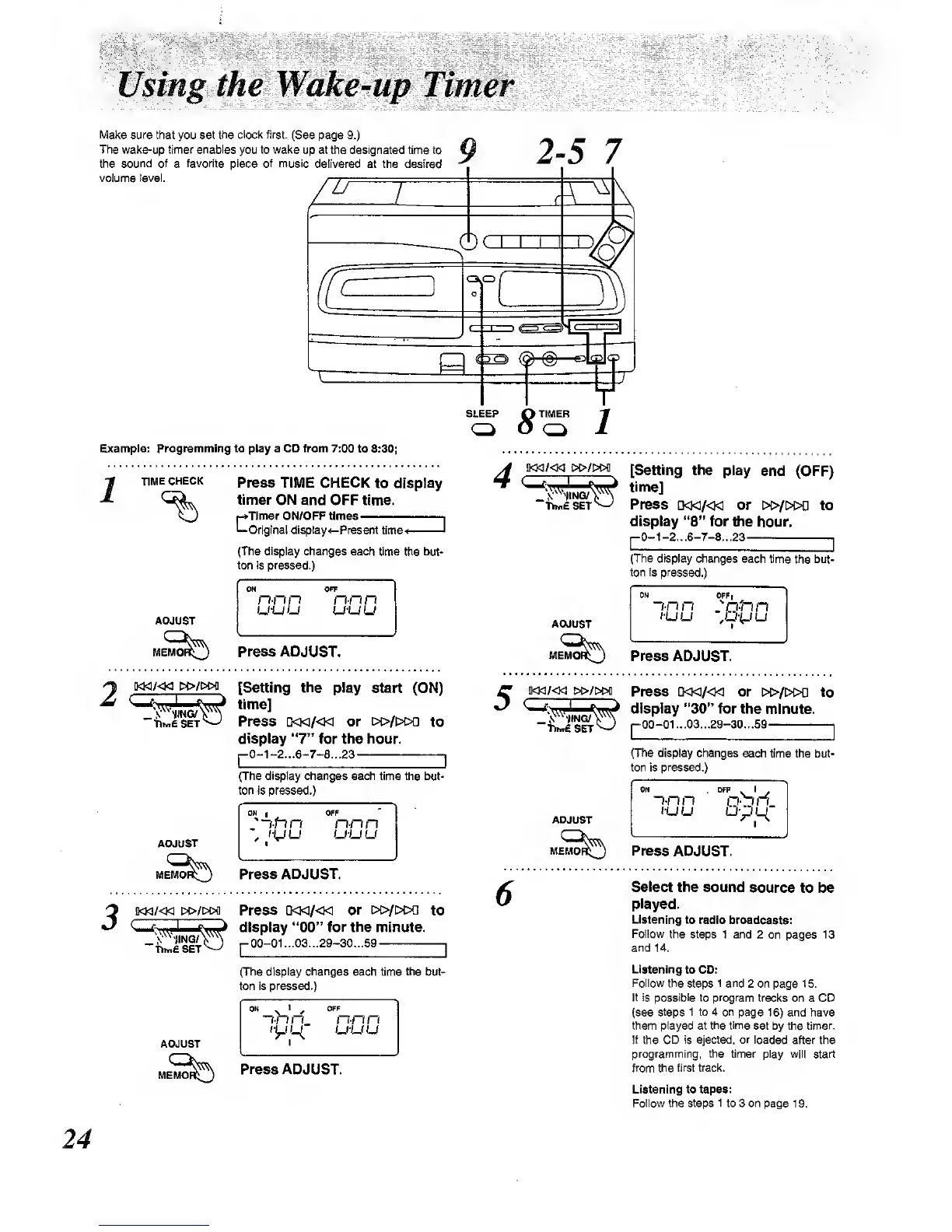
Make sure that you set
the clock first.
(See page
9.)
The wake-up timer enables
you to
wake
up at the designated time to
the
sound of
a
favorite piece of music delivered at the desired
volume ieval.
9
2-5
7
SLEEP
Q
TIMER
-g
Example: Programming to play a CD from 7:00
to 8:30;
TIME CHECK
Press TIME
CHECK to display
timer ON
and
OFF time.
r^Tlmef ON/OFF Umes
,
—Original cUsplay^-Prasent time-*
'
{The display changes
each time the but-
ton is pressed.)
ADJUST
ON OFF
n-nn
n-nn
u-uuu-uu
Press
ADJUST.
iKKi/<Ki i»/i>M
[Setting the play start (ON)
^^rtli^Sfj^
time]
"WsET*^
Press
d«/«
or [>t>/t>E>a
to
display
"7"
for the hour.
p0-1-2...6-7-8...23
I
(The
display
changes each time the tHit-
ton is pressed.)
ADJUST
:-ftin
OFF
n-nn
u-uu
Press
ADJUST.
3
M<i/«i
&o-/i>M
Press D<]</«
or [>i>/i>t>a
to
3
^^-^^^i^J
iw^
display
"00"
tor
the minute.
-LIsIt^
r00-01-03-29-30...59
,
(The display
changes
each time
the
but-
ton is
pressed.)
ADJUST
MEMO^^
~i-n
n_ nnn
tyiL^
u-uu
Press
ADJUST.
4
!>C>/!>Ofl
SET
[Setting
the play
end (OFF)
time]
Press
a<i</<M
or i>i>/i>t>n
to
display
"8"
for
the hour.
p0-1-2...6-7-e...23
—
I
(The display changes
each time
the but-
ton
fs pressed.)
ADJUST
ON opr,
~i-n
n
:Q-nn
lUU
Press ADJUST.
iKw/<Ki
i>i>/w>D
Press
0«/«
or
[»/[>t>n to
>
display
"30"
for the
minute.
00-01 ...03...29-30...59
.
r
(The
display changes
each time the but-
ton is pressed.)
ADJUST
Press
ADJUST.
6
Select
the sound
source to be
played.
Listening to
radio broadcasts:
Follow
the 8te|}8 1 and
2 on pages
13
and 14.
Listening
to CD:
Follow
the steps
1 and
2 on
page
15.
It is possible to program
tracks on a CD
(see
steps 1 to 4 on
page
16)
and have
them played at
the time
set by the timer.
If
the CD
is ejected, or loaded
after the
programming, the timer play will start
from ttie first track.
Listening to tapes;
Follow the steps
1
to 3 on
page 1 9.
24



 To Next Page