TAPE TUNER CD
REW
FF
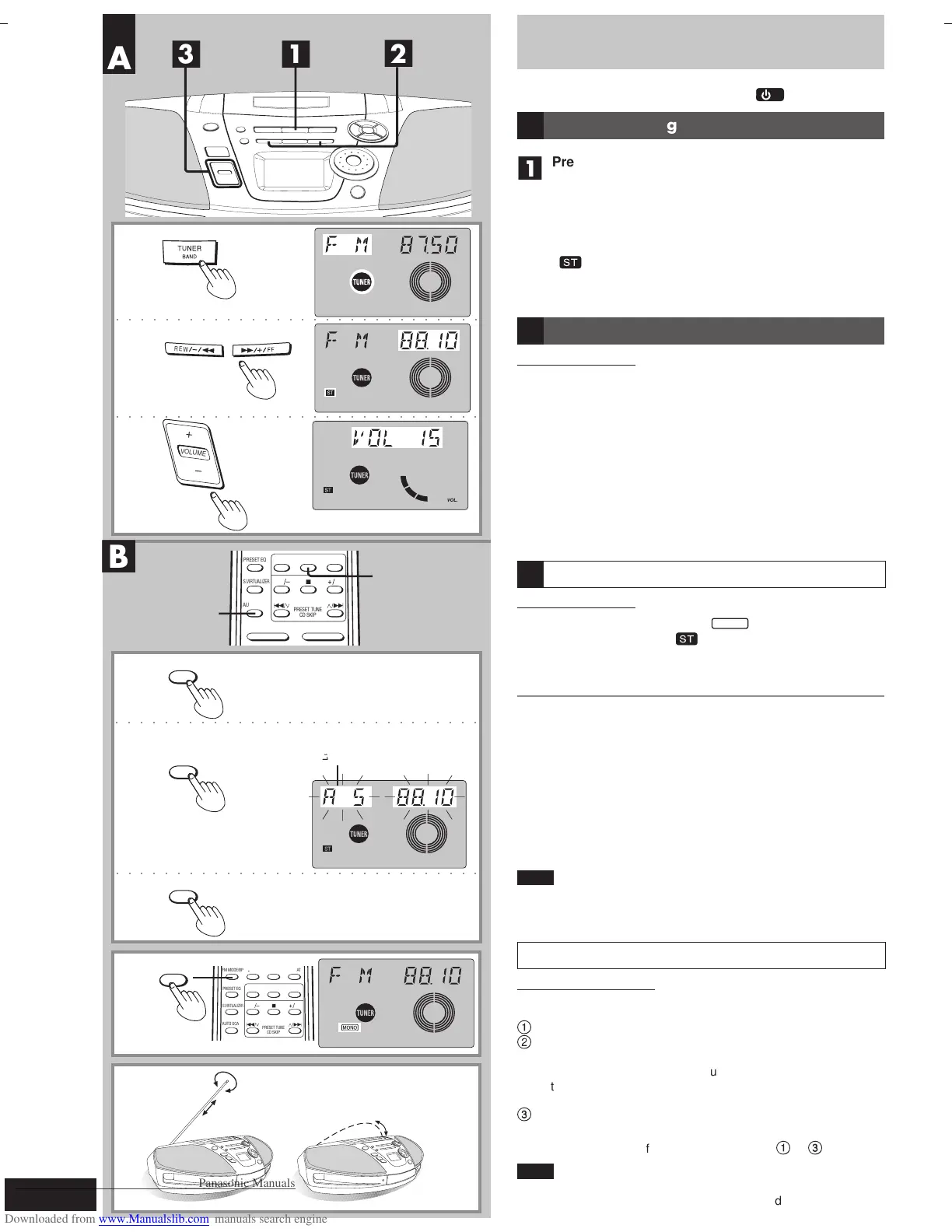
TUNER
Indicates auto scan
!"#
The Radio
Preparation: (when using batteries) Press [
/I
].
Normal tuning
■
1
Press [TUNER BAND] to select “FM” or “AM”.
(Unit comes on when using AC power.)
Each time you press the button:
AM ↔ FM
■
2
Press [ REW/–/
QQ
QQ
Q ] or [
RR
RR
R/+/FF ] to select a
station.
“ ” is displayed during FM stereo broadcasts.
■
3
Press [+, – VOLUME] to adjust the volume.
Using auto scan
Remote control only
You can search for a station by listening to all tuned-in stations for 8
seconds each.
■
1
Press [TUNER] to select “FM” or “AM”.
■
2
Press [AUTO SCAN].
Auto scan starts.
■
3
Press [AUTO SCAN] when you find the desired
station.
Auto scan ends when it reaches the original frequency again.
To stop during the process, press [AUTO SCAN].
If noise is excessive in FM
Remote control only
Press [FM MODE/BP] to display “
MONO
”.
Monaural sound is selected (“
” goes off) and noise reduces when
reception is weak.
Press [FM MODE/BP] again to cancel the mode.
Auto-tuning
Press and hold [REW / – / Q] or [R / + / FF] until the frequency
starts changing rapidly.
The frequency stops when it finds a station. (Interference may also
cause it to stop. Start auto-tuning again if this occurs.)
To stop auto-tuning
Press [REW / – / Q] or [R / + / FF].
■
D To improve reception
FM: Change the length and direction of the antenna.
AM: Change the facing of the unit.
Note
• AM reception is briefly interrupted if [0
DECK] is pressed.
• To improve reception when using the unit in a building or vehicle,
use it near a window.
AM allocation setting
Only from the main unit
Before receiving AM broadcasts, be sure to select the correct alloca-
tion setting (either 9 kHz or 10 kHz) for your area.
1
Press [TUNER BAND] to select FM.
2
Press and hold [TUNER BAND] for approximately 5
seconds.
The frequency display will be returned to the minimum frequency
of the AM band and the display will begin to flash. Keep holding
for approximately 5 more seconds.
3
When the display stops flashing and indicates a
different frequency number, release [TUNER BAND].
To return to the original frequency, repeat steps
1
to
3
above.
Note
After changing the “allocation” setting, the frequencies you
previously preset into the memory will be cleared.
wJOðUuðË_« `*« 5³¹
A
C
B
RQT6279-G (12-15)4 7/12/01, 4:43 PM14
Downloaded From Disc-Player.com Panasonic Manuals



 To Next Page