7
C
PRESET EQ
S.VIRTUALIZER
PRESET TUNE
CD SKIP
AUTO SCAN
–
VOLUME
+
TAPE TUNER CD
REW
FF
7
1
7
2
•
7
2
7
1
7
1
7
2
PRESET TUNE
CD SKIP
PRESET TUNE
CD SKIP
Preset channel
!
Indicates preset scan
!"#$%
The Radio
Preparation: (when using batteries) Press [
/I
].
Preset tuning
Tuning is simpler if you preset stations.
You can preset 12 FM and 12 AM stations.
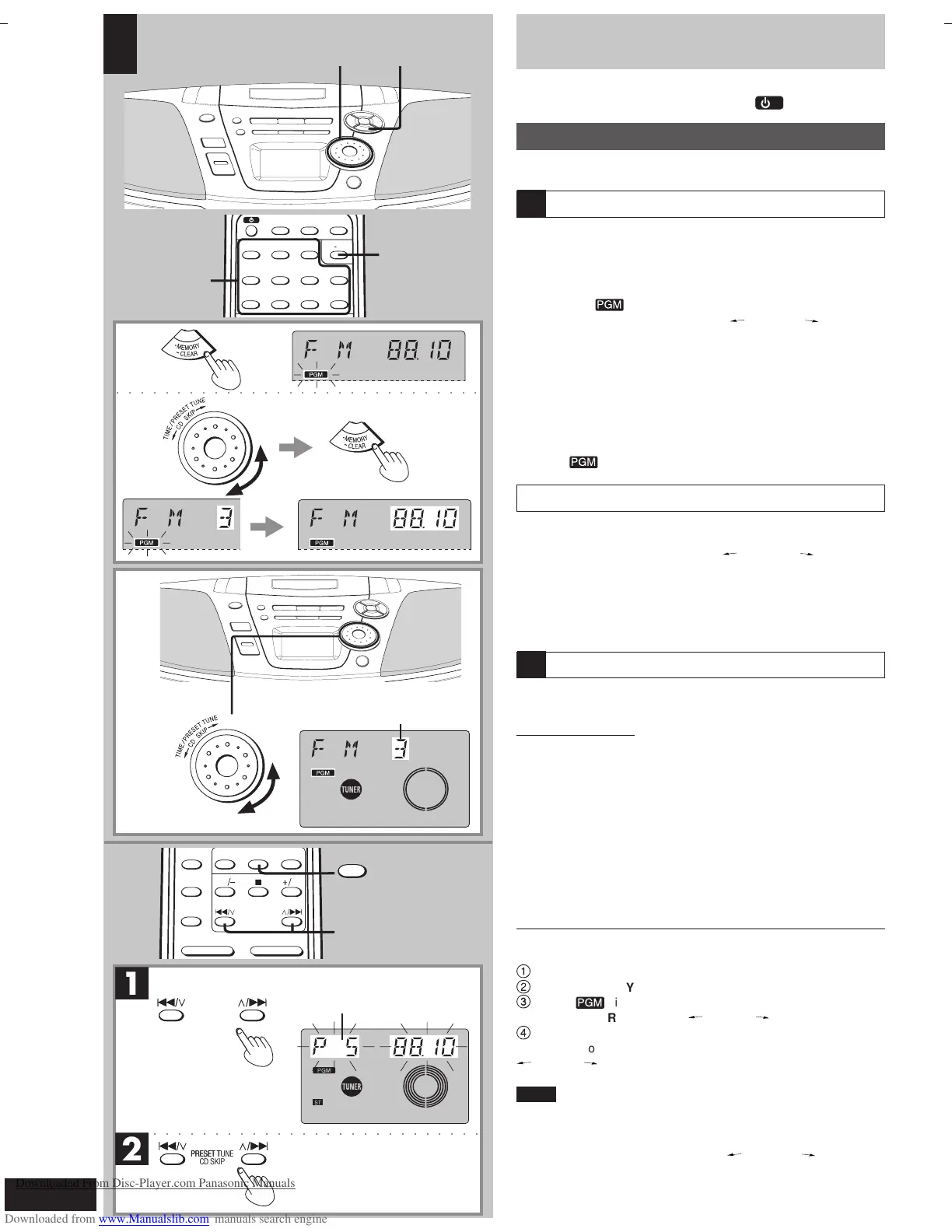
Presetting radio stations
Preparation: Tune to the station you want to preset. (
\
page 14)
■
1
Press [•MEMORY
**
**
*
CLEAR].
■
2
While “ ” is flashing
Turn [TIME/PRESET TUNE CD SKIP ] to select
a channel and press [•MEMORY
**
**
*
CLEAR].
On the remote control
Press the numbered button(s) to enter the station into a
channel (1 to 12).
To enter channel 10, 11 or 12
Press [
≥≥
≥≥
≥10], then the two digits.
If “
” goes off during presetting, return to step
■
1 .
Selecting channels
Preparation: Press [TUNER BAND] to select “FM” or “AM”.
■
B
Turn [TIME/PRESET TUNE CD SKIP ] to select
the channel.
On the remote control
Press the numbered button(s) to select the channel (1 to 12).
To select channel 10, 11 or 12, press [
≥≥
≥≥
≥10], then the two digits.
Using preset scan
You can search for a station by listening to all preset channels for 8
seconds each.
Remote control only
Preparation: Press [TUNER] to select “FM” or “AM”.
■
1
Press and hold [
SS
SS
S /
44
44
4 ] or [
33
33
3 /
TT
TT
T ] until “PS”
appears on the display.
Preset scan starts.
■
2
Press [
SS
SS
S /
44
44
4 ] or [
33
33
3 /
TT
TT
T ] when you find the
desired channel.
Preset scan ends after searching through each preset channel once.
To stop during the process, press [ S /
44
44
4] or [
33
33
3
/ T].
Cancelling a preset channel
e.g. If channel 3 is not needed
1
Select channel 3.
2
Press [
•
MEMORY
*
CLEAR].
3
While “ ” is flashing
Turn [TIME/PRESET TUNE
CD SKIP ] to display “– –”.
4
Press [
•
MEMORY
*
CLEAR].
Now, when you perform preset scan or turn [TIME/PRESET TUNE
CD SKIP ] to select a preset channel, channel 3 is skipped.
Hints
• To select the cancelled channel, press the remote control’s num-
bered buttons.
• You can press [S /
44
44
4] or [
33
33
3 / T] on the remote control for
turning of [TIME/PRESET TUNE
CD SKIP ] described
above.
A
C
o³*« j³C« …UM
o³*« j³C« ` 5³¹
TUNER
○○○○○○○○○○○○○○○○○○○○○○○○○○○○○○
RQT6279-G (16-19)3 7/12/01, 4:45 PM16
Downloaded From Disc-Player.com Panasonic Manuals



 To Next Page