22
RQT6279
7
3
7
1
○○○○○○○○○○○○○○○○○○○○○○○○○○○○○
7
2
○○○○○○○○○○○○○○○○○○○○○○○○○○○○○○
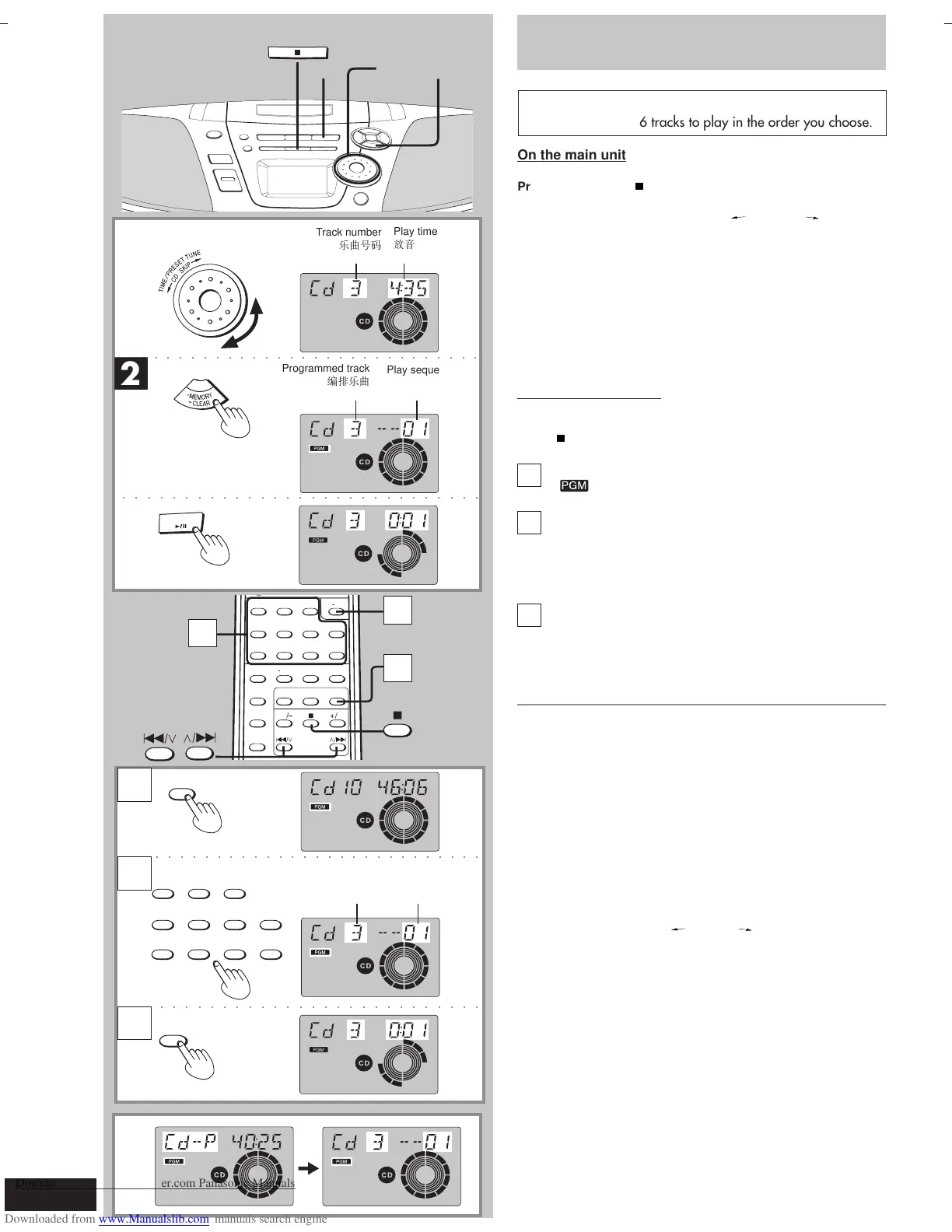
Track number
!
Play time
!
Programmed track
!
Play sequence
!
7
2
7
3
7
1
TAPE ⁄ CD
CD
○○○○○○○○○○○○○○○○○○○○○○○○○○○○○
○○○○○○○○○○○○○○○○○○○○○○○○○○○○○○
PGM/-CLEAR
7
A
CD
1
2
3
CDs
Program play
Select up to 36 tracks to play in the order you choose.
On the main unit
Preparation: Press [ TAPE/CD] to switch to CD mode.
■
1
Turn [TIME/PRESET TUNE CD SKIP ] to select
the track.
■
2
Press [•MEMORY
**
**
*
CLEAR].
Repeat step
■
1 and
■
2 to program other tracks.
■
3
Press [6 CD] to start play.
On the remote control
Preparation:
Press [
] to switch to CD mode.
1
Press [PGM/
**
**
*
CLEAR].
“ ” appears on the display.
Enter the track number with the numbered
buttons.
For tracks numbered 10 and over, press [≥10] then the two
digits.
Repeat this step to program other tracks.
Press [CD] to start play.
The program remains intact even if play is stopped or the unit is
turned off. “Cd-P” appears when play is stopped to indicate the con-
tents are in the memory.
To cancel
Press and hold [
•
MEMORY
**
**
*
CLEAR] (remote control: [PGM/
**
**
*
CLEAR]) in the stop mode until “CLEAR” is displayed.
The mode is also cancelled if the CD tray is opened.
“FULL” is displayed
If 36 tracks have already been programmed.
“– –:– –” is displayed
If the total play time of the program exceeds 100 minutes.
You can still program and play tracks.
■
A
To check the program contents (while “Cd-P” is
displayed)
Turn [TIME/PRESET TUNE CD SKIP ].
On the remote control
Press [S /
44
44
4] or [
33
33
3
/ T].
2
3
—U*« r—
ŸUL²Ýù« VUFð
ŸUL²Ýù« XË
Zd³*« —U*«
Programmed track
!
Play sequence
!
ŸUL²Ýù« VUFð
Zd³*« —U*«
23
PGM/-CLEAR
1
56≥104
8907
C RESET RANDOM REPEATFM MODE/BP
PRESET EQ
S.VIRTUALIZER
PRESET TUNE
CD SKIP
AUTO SCAN



 To Next Page