28
RQT6279
7
3
7
4
7
1
○○○○○○○○○○○○○○○○○○○○○○○○○○○○○○
○○○○○○○○○○○○○○○○○○○○○○○○○○○○○○
7
2
○○○○○○○○○○○○○○○○○○○○○○○○○○○○○○
7
4
7
1
7
2
7
3
TAPE ⁄ CD
DECK
Recording CDs
ALL-REC
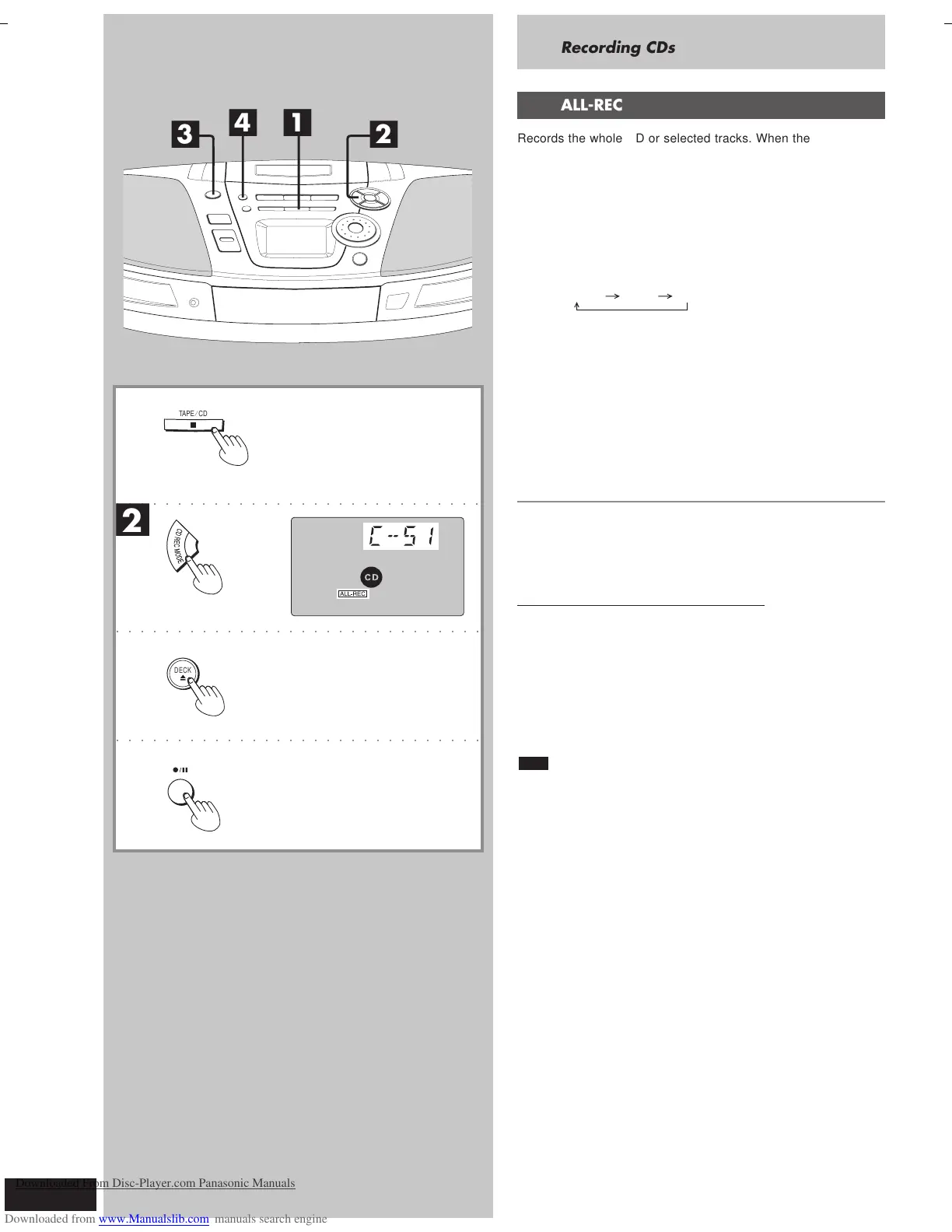
Records the whole CD or selected tracks. When the tape finishes
before CD, recording and CD pauses for you to resume recording on
the opposite side.
Preparation: Insert a CD (
\
page 18).
■
1
Press [
L
TAPE/CD] to switch to CD mode.
■
2
Press [
CD REC MODE
] to display “ALL-REC”.
Each time you press the button:
ALL-REC 1-REC OFF
The display shows the tape length needed.
“C – – – –” indicates the tape needed exceeds 100 minutes.
You can still record, but some tracks may not be recorded if the
tape isn’t long enough.
■
3
Press [0 DECK] to open the deck and load a cas-
sette with the side for recording facing up.
■
4
Press [
a/ J
] to start recording.
The unit rewinds the tape, records 10 seconds of silence, and
then starts recording.
To stop recording
Press [
L
TAPE/CD]. The CD also stops.
If a track is interrupted at the end of the side facing up
Recording and CD pauses.
To record the track again on the opposite side
1. Press [0 DECK], flip the cassette, and insert it.
2. Press [
a/ J
].
The unit records 10-second of silence, and resumes recording
from the beginning of the cut-off track.
To record selected tracks
1 Program tracks (
\
page 22).
2 Do steps
■
2. to
■
4..
Note
You cannot use ALL-REC with random play and repeat play (
\ page
20).
RQT6279-G (24-29)3 7/12/01, 4:48 PM28
Downloaded From Disc-Player.com Panasonic Manuals



 To Next Page