RQT6924
20
Disc operations
WMA/MP3, CD text and JPEG navigation menus
[WMA] [MP3] [CD] (CD text only) [JPEG]
These menus help you find items to play.
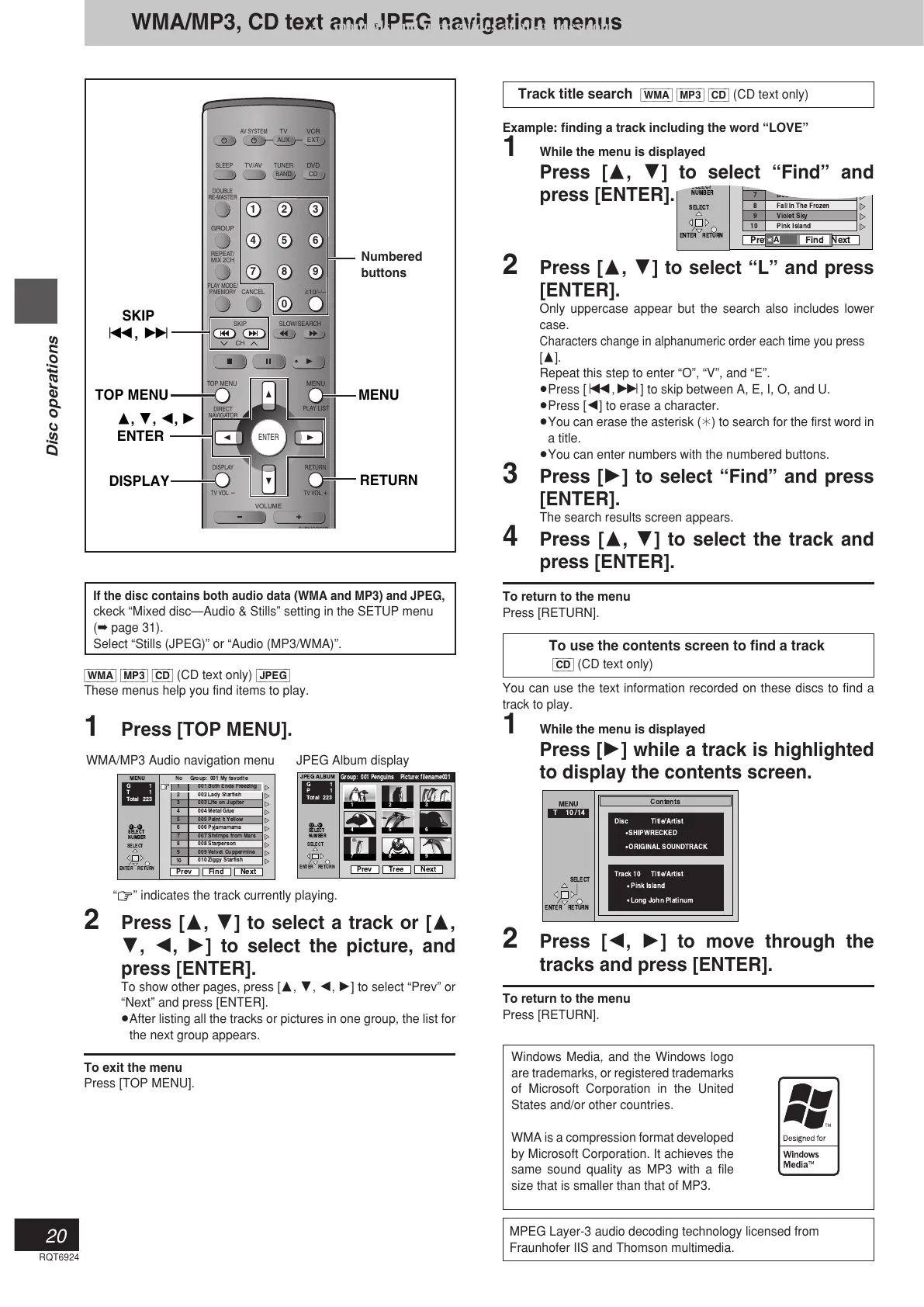
1 Press [TOP MENU].
2 Press [3, 4] to select a track or [3,
4, 2, 1] to select the picture, and
press [ENTER].
To show other pages, press [3, 4, 2, 1] to select “Prev” or
“Next” and press [ENTER].
≥After listing all the tracks or pictures in one group, the list for
the next group appears.
To exit the menu
Press [TOP MENU].
WMA/MP3 Audio navigation menu
Track title search [WMA] [MP3] [CD] (CD text only)
Example: finding a track including the word “LOVE”
1 While the menu is displayed
Press [3, 4] to select “Find” and
press [ENTER].
2 Press [3, 4] to select “L” and press
[ENTER].
Only uppercase appear but the search also includes lower
case.
Characters change in alphanumeric order each time you press
[3].
Repeat this step to enter “O”, “V”, and “E”.
≥Press [:,9] to skip between A, E, I, O, and U.
≥Press [2] to erase a character.
≥You can erase the asterisk (¢) to search for the first word in
a title.
≥You can enter numbers with the numbered buttons.
3 Press [1] to select “Find” and press
[ENTER].
The search results screen appears.
4 Press [3, 4] to select the track and
press [ENTER].
To return to the menu
Press [RETURN].
To use the contents screen to find a track
[CD] (CD text only)
You can use the text information recorded on these discs to find a
track to play.
1 While the menu is displayed
Press [1] while a track is highlighted
to display the contents screen.
2 Press [2, 1] to move through the
tracks and press [ENTER].
To return to the menu
Press [RETURN].
AV SYSTEM
SLEEP
GROUP
REPEAT/
MIX 2CH
PLAY MODE/
P.MEMORY
CANCEL
SKIP
CH
TOP MENU
DISPLAY
VOLUME
SELECT
ENTER RETURN
T 10 /14
MENU
Contents
Track 10 Title/Artist
Pink Island
Long John Platinum
Disc Title/Artist
SHIPWRECKED
ORIGINAL SOUNDTRACK
Windows Media, and the Windows logo
are trademarks, or registered trademarks
of Microsoft Corporation in the United
States and/or other countries.
WMA is a compression format developed
by Microsoft Corporation. It achieves the
same sound quality as MP3 with a file
size that is smaller than that of MP3.
“0” indicates the track currently playing.
If the disc contains both audio data (WMA and MP3) and JPEG,
ckeck “Mixed disc—Audio & Stills” setting in the SETUP menu
(➡ page 31).
Select “Stills (JPEG)” or “Audio (MP3/WMA)”.
MPEG Layer-3 audio decoding technology licensed from
Fraunhofer IIS and Thomson multimedia.




 To Next Page