ENGLISH
RQT9537
6
6
Discs
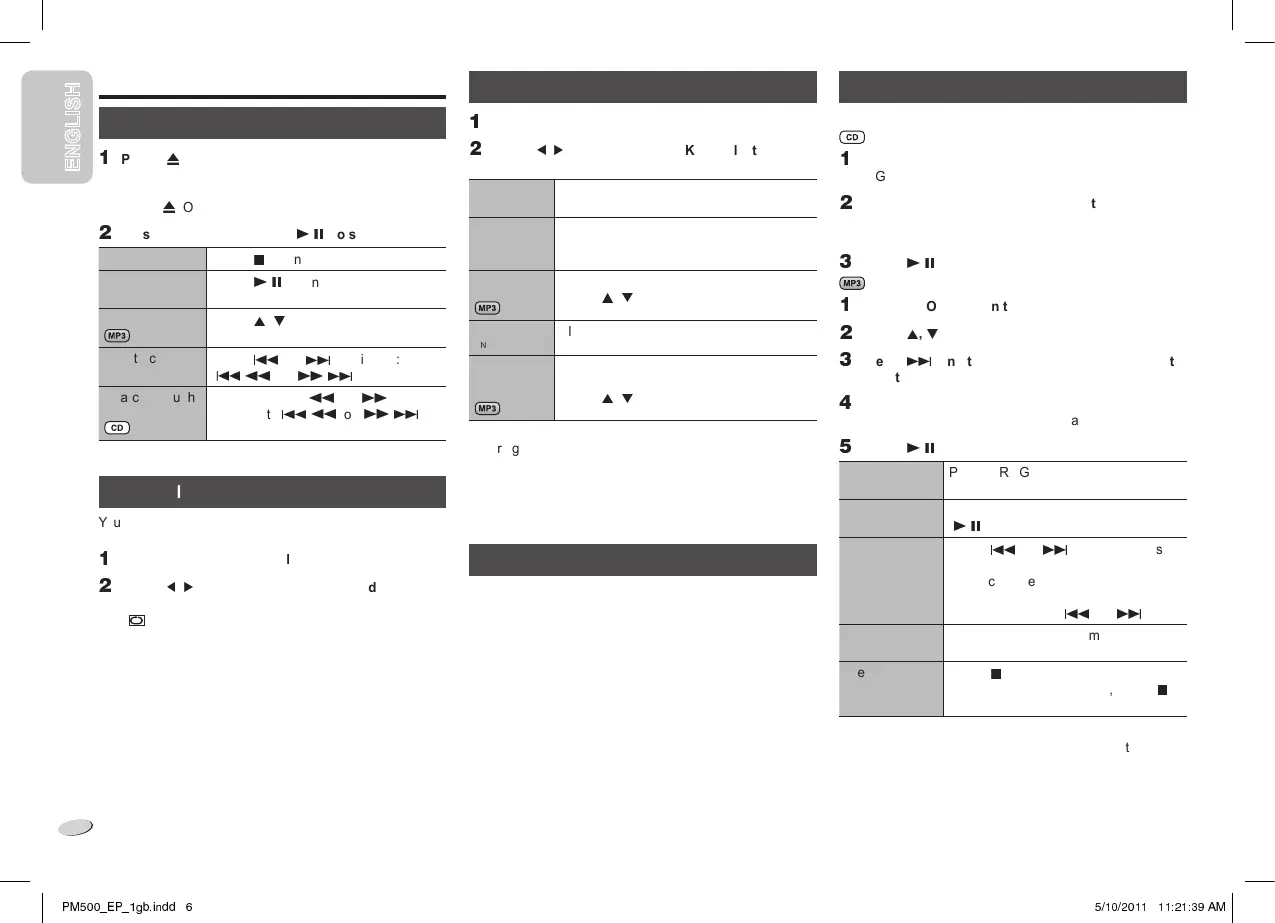
Playing discs
✶
Press [
①
, OPEN/CLOSE] on the main unit to open
the disc tray.
Put in a disc with the label facing up.
Press [
①
, OPEN/CLOSE] again to close the disc tray.
✷
Press [CD] and then press [
✹
/
✾
] to start playback.
Stop playback
Press [
✽
] during playback.
Pause playback
Press [
✹
/
✾
] during playback.
Press again to continue playback.
Skip album
Press [
❘
,
❚
].
Skip track
Press [
] or [
✻
] (main unit:
[
/
✸
] or [
✺
/
✻
]).
Search through
track
Press and hold [
✸
] or [
✺
]
(main unit: [
/
✸
] or [
✺
/
✻
]).
Repeat playback
You can repeat “Program playback” or other selected
“Playmode function”.
✶
Press [PLAY MENU] to select “REPEAT”.
✷
Press [
❨
,
❯
] to select “ON REPEAT” and then
press [OK].
“ ” is shown.
To cancel, select “OFF REPEAT”.
Playmode function
✶
Press [PLAY MENU] to select “PLAYMODE”.
✷
Press [
❨
,
❯
] and then press [OK] to select the
desired mode.
OFF
PLAYMODE
Play all tracks.
1-TRACK
1TR
Play one selected track on the disc.
Press the numeric buttons to select the
track.
1-ALBUM
1ALBUM
Play one selected album on the disc.
Press [
❘
,
❚
] to select the album.
RANDOM
RND
Play a disc randomly.
1- ALBUM
RANDOM
1ALBUM RND
Play all tracks in one selected album
randomly.
Press [
❘
,
❚
] to select the album.
Note:
• During random playback, you cannot skip to tracks which
have been played or press the numeric buttons.
• This function does not work with “Program playback”.
• The setting returns to the default “OFF PLAYMODE”
when you open the disc tray.
Viewing available information
You can view the available information on the display panel.
Press [DISPLAY].
Note:
• Maximum characters that can be shown:
approximately 16
• This system supports ver. 1.0, 1.1 and 2.3 ID3 tags.
• Text data that the system does not support can show
differently.
Program playback
This function allows you to program up to 24 tracks.
✶
Press [PROGRAM] in the stop mode.
“PGM” is shown.
✷
Press the numeric buttons to select the desired
track.
Do this step again to program other tracks.
✁
Press [
✹
/
✾
] to start playback.
✶
Press [PROGRAM] in the stop mode.
✷
Press [
❘
,
❚
] to select the desired album.
✁
Press [
✻
] and then press the numeric buttons to
select the desired track.
✂
Press [OK].
Do steps 2 through 4 again to program other tracks.
✄
Press [
✹
/
✾
] to start playback.
Cancel
program mode
Press [PROGRAM] in the stop mode.
Replay the
program
Press [PROGRAM] and then press
[
✹
/
✾
].
Check program
contents
Press [
] or [
✻
] when “PGM” is
shown in the stop mode.
To check while programming, press
[PROGRAM] two times after “PGM” is
shown, then press [
] or [
✻
].
Clear the last
track
Press [DEL] in the stop mode.
Clear all
programmed
tracks
Press [
✽
] in the stop mode. “CLR ALL”
is shown. Within 5 seconds, press [
✽
]
again.
Note:
The program memory is cleared when you open the disc
tray.
P☎✆✝✝✞✟P✞✠✡☛☞✌✍✎✎ ✏ ✑✒✓✔✒✕✔✓✓ ✓✓✖✕✓✖✗✘ ✙✚









 To Next Page