EasyManua.ls Logo

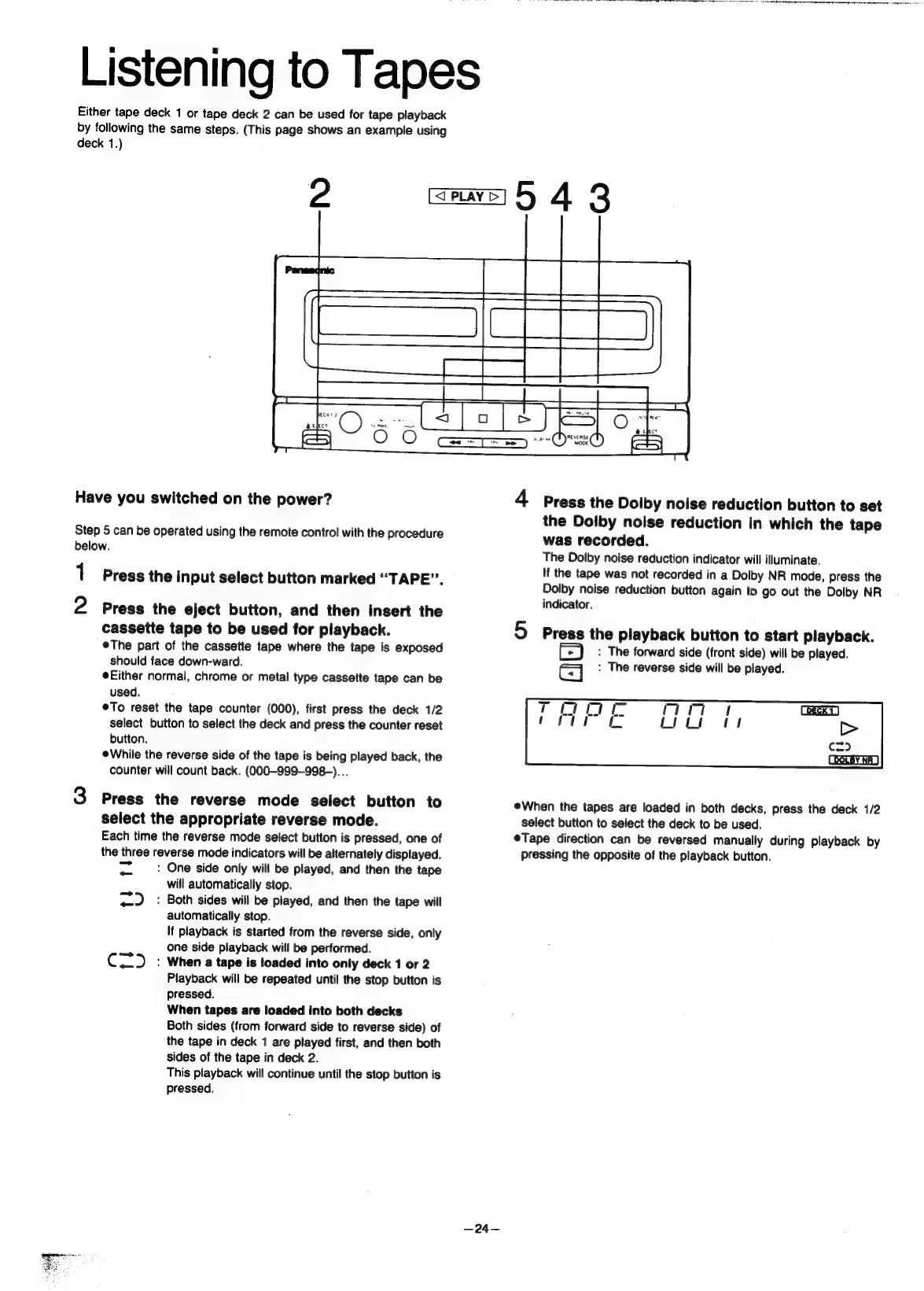
Panasonic SC-CH55 - Listening to Tapes; Playback from Deck 1 or Deck 2; Dolby noise reduction; Reverse mode selection

Panasonic SC-CH55
60 pages
Print Icon
To Next Page IconTo Next Page
To Previous Page IconTo Previous Page
Loading...
a
A
NO
i
dln
Nia
IR
ai
Rl
el
IR
JOE
BN
a
Ra
a
a
tl
th
ee
we
i
Goa
abe:
rn ma
Listening
to
Tapes
Either
tape
deck
1
or
tape
deck
2
can
be
used
for
tape
playback
by
following
the
same
steps.
(This
page
shows
an
example
using
deck
1.)
Have
you
switched
on
the
power?
Step
5
can
be
operated
using
the
remote
control
with
the
procedure
below.
1
2
Press
the
input
select
button
marked
“TAPE”.
Press
the
eject
button,
and
then
insert
the
cassette
tape
to
be
used
for
playback.
®The
part
of
the
cassette
tape
where
the
tape
is
exposed
should
face
down-ward.
Either
normal,
chrome
or
metal
type
cassette
tape
can
be
used.
eTo
reset
the
tape
counter
(000),
first
press
the
deck
1/2
select
button
to
select
the
deck
and
press
the
counter
reset
button.
eWhile
the
reverse
side
of
the
tape
is
being
played
back,
the
counter
will
count
back.
(000-999-998-)...
Press
the
reverse
mode
select
button
to
select
the
appropriate
reverse
mode.
Each
time
the
reverse
mode
select
button
is
pressed,
one
of
the
three
reverse
mode
indicators
will
be
alternately
displayed.
pas
:
One
side
only
will
be
played,
and
then
the
tape
will
automatically
stop.
<_.
:
Both
sides
will
be
played,
and
then
the
tape
will
automatically
stop.
If
playback
is
started
from
the
reverse
side,
only
one
side
playback
will
be
performed.
C=)
_:
When
a
tape
is
loaded
into
only
deck
1
or
2
Playback
will
be
repeated
until
the
stop
button
is
pressed.
When
tapes
are
loaded
into
both
decks
Both
sides
(from
forward
side
to
reverse
side)
of
the
tape
in
deck
1
are
played
first,
and
then
both
sides
of
the
tape
in
deck
2.
This
playback
will
continue
until
the
stop
button
is
pressed.
—24—
4
Press
the
Dolby
noise
reduction
button
to
set
the
Dolby
noise
reduction
in
which
the
tape
was
recorded.
The
Dolby
noise
reduction
indicator
will
illuminate.
If
the
tape
was
not
recorded
in
a
Dolby
NR
mode,
press
the
Dolby
noise
reduction
button
again
to
go
out
the
Dolby
NR
indicator.
5
Press
the
playback
button
to
start
playback.
:
The
forward
side
(front
side)
will
be
played.
ea
:
The
reverse
side
will
be
played.
eWhen
the
tapes
are
loaded
in
both
decks,
press
the
deck
1/2
select
button
to
select
the
deck
to
be
used.
eTape
direction
can
be
reversed
manually
during
playback
by
pressing
the
opposite
of
the
playback
button.

Related product manuals