EasyManua.ls Logo

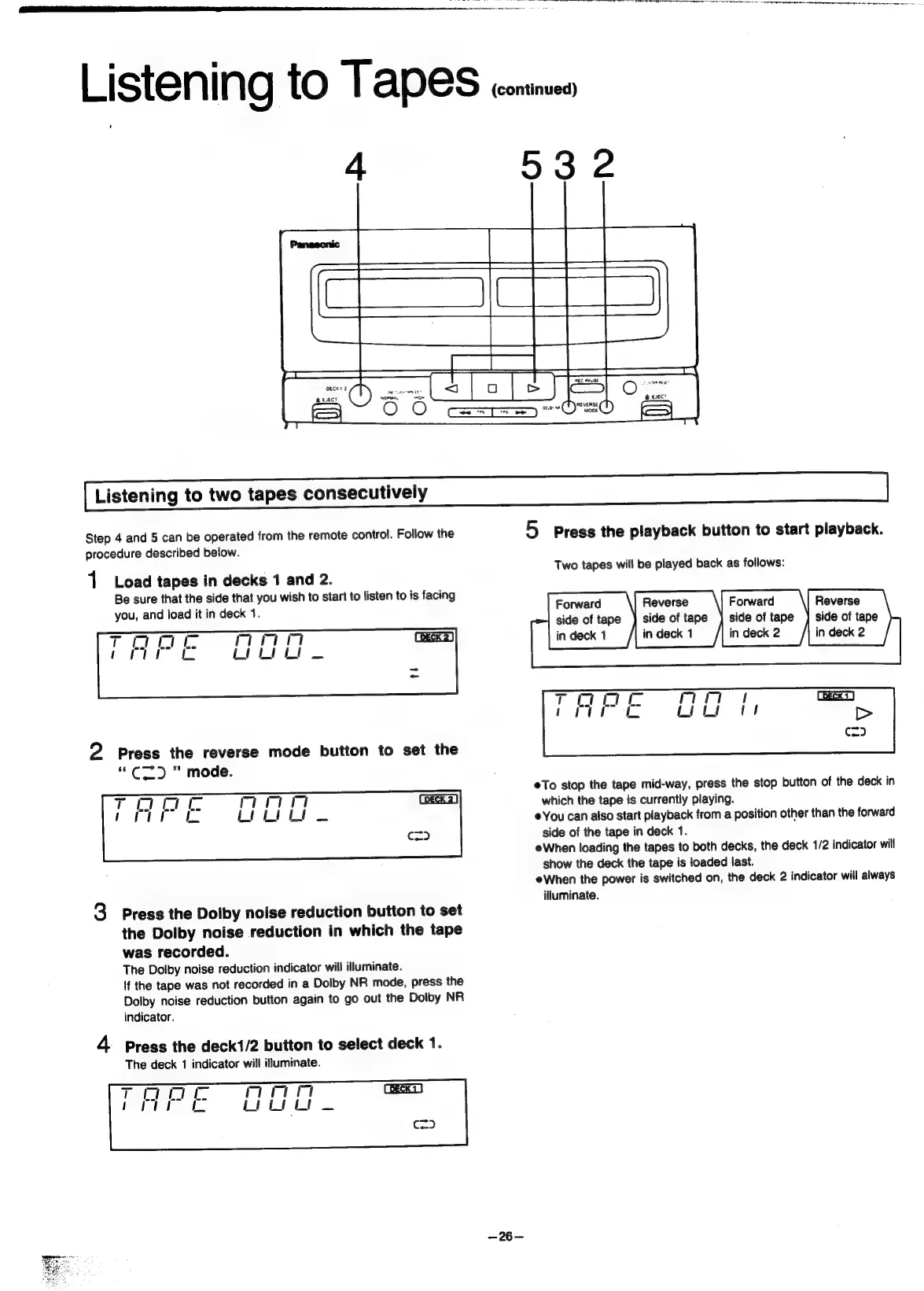
Panasonic SC-CH55 - Listening to two tapes consecutively; Load tapes in decks 1 and 2; Set the reverse mode; Set Dolby noise reduction

Panasonic SC-CH55
60 pages
Print Icon
To Next Page IconTo Next Page
To Previous Page IconTo Previous Page
Loading...
Listening
tO
TAPES
conines
4
532
Listening
to
two
tapes
consecutively
Step
4
and
5
can
be
operated
from
the
remote
control.
Follow
the
5
Press
the
playback
button
to
start
playback.
procedure
described
below.
Two
tapes
will
be
played
back
as
follows:
1
Load
tapes
in
decks
1
and
2.
Be
sure
that
the
side
that
you
wish
to
start
to
listen
to
is
facing
you,
and
load
it
in
deck
1.
Forward
Reverse
Forward
Reverse
side
of
tape
)
side
of
tape
}
side
of
tape
]
side
of
tape
eee
[hike
[iia
lace
i
2
Press
the
reverse
mode
button
to
set
the
“C2Z)
mode.
®To
stop
the
tape
mid-way,
press
the
stop
button
of
the
deck
in
which
the
tape
is
currently
playing.
You
can
also
start
playback
from
a
position
other
than
the
forward
side
of
the
tape
in
deck
1.
eWhen
loading
the
tapes
to
both
decks,
the
deck
1/2
indicator
will
show
the
deck
the
tape
is
loaded
fast.
eWhen
the
power
is
switched
on,
the
deck
2
indicator
will
always
illuminate.
3
Press
the
Dolby
noise
reduction
button
to
set
the
Dolby
noise
reduction
in
which
the
tape
was
recorded.
The
Dolby
noise
reduction
indicator
will
illuminate.
If
the
tape
was
not
recorded
in
a
Dolby
NR
mode,
press
the
Doiby
noise
reduction
button
again
to
go
out
the
Dolby
NR
indicator.
4
Press
the
deck1/2
button
to
select
deck
1.
The
deck
1
indicator
will
illuminate.
—26—

Related product manuals