EasyManua.ls Logo

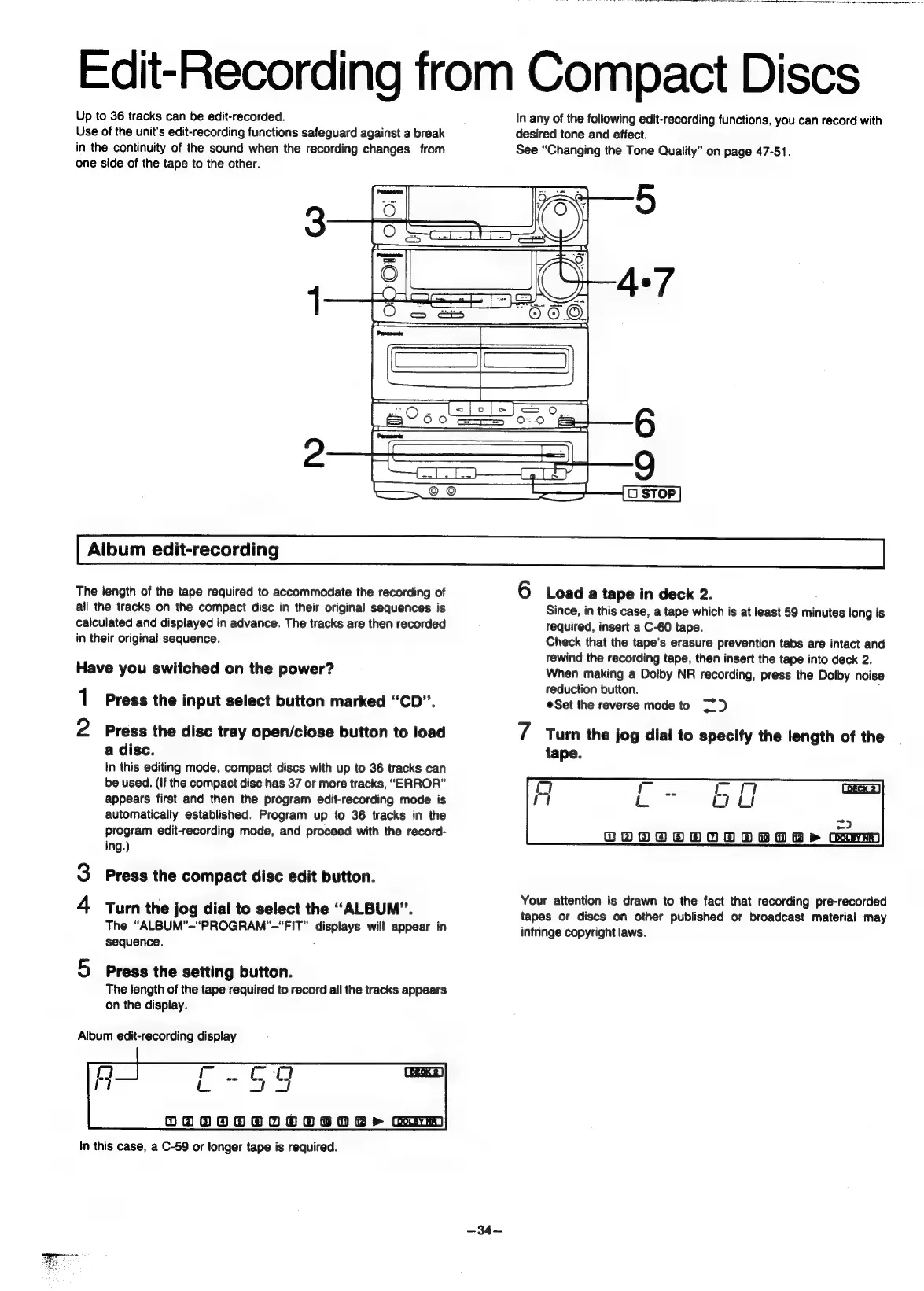
Panasonic SC-CH55 - Edit-Recording from Compact Discs; Album edit-recording; Load a tape in deck 2.; Specify the length of the tape.

Panasonic SC-CH55
60 pages
Print Icon
To Next Page IconTo Next Page
To Previous Page IconTo Previous Page
Loading...
a
a
a
ohare
eae
Edit-Recording
from
Compact
Discs
Up
to
36
tracks
can
be
edit-recorded.
Use
of
the
unit's
edit-recording
functions
safeguard
against
a
break
in
the
continuity
of
the
sound
when
the
recording
changes
from
one
side
of
the
tape
to
the
other.
Aibum
edit-recording
In
any
of
the
following
edit-recording
functions,
you
can
record
with
desired
tone
and
effect.
See
“Changing
the
Tone
Quality”
on
page
47-51.
O
STOP
The
length
of
the
tape
required
to
accommodate
the
recording
of
all
the
tracks
on
the
compact
disc
in
their
original
sequences
is
calculated
and
displayed
in
advance.
The
tracks
are
then
recorded
in
their
original
sequence.
Have
you
switched
on
the
power?
1
Press
the
input
select
button
marked
“CD”.
2
Press
the
disc
tray
open/close
button
to
load
a
disc.
In
this
editing
mode,
compact
discs
with
up
to
36
tracks
can
be
used.
(If
the
compact
disc
has
37
or
more
tracks,
“ERROR”
appears
first
and
then
the
program
edit-recording
mode
is
automatically
established.
Program
up
to
36
tracks
in
the
program
edit-recording
mode,
and
proceed
with
the
record-
ing.)
Cée)
Press
the
compact
disc
edit
button.
Lh
Turn
the
jog
dial
to
select
the
“ALBUM”.
The
“ALBUM’-"PROGRAM’-"FIT"
displays
will
appear
in
sequence.
5
Press
the
setting
button.
The
length
of
the
tape
required
to
record
all
the
tracks
appears
on
the
display.
Album
edit-recording
display
DOAOOOOT
O8
08>
Gorm
in
this
case,
a
C-59
or
longer
tape
is
required.
6
Load
a
tape
in
deck
2.
Since,
in
this
case, a
tape
which
is
at
least
59
minutes
long
is
required,
insert
a
C-60
tape.
Check
that
the
tape’s
erasure
prevention
tabs
are
intact
and
rewind
the
recording
tape,
then
insert
the
tape
into
deck
2.
When
making
a
Dolby
NR
recording,
press
the
Dolby
noise
reduction
button.
=
Set
the
reverse
mode
to
7
Turn
the
jog
dial
to
specify
the
length
of
the
tape.
=)
DOOOOOOTORBOA
BR
>
Gorm
Your
attention
is
drawn
to
the
fact
that
recording
pre-recorded
tapes
or
discs
on
other
published
or
broadcast
material
may
infringe
copyright
laws.

Related product manuals