EasyManua.ls Logo

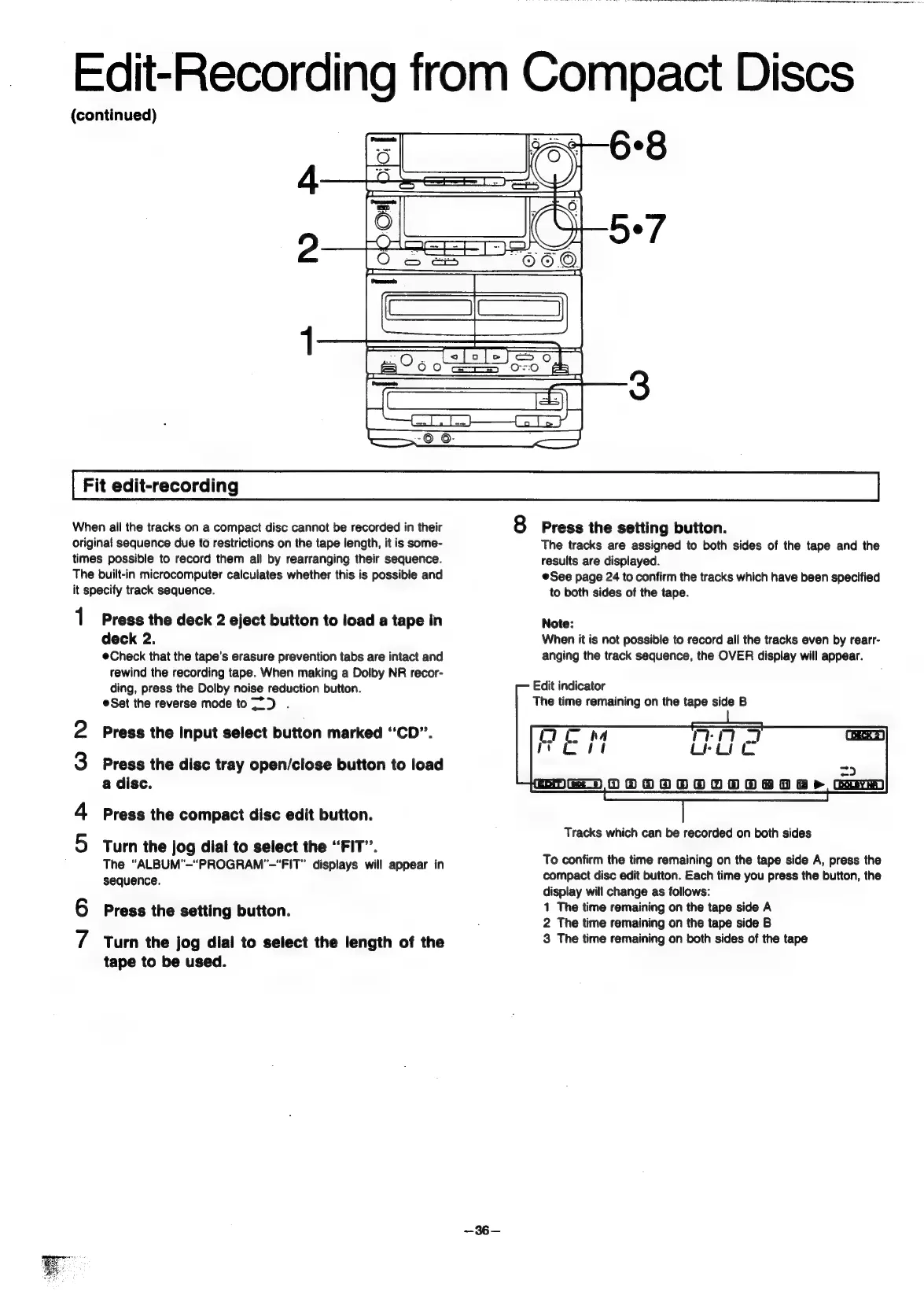
Panasonic SC-CH55 - Fit edit-recording; Assign the tracks in sequence.; Confirm the tracks which have been specified to both sides of the tape.

Panasonic SC-CH55
60 pages
Print Icon
To Next Page IconTo Next Page
To Previous Page IconTo Previous Page
Loading...
Edit-Recording
from
Compact
Discs
(continued)
Fit
edit-recording
When
all
the
tracks
on
a
compact
disc
cannot
be
recorded
in
their
original
sequence
due
to
restrictions
on
the
tape
length,
it
is
some-
times
possible
to
record
them
all
by
rearranging
their
sequence.
The
built-in
microcomputer
calculates
whether
this
is
possible
and
it
specify
track
sequence.
1
ark
WN
NO
Press
the
deck
2
eject
button
to
load
a
tape
in
deck
2.
eCheck
that
the
tape’s
erasure
prevention
tabs
are
intact
and
rewind
the
recording
tape.
When
making
a
Dolby
NR
recor-
ding,
press
the
Dolby
noise
reduction
button.
Set
the
reverse
mode
to")
.
Press
the
input
select
button
marked
“CD”.
Press
the
disc
tray
open/close
button
to
load
a
disc.
Press
the
compact
disc
edit
button.
Turn
the
jog
dial
to
select
the
“FIT”.
The
“ALBUM”—“PROGRAM’—“FIT”
displays
will
appear
in
sequence.
Press
the
setting
button.
Turn
the
jog
dial
to
select
the
length
of
the
tape
to
be
used.
~36—
8
Press
the
setting
button.
The
tracks
are
assigned
to
both
sides
of
the
tape
and
the
results
are
displayed.
See
page
24
to
confirm
the
tracks
which
have
been
specified
to
both
sides
of
the
tape.
Note:
When
it
is
not
possible
to
record
all
the
tracks
even
by
rearr-
anging
the
track
sequence,
the
OVER
display
will
appear.
Edit
indicator
The
time
remaining
on
the
tape
side
B
Tracks
which
can
be
recorded
on
both
sides
To
confirm
the
time
remaining
on
the
tape
side
A,
press
the
compact
disc
edit
button.
Each
time
you
press
the
button,
the
display
will
change
as
follows:
1
The
time
remaining
on
the
tape
side
A
2
The
time
remaining
on
the
tape
side
B
3
The
time
remaining
on
both
sides
of
the
tape

Related product manuals