EasyManua.ls Logo

Panasonic SC-CH55 - Program edit-recording; Assign the tracks in sequence.; Complete the program.

Panasonic SC-CH55
60 pages
Print Icon
To Next Page IconTo Next Page
To Previous Page IconTo Previous Page
Loading...
Edit-Recording
from
Compact
Discs
(continued)
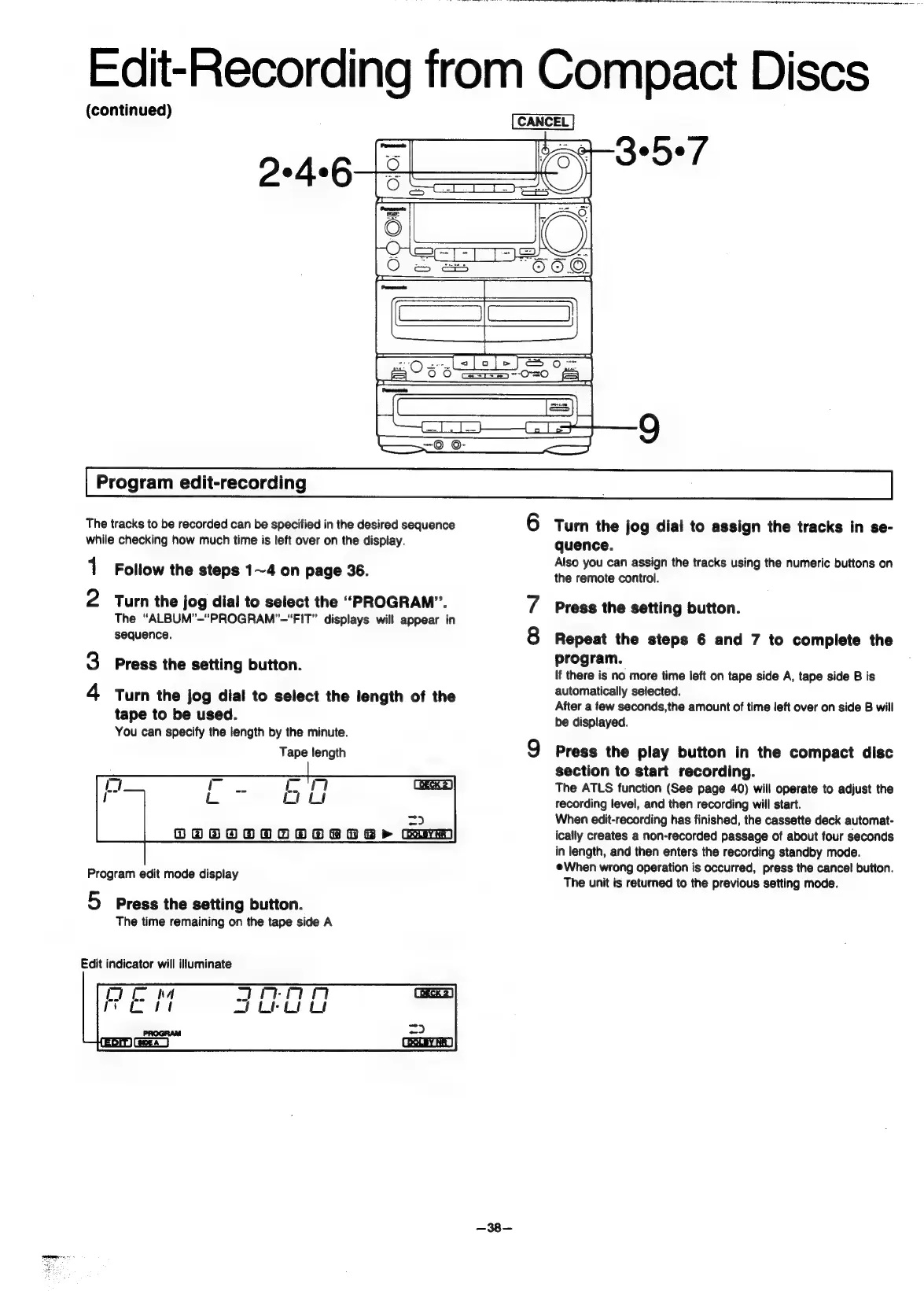
Program
edit-recording
The
tracks
to
be
recorded
can
be
specified
in
the
desired
sequence
6
Turn
the
jog
dial
to
assign
the
tracks
in
se-
while
checking
how
much
time
is
left
over
on
the
display.
quence.
Also
you
can
assign
the
tracks
using
the
numeric
buttons
on
the
remote
control.
1
Follow
the
steps
1~4
on
page
36.
2
Turn
the
jog
dial
to
select
the
“PROGRAM”.
The
“ALBUM’-"“PROGRAM’”-“FIT”
displays
will
appear
in
N
Press
the
setting
button.
sequence.
8
Repeat
the
steps
6
and
7
to
complete
the
program.
3
Press
the
setting
button.
If
there
is
no
more
time
left
on
tape
side
A,
tape
side
B
is
4
Turn
the
jog
dial
to
select
the
length
of
the
Seen
any
Secee:
After
a
few
seconds,the
amount
of
time
left
over
on
side
B
will
tape
to
be
used.
be
displayed.
You
can
specify
the
length
by
the
minute.
Tape
length
Q
Press
the
play
button
in
the
compact
disc
section
to
start
recording.
The
ATLS
function
(See
page
40)
will
operate
to
adjust
the
recording
level,
and
then
recording
will
start.
=>
When
edit-recording
has
finished,
the
cassette
deck
automat-
OGSOOOOOOSRBRORB>
Com
ically
creates
a
non-recorded
passage
of
about
four
seconds
in
length,
and
then
enters
the
recording
standby
mode.
;
;
@When
wrong
operation
is
occurred,
press
the
cancel
button.
Program
edit
mode
display
The
unit
is
returned
to
the
previous
setting
mode.
5
Press
the
setting
button.
The
time
remaining
on
the
tape
side
A
Edit
indicator
will
illuminate
—38—

Related product manuals