EasyManua.ls Logo

Panasonic SC-CH55 - Setting the timer recording; To cancel the timer recording; To confirm the timer recording; To use the sleep timer

Panasonic SC-CH55
60 pages
Print Icon
To Next Page IconTo Next Page
To Previous Page IconTo Previous Page
Loading...
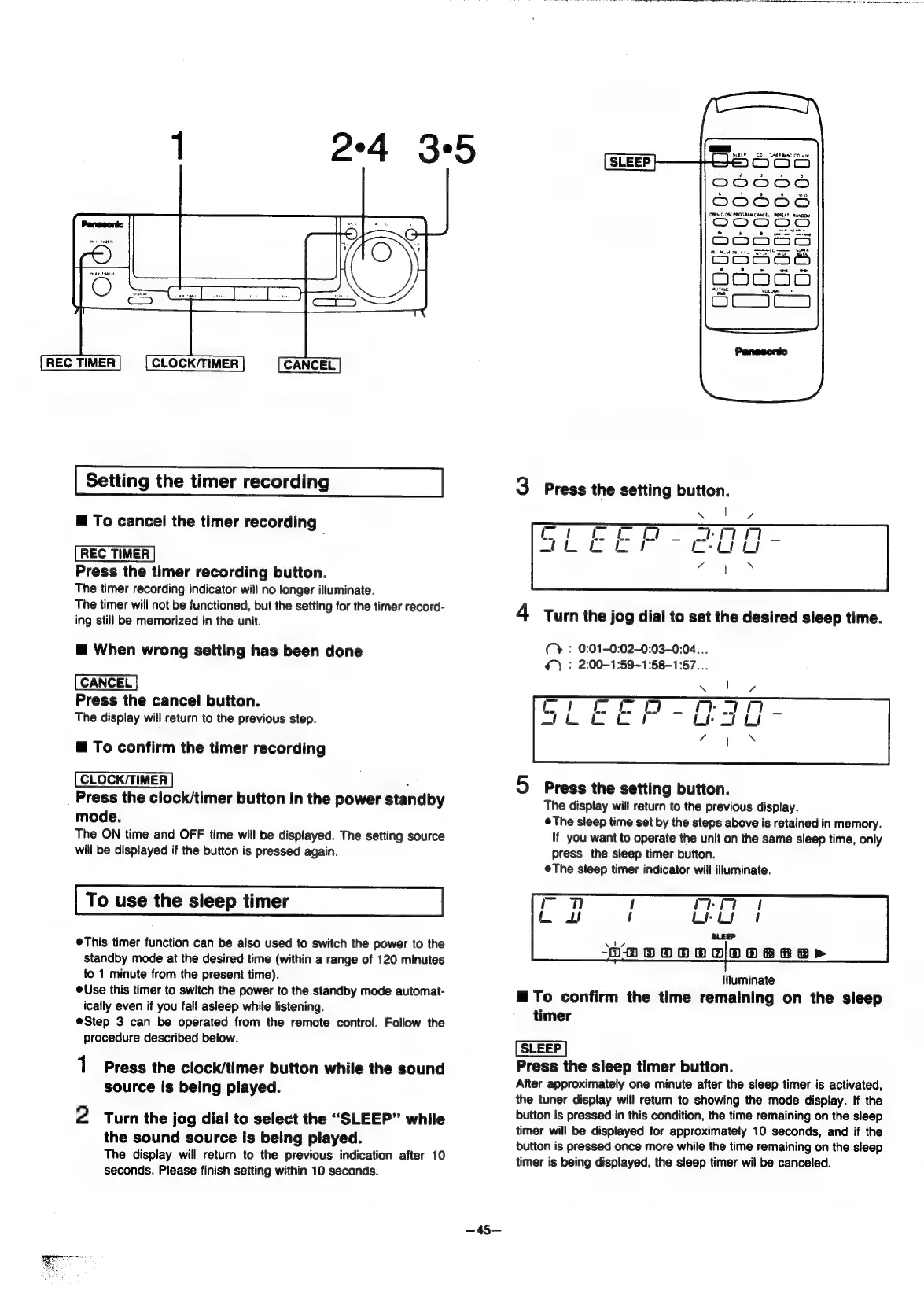
REC
TIMER
1
2°4
35
CLOCK/TIMER
CANCEL
Setting
the
timer
recording
@
To
cancel
the
timer
recording
[REC
TIMER
|
Press
the
timer
recording
button.
The
timer
recording
indicator
will
no
longer
illuminate.
The
timer
will
not
be
functioned,
but the
setting
for
the
timer
record-
ing
still
be
memorized
in
the
unit.
@
When
wrong
setting
has
been
done
CANCEL
Press
the
cancel
button.
The
display
will
return
to
the
previous
step.
@
To
confirm
the
timer
recording
[CLOCK/TIMER]
Press
the
clock/timer
button
in
the
power
standby
mode.
The
ON
time
and
OFF
time
will
be
displayed.
The
setting
source
will
be
displayed
if
the
button
is
pressed
again.
To
use
the
sleep
timer
This
timer
function
can
be
also
used
to
switch
the
power
to
the
standby
mode
at
the
desired
time
(within
a
range
of
120
minutes
to
1
minute
from
the
present
time).
©Use
this
timer
to
switch
the
power
to
the
standby
mode
automat-
ically
even
if
you
fall
asleep
while
listening.
@Step
3
can
be
operated
from
the
remote
control.
Follow
the
procedure
described
below.
1
Press
the
clock/timer
button
while
the
sound
source
is
being
played.
2
Turn
the
jog
dial
to
select
the
“SLEEP”
while
the
sound
source
is
being
played.
The
display
will
return
to
the
previous
indication
after
10
seconds.
Please
finish
setting
within
10
seconds.
Oe
ey
Ne
Te
Fe
Bee
gir
ge
Og
ars
nate
a
er
ee
re
ee,
ee
ee
merry
SLEEP
SoCeo
aoodbsS
Beeires
DOMUE
Se34b
4
3
Press
the
setting
button.
4
Turn
the
jog
dial
to
set
the
desired
sleep
time.
Cy
:
0:01-0:02-0:03~-0:04...
>)
:
2:00-1:59-1:58-1:57...
5
Press
the
setting
button.
The
display
will
return
to
the
previous
display.
©The
sleep
time
set
by
the
steps
above
is
retained
in
memory.
If
you
want
to
operate
the
unit
on
the
same
sleep
time,
only
press
the
sleep
timer
button.
©The
sleep
timer
indicator
will
illuminate.
lNiuminate
@
To
confirm
the
time
remaining
on
the
sleep
timer
[SLEEP]
Press
the
sleep
timer
button.
After
approximately
one
minute
after
the
sleep
timer
is
activated,
the
tuner
display
will
return
to
showing
the
mode
display.
If
the
button
is
pressed
in
this
condition,
the
time
remaining
on
the
sleep
timer
will
be
displayed
for
approximately
10
seconds,
and
if
the
button
is
pressed
once
more
while
the
time
remaining
on
the
sleep
timer
is
being
displayed,
the
sleep
timer
wil
be
canceled.

Related product manuals