la
i
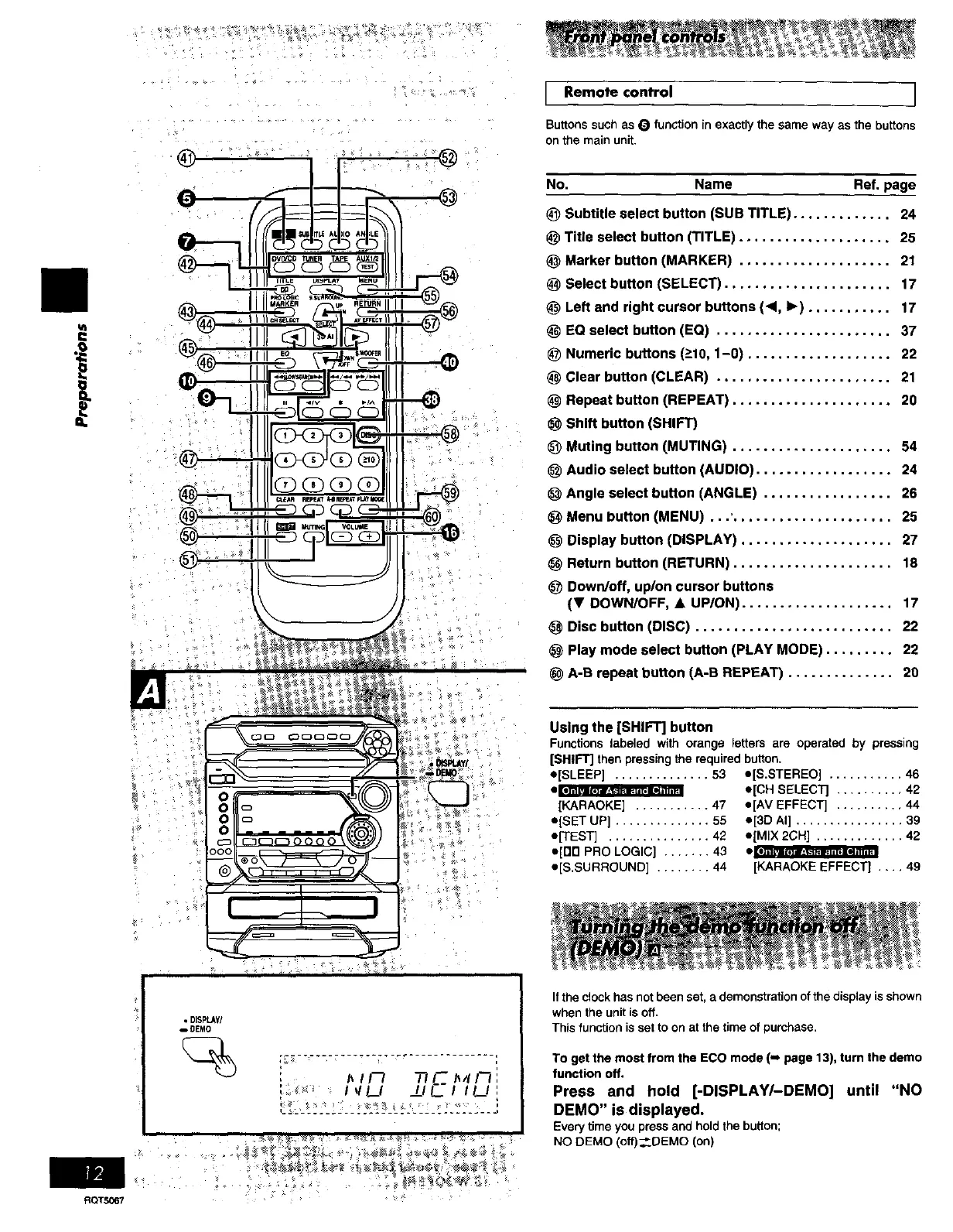
Remo_ control ]
Buttons such as O function in exactly the same way as the buttons
on the main unit.
No. Name Ref. page
(_ Subtitle select button (SUB TITLE) ............. 24
Title select button (TITLE) .................... 25
Marker button (MARKER) .................... 21
_) Select button (SELECT) ...................... 17
Left and right cursor buttons (4, I_) ........... 17
EQ select button (EQ) ....................... 37
(_ Numeric buttons (>10,1-0) ................... 22
Clear button (CLEAR) ....................... 21
Repeat button (REPEAT) ..................... 20
Shift button (SHIFT)
Muting button (MUTING) ..................... 54
Audio select button (AUDIO) .................. 24
Angle select button (ANGLE) ................. 26
Menu button (MENU) ...' ..................... 25
Display button (DISPLAY) .................... 27
Return button (RETURN) ..................... 18
Down/off, up/on cursor buttons
(Y DOWN/OFF, • UP/ON).................... 17
Disc button (DISC) .......................... 22
Play mode select button (PLAY MODE) ......... 22
A-B repeat button (A-B REPEAT) .............. 20
Using the [SHIFT] button
Functions labeled with orange letters are operated by pressing
[SHIFT] then pressing the required button.
e[SLEEP] .............. 53 e[S.STEREO] ........... 46
[KARAOKE] ........... 47
o[SET UP] .............. 55
e[TEST] ............... 42
e[on PRO LOGIC] ....... 43
o[S.SURROUND] ........ 44
e[CH SELECTJ .......... 42
o[AV EFFECT] .......... 44
o[3D AI] ................ 39
o[MIX 2CH] ............. 42
iili_lllllll lili'lll
[KARAOKE EFFECT] .... 49
RQTS067
• DISPLAy/
_DEMO
I_11-'1 _ I--_I_4 FI :
_ _ IVl._I I__IF-I II__l:
If the clock has not been set, a demonstration of the display is shown
when the unit is off.
This function is se! to on at the time of purchase.
To get the most from the ECO mode (i page 13), turn the demo
function off.
Press and hold [-DISPLAY/-DEMO] until "NO
DEMO" is displayed.
Every time you press and hold the button;
NO DEMO (off).__DEMO (on)















 To Next Page