!
....... • ....°* ...........................
.....o*.**,,.. ........................ *,.
pck
AC IN
%
I_ I17 L_ I_4 __I I
I VLII_I ll-IL
#t
, l
' L_-F 17 ,
LLLI
i
i .................................. J
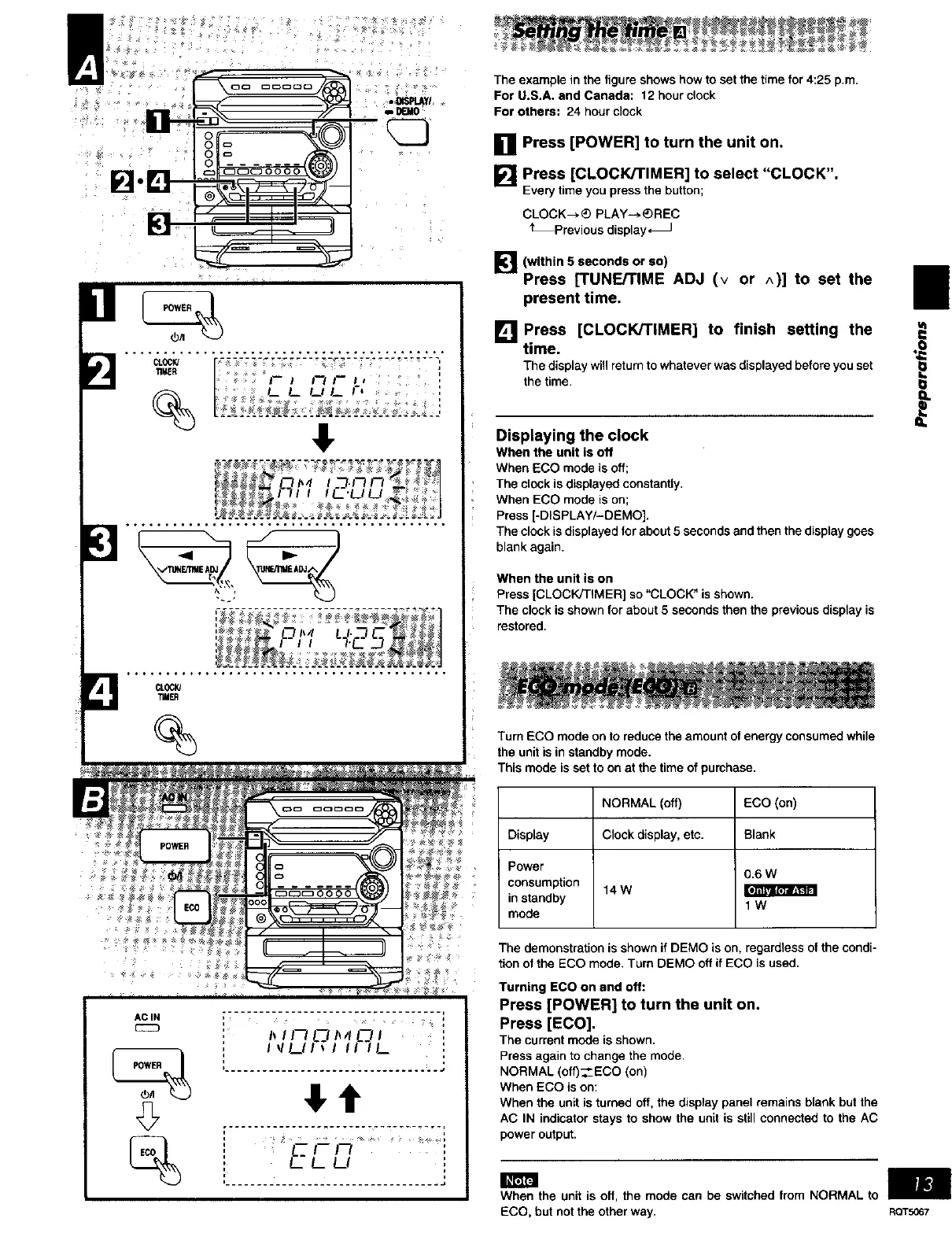
The example in the figure shows how to set the time for 4:25 p.m.
For U.S.A. end Canada: 12 hour clock
For others: 24 hour clock
[] Press [POWER] to turn the unit on.
[] Press [CLOCK/TIMER] to select "CLOCK".
Every time you press the button;
CLOCK_) PLAY--, _)REC
_Previous display_
[_"] (within 5 seconds or so)
I
Press [TUNE/TIME ADJ (v or ^)] to set the I
present time.
mm
[] Press [CLOCK/TIMER] to finish setting the _:
time.
The display will return to whatever was displayed before you set
the time
Displaying the clock
When the unit is off
When ECO mode is off;
The clock is displayed constantly.
When ECO mode is on;
Press [-DISPLAY/-DEMO],
The clock is displayed for about 5 seconds and then the display goes
blank again.
When the unit is on
Press [CLOCK/TIMER] so "CLOCK" is shown.
The clock is shown for about 5 seconds then the previous display is
restored,
Turn ECO mode on to reduce the amount of energy consumed while
the unit is in standby mode.
This mode is set to on at the time of purchase.
NORMAL (off) ECO (on)
Display Clock display, etc. Blank
Power
0.6 W
consumption 14 W
in standby 1 W
mode
The demonstration is shown if DEMO is on, regardless of the condi-
tion of the ECO mode. Turn Dr=MO off if ECO is used.
Turning ECO on and off:
Press [POWER] to turn the unit on.
Press [ECO].
The current mode isshown.
Press again to change the mode•
NORMAL (off)__ECO (on)
When ECO is on:
When the unit is turned off, the display panel remains blank but the
AC IN indicator stays to show the unit is still connected to the AC
power output.
When the unit is off, the mode can be switched from NORMAL to
ECO, but not the other way. RQTS067















 To Next Page