a.
RQT5067
TUNER/
BAND
/ Tu. 'o
E]
MEMORY
Preset channel $
L
1 I I I LI--"I._I ,;
• Up to 12 stations can be set in each band with automatic or mancaf
memory presetting.
==Ifbroadcast frequencies are preset in the memory, you can easily
tune in any of these frequencies from the system or remote control
unit.
• You can preset just those stations you like. (See "Presetting only
your favorite stations" below.)
Foryour reference
Frequencydisplays are different according to the area.
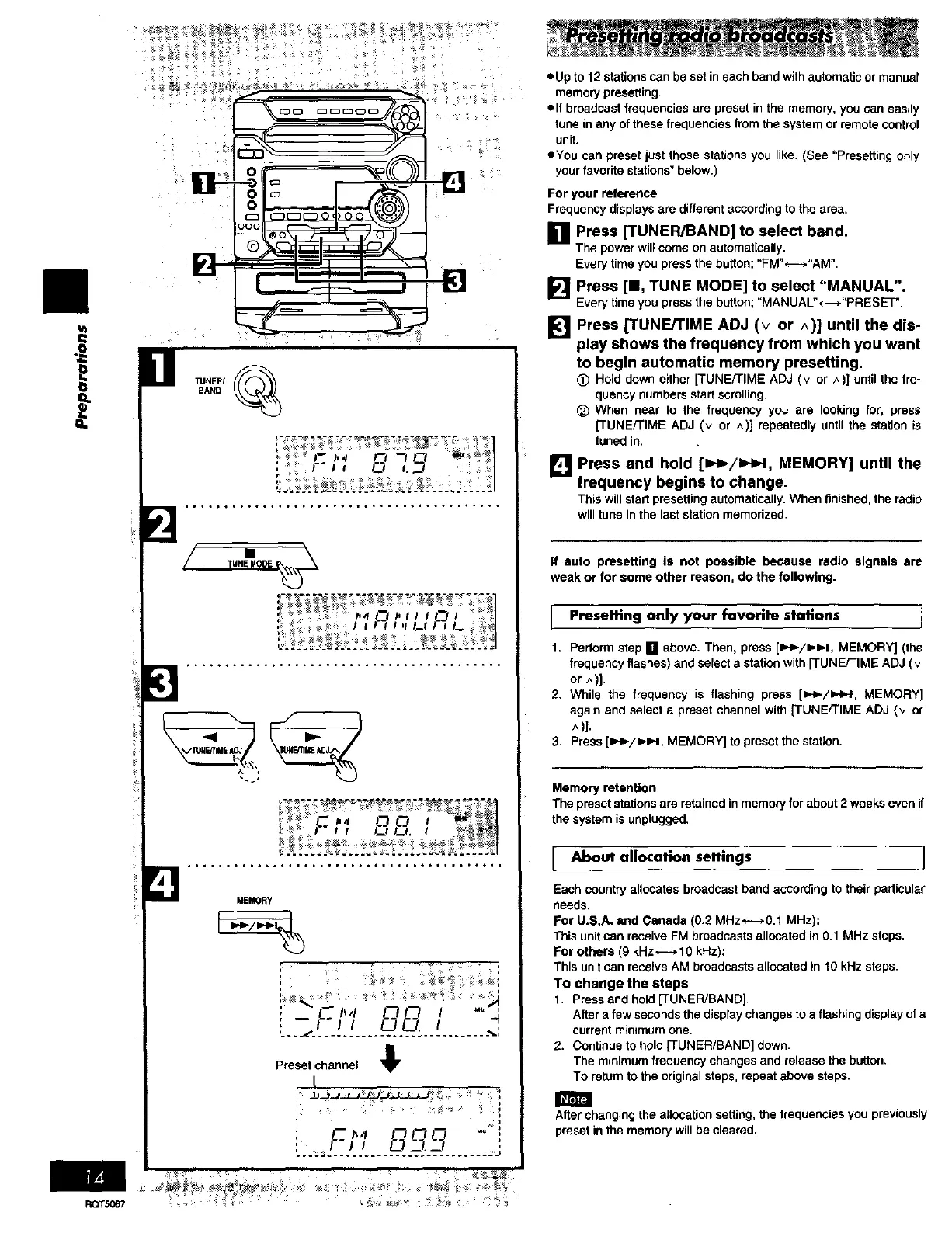
[] Press [TUNER/BAND] to select band.
The powerwillcomeonautomatically.
Everytimeyou pressthe button;"FM"*-_."AM".
[] Press [11, TUNE MODE] to select "MANUAL".
Every time you pressthe button; "MANUAL"*_."PRESET".
[] Press [TUNE/TIME ADJ (v or ^)] until the dis-
play shows the frequency from which you want
to begin automatic memory presetting.
(_) Hold downeither[TUNE/TIME ADJ (v or ^)] until the fre-
quencynumbersstartscrolling.
_) When near to the frequency you are lookingfor, press
[TUNE/TIME ADJ (v or ^)] repeatedlyuntilthe stationis
tunedin.
[] Press and hold [_H_/=,._I, MEMORY] until the
frequency begins to change.
Thiswillstartpresettingautomatically.Whenfinished, theradio
willtuneinthe laststationmemorized.
If auto presetting is not possible because radio signals are
weak or for some other reason, do the following.
I Presetting only your favorite stations I
1. Perform step [] above. Then, press [=,_-/=HM, MEMORY] (the
frequency flashes) and select a station with [-rUNE/TIME ADJ (v
or ^)).
2. While the frequency is flashing press [1_._-/_, MEMORY]
again and select a preset channel with [TUNE/TIME ADJ (v or
^)].
3. Press [1_/_._1, MEMORY] to preset the station.
Memoryretention
The preset stationsare retained in memoryfor about2 weeksevenif
the systemis unplugged.
[ About allocation seltlngs ]
Each country allocates broadcast band according to their particular
needs.
For U.S.A. and Canada (0.2 MHzH0.1 MHz):
This unit can receive FM broadcasts allocated in 0.1 MHz steps.
For others (9 kHz _ 10 kHz):
This unit can receive AM broadcasts allocated in 10 kHz steps.
To change the steps
1, Press and hold [TUNER/BAND].
After a few seconds the display changes to a flashing display of a
current minimum one.
2. Continue to hold [TUNER/BAND] down.
The minimum frequency changes and release the button.
To return to the original steps, repeat above steps.
After changing the allocation setting, the frequencies you previously
preset in the memory will be cleared.















 To Next Page