FM MOOE/BP
,,,,,..., ................................
VOLUME
i@o
-dB 0dB
* I o 17 _ I I 17 t_i
' _' LIL -- -'_ _'_ _'_
e
For your reference
Frequency displays are different according to the area.
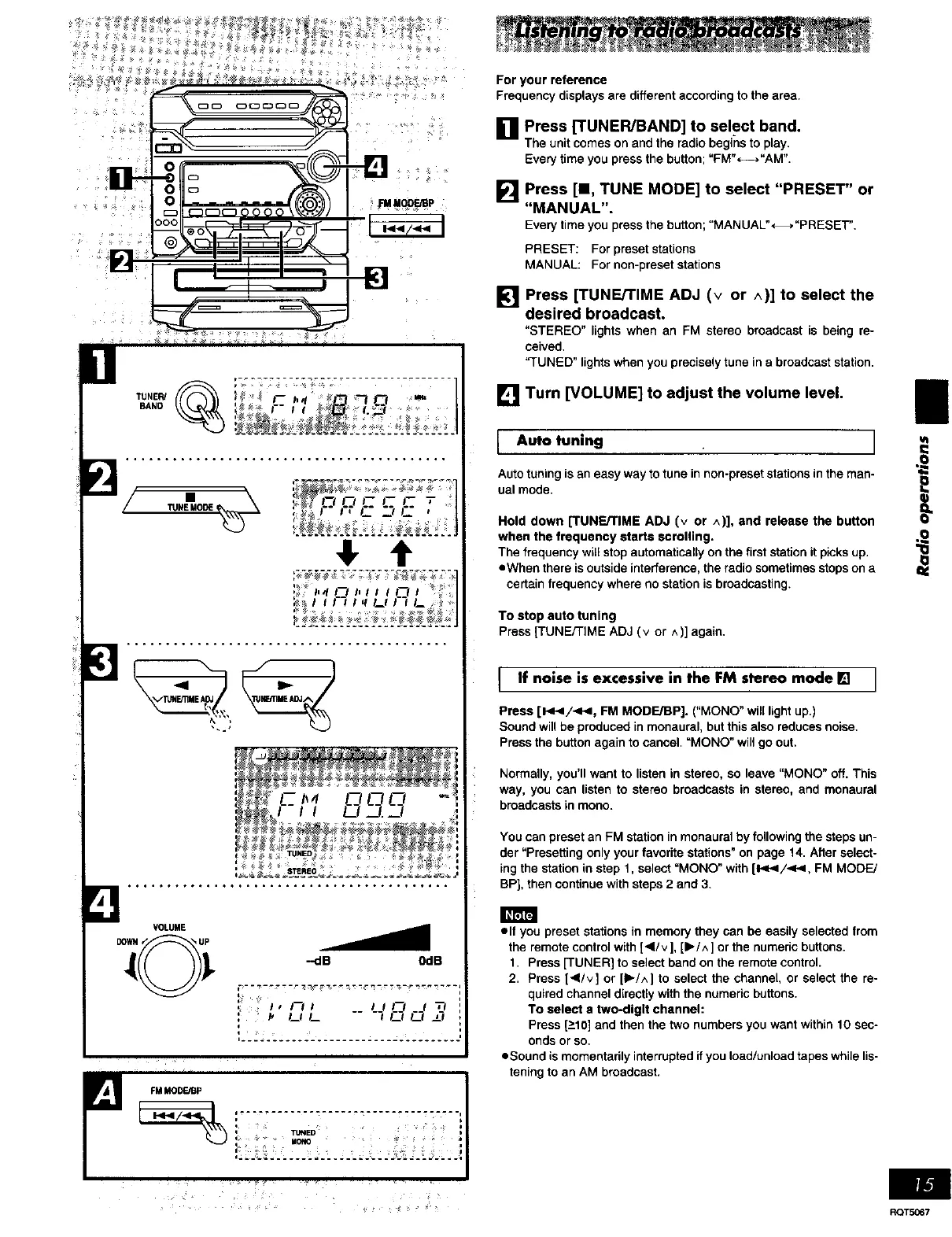
i'I Press [TUNER/BAND] to select band.
The unit comes on and the radio begins to play.
Every time you press the button; "FM"<--->"AM".
Press [I, TUNE MODE] to select "PRESET" or
[] "MANUAL".
Every timeyou press thebutton; "MANUAL"*_."PRESET".
PRESET: For preset stations
MANUAL: For non-preset stations
[] Press [TUNE/TIME ADJ (v or ^)] to select the
desired broadcast.
"STEREO" lightswhen an FM stereo broadcastis being re-
ceived,
"TUNED"lightswhenyoupreciselytuneina broadcaststation,
[] Turn [VOLUME] to adjust the volume level,
Auto tuning ]
Auto tuning is an easy way to tune in non-preset stations in the man- "_
ual mode.
}Hold down [TUNE/TIME ADJ (v or ^)], and release the button
when the frequency starts scrolling.
The frequency will stop automaticalty on the first station it picks up. "Ol._
•When there is outside interference, the radio sometimes stops on a
certain frequency where no station is broadcasting.
To stop auto tuning
Press[TUNE/TIME ADJ(v or ^)] again,
I If noise is excessive in the FM stereo mode [] I
Press [1<</<.4, FM MODE/BP]. ("MONO" will light up.)
Sound will be produced in monaural, but this also reduces noise.
Press the button again to cancel. =MONO" will go out.
Normally, you'll want to listen in stereo, so leave "MONO" off. This
way, you can listen to stereo broadcasts in stereo, and monaural
broadcasts in mono.
You can preset an FM station in monaural by following the steps un-
der "Presetting only your favorite stations" on page 14. After select-
ing the station in step 1, select "MONO" with [I_P</.<-<, FM MODE/
BP], then continue with steps 2 and 3.
oil you preset stations in memory they can be easily selected from
the remote control with [41/v], [1_/^] or the numeric buttons.
1. Press [TUNER] to select band on the remote control.
2. Press [</v] or [1_/^] to select the channel, or select the re-
quired channel directly with the numeric buttons.
To select a two-digit channel:
Press [_>10]and then the two numbers you want within 10 sec-
onds or so.
oSound is momentarily interrupted if you load/unload tapes while lis-
tening to an AM broadcast.
.... _ _ ROTS067















 To Next Page