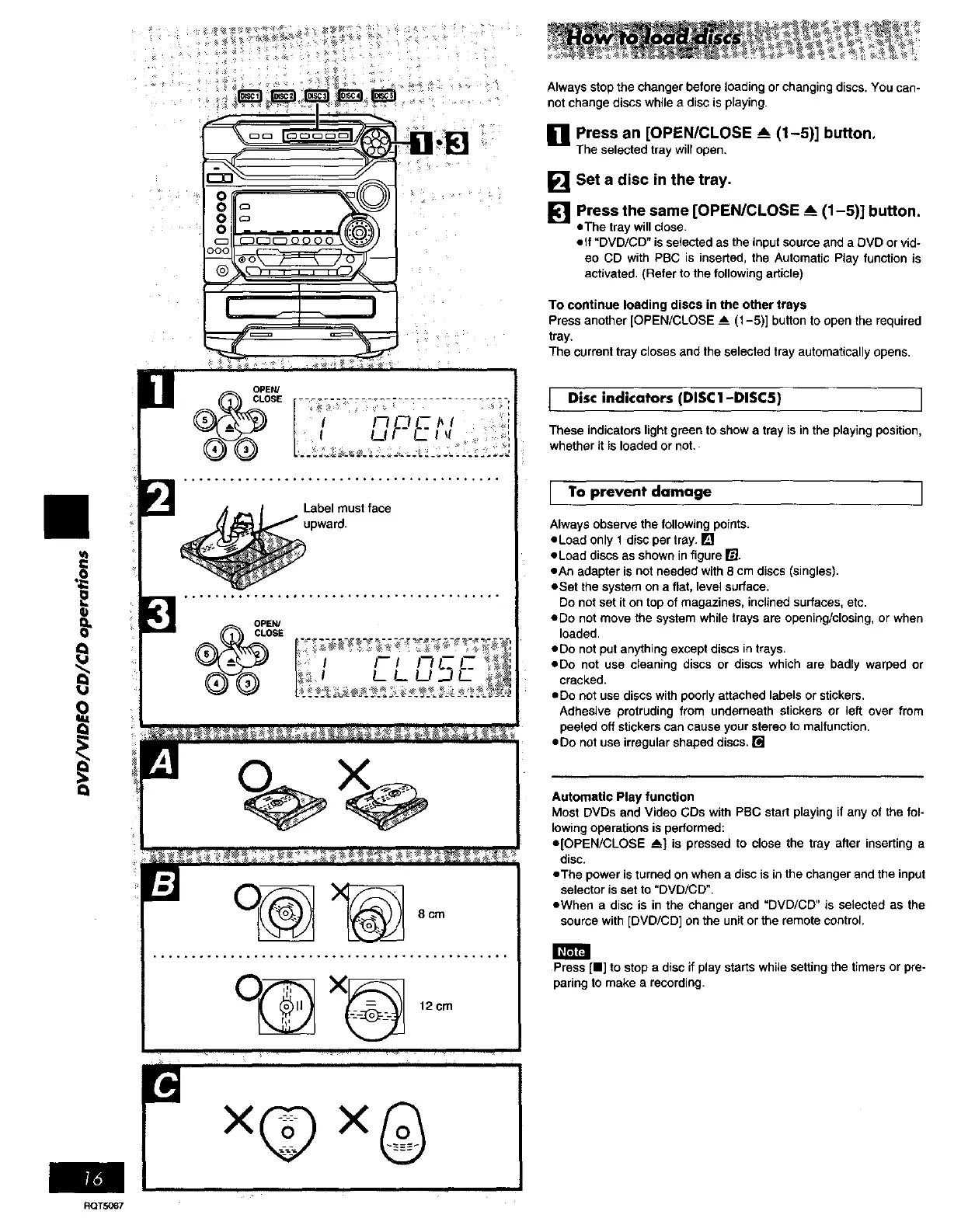
Always stop the changer before loading or changing discs. You can-
not change discs while e disc is playing.
[] press an [OPEN/CLOSE _ (1-5)] button.
]'he selected tray will open.
[] Set a disc in the tray.
[] Press the same [OPEN/CLOSE A (1-5)] button.
eThe tray will close•
olf "DVD/CD" is selected as the input source and a DVD or vid-
eo CD with PBC is inserted, the Automatic Play function is
activated. (Refer to the following article)
To continue loading discs in the other trays
Press another [OPEN/CLOSE A (1-5)] button to open the required
tray.
The current tray closes and the selected tray automatically opens.
{
V
Q
OPEN/
CLOSE
O_ X_ 12cm
Disc indicators (DISC1-DISC5) ]
These indicatorslightgreentoshowa trayis in the playing position,
whetherit isloaded ornot,.
[ TO prevent damage ]
Always observe the following points.
oLoad only 1 disc per tray. []
oLoad discs as shown in figure I_J.
oAn adapter is not needed with 8 cm discs (singles).
oSet the system on a flat, level surface.
Do not set it on top of magazines, inclined surfaces, etc.
ado not move the system while trays are opening/closing, or when
loaded.
oDo not put anything except discs in trays.
oDo not use cleaning discs or discs which are badly warped or
cracked.
oDo not use discs with poorly attached labels or stickers.
Adhesive protruding from underneath stickers or left over from
peeled off stickers can cause your stereo to malfunction.
oDo not use irregular shaped discs. []
Automatic Play function
Most DVDs and Video GDs with PBC start playing if any of the fol-
lowing operations is performed:
e[OPEN/CLOSE _] is pressed to close the tray after inserting a
disc.
eTha power isturned on when a disc is in the changer and the input
selector is set to "DVD/CD".
oWhen a disc is in the changer and "DVD/CD" is selected as the
source with [DVD/CD] on the unit or the remote control.
Press [HI to stop a disc if play starts while setting the timers or pre-
paring to make a recording.
×@×0
RQTS067















 To Next Page