/
TLeNEMODE
DVD/CD
CLOSE
.............. .*.....**.*****.*.... ......
SELECT
Before playing DVDs and Video CDs
The menu screen language has been factory preset to English.
If you would like to change the menu language, please refer to "Se-
lecting menu language" (-, page 56).
I Some figures are slightly different for discs. 1
rtm li
Preparation:
Switch the TV on and set it to =Video" input when playing DVDs or
video CDs,
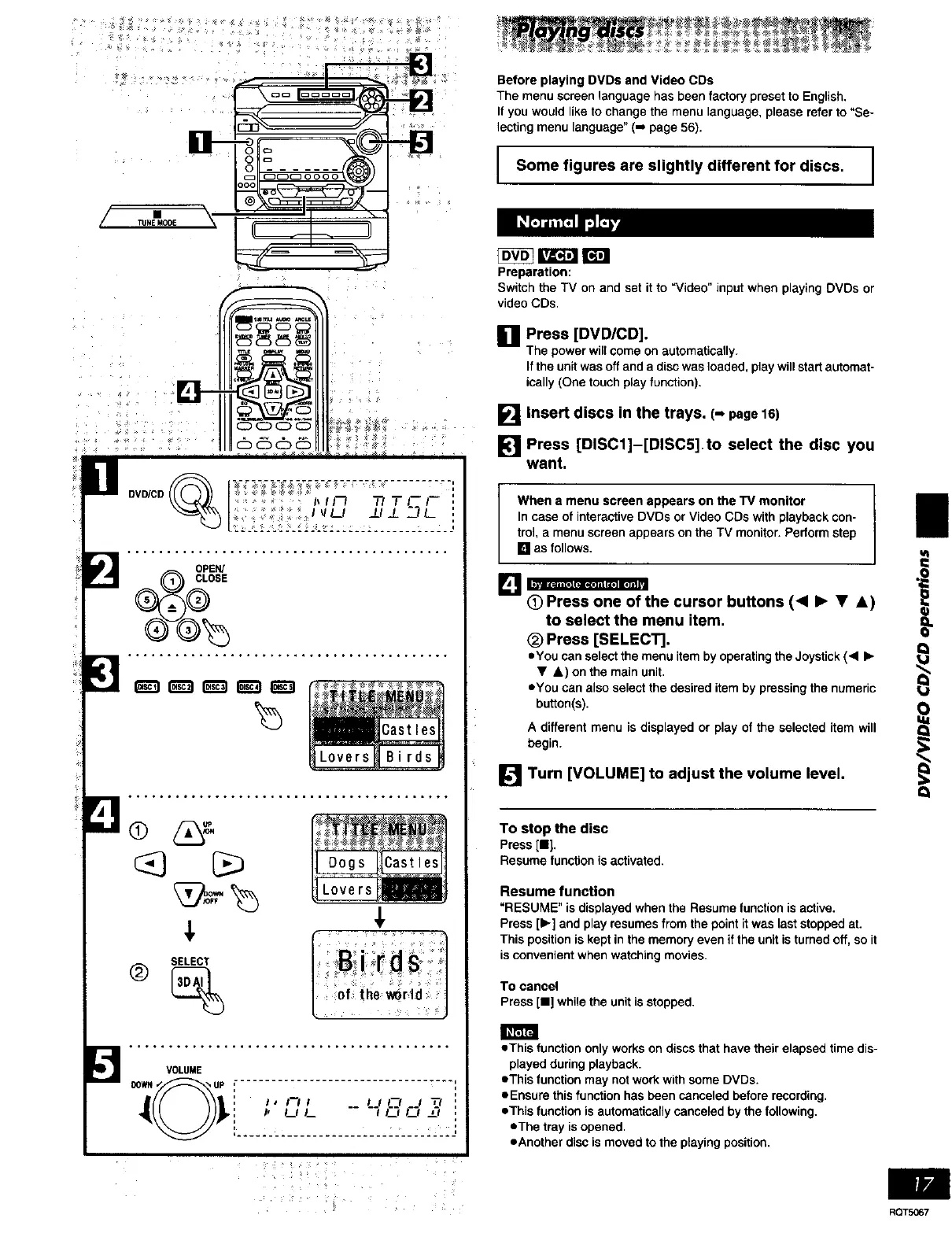
[] Press [DVD/CD].
The powerwillcomeonautomatically.
If the unit was off and a disc was loaded, play will start automat-
ically (One touch play function).
_'_1Insert discs in the trays. (- page16)
[] Press [DISC1]-[DISCS] to select the disc you
want.
[]
[] Turn [VOLUME] to adjust the volume level.
When e menu screen appears on the TV monitor
In case of interactive DVDs or Video CDs with playback con-
trol, a menu screen appears on the TV monitor. Perform step
[] as follows.
he cursor buttons 1<1• • J,)
to select the menu item,
Q
(_) Press [SELECT].
eYou can select the menu item by operating the Joystick (< •
• &) on the main unit.
eYou can also select the desired item by pressing the numeric _,j
button(s). O
A different menu is displayed or play of the selected item will Q
begin.
To stop the disc
Press [11].
Resume function is activated.
Resume function
"RESUME" is displayed when the Resume function is active.
Press [•] and play resumes from the point it was last stopped at.
This position is kept in the memory even if the unit is turned off, so it
is convenient when watching movies.
To cancel
Press [11]while the unit is stopped.
*This function only works on discs that have their elapsed time dis-
played during playback.
*This function may not work with some DVDs.
*Ensure this function has been canceled before recording.
*This function is automatically canceled by the following.
*The tray is opened.
eAnother disc is moved to the playing position.
RQT5067















 To Next Page