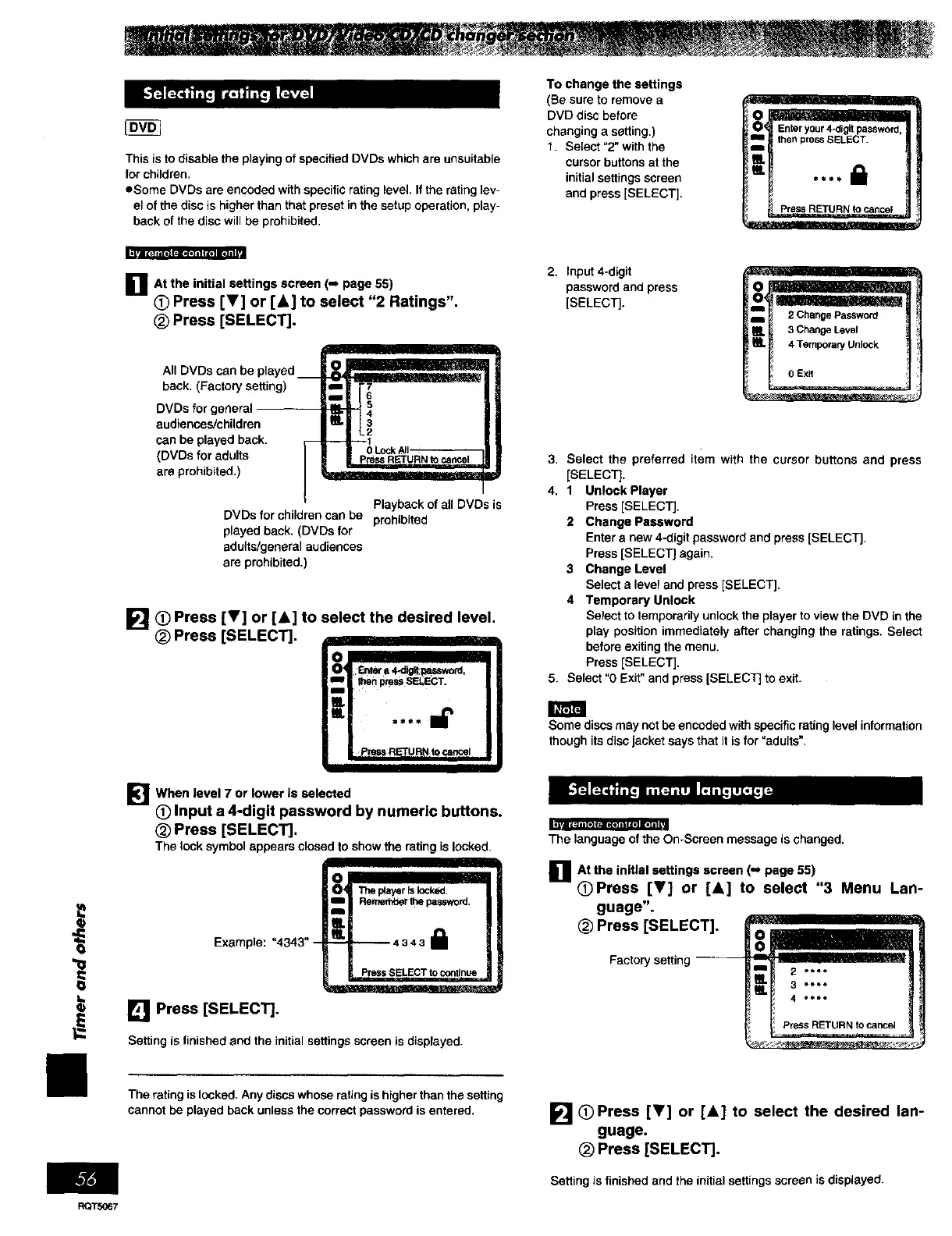
This is to disable the playing of specified DVDs which are unsuitable
for children.
eSome DVDs are encoded with specific rating level. If the rating lev-
el of the disc is higher than that preset in the setup operation, play-
back of the disc will be prohibited.
To change the settings
(Be sure to remove a
DVD disc before
changing a setting.)
1. Select "2" with the
cursor buttons at the
initial settings screen
and press [SELECT].
then pressSELECT.
IlL
Io "=1. *,l I Ir_ll
O
"1=
I=
D At the initial settings screen (-J page 55)
(_ Press [T] or [A] to select "2 Ratings",
(_ Press [SELECT].
All DVDs can be played __
back. (Factor/setting)
DVDs for general
audiences/children
can be played back.
r--
(DVDs for adults |
are prohibited.)
/
DVDs for children can be
played back. (DVDs for
adults/general audiences
are prohibited.)
Playback of all DVDs is
prohibited
[] (_)Press [V] or [&] to select the desired level.
(_ Press [SELECT].
_4 a:_era_i_l_,u=_word,
_iI Ihen press SELECT.
"= .... =i'
I _'r,_ REFURNto_i
IIII I
[_'1 When level 7 or lower is selected
O Input a 4-digit password by numeric buttons.
(_) Press [SELECT].
The lock symbolappears closedtoshowtheratingis locked,
Example: "4343" -
[] Press [SELECT].
_! Thep4ayerIs_cked.
R_r_n_erthepassword,
PressSELECTtocontinue
Setting is finished and the initial settings screen is displayed.
2. Input 4-digit
password and press
[SELECT],
3. Select the preferred item with the cursor buttons and press
[SELECT].
4. 1 Unlock Player
Press [SELECT],
2 Change Password
Enter a new 4-digit password and press [SELECT],
Press [SELECT] again.
3 Change Level
Select a level and press [SELECT].
4 Temporary Unlock
Select to temporarily unlock the player to view the DVD in the
play position immediately after changing the ratings, Select
before exiting the menu,
Press [SELECT],
5. Select =0 Exit" and press [SELECT] to exit.
Some discs may not be encoded with specific rating level information
though its disc jacket says that it is for "adults".
The language ofthe On-Screen message is shanged.
_]lAt the inlUal settings screen(._ page 55)
OPress [V] or [A] to select "3 Menu Lan-
guage".
(_ Press [SELECT].
The rating is locked. Any discs whose rating is higher than the setting
cannot be played back unless the correct password is entered.
[] (_) Press [T] or [A] to select the desired lan-
guage.
_) Press [SELECT].
Setting is finished and the initial settings screen is displayed.
RQTS067















 To Next Page