ml_lllO_(_l_o,,I,Iqll=O}ll
i
II
IN, At the initial settings screen (-,, page 55)
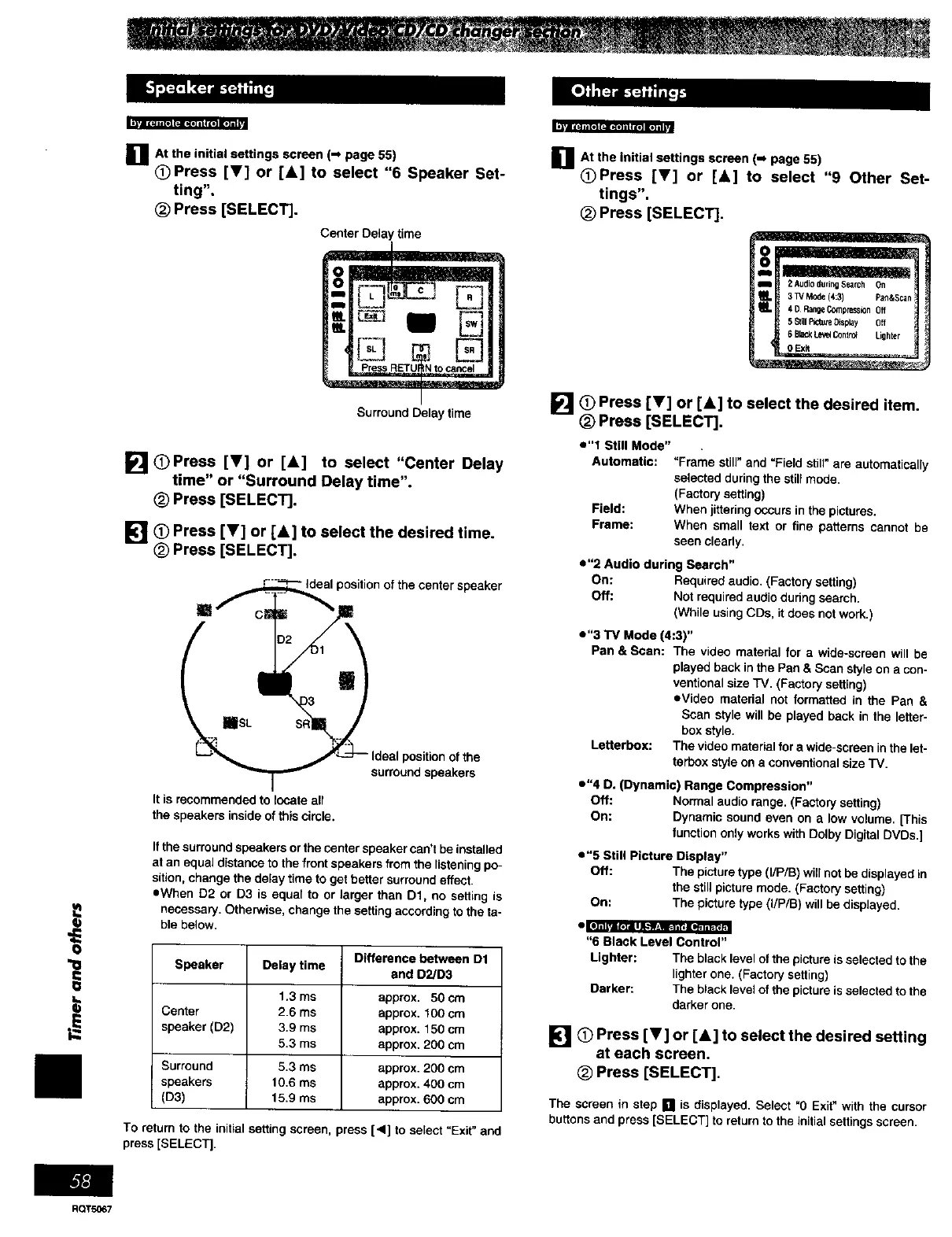
Press iV] or [A] to select "6 Speaker Set-
ting".
(_ Press [SELECT].
time
Surround Delay time
[] OPress iT] or [&] to select "Center Delay
time" or "Surround Delay time".
(_) Press [SELECT].
I_1_ Press iV] or [A] to select the desired time.
(_ Press [SELECT].
;peaker
It is recommended to locate all
the speakers inside of this circle.
position of the
surround speakers
If the surround speakers or the center speaker can't be installed
at an equal distance to the front speakers from the listening po-
sition, change the delay time to get better' surround effect.
eWhen D2 or D3 is equal to or larger than D1, no setting is
necessary. Otherwise, change the setting according to the ta-
ble below.
Difference between D1
Speaker Delay time and D2/D3
1.3 ms approx• 50 cm
Center 2.6 ms approx. 100 em
speaker (D2) 3.9 ms approx. 150 cm
5.3 ms approx. 200 cm
Surround 5.3 ms approx. 200 cm
speakers 10.6 ms approx. 400 cm
(D3) 15.9 ms approx. 600 cm
To return to the initial setting screen, press [4] to select =Exit" and
press [SELECT].
nAt the initial settings screen (-_ 55)
page
_)Press iT] or [&] to select "9 Other Set-
tings".
(_ Press [SELECT].
o
]O Press iV] or [&] to select the desired item.
(_) Press [SELECT].
e"l Still Mode"
Automatic: "Frame still" and "Field still" are automatically
selected during the still mode.
(Factory setting)
Field: When jittering occurs in the pictures,
Frame: When small text or fine patterns cannot be
seen clearly.
e"2 Audio during Search"
On: Required audio. (Factory setting)
Off: Not required audio during search.
(While using CDs, it does not work.)
e"3 TV Mode (4:3)"
Pan & Scan: The video material for a wide-screen will be
played back inthe Pan & Scan style on a con-
ventional size TV, (Factory setting)
sVideo material not formatted in the Pan &
Scan style will be played back in the letter-
box style.
Lenerbox: The video material for a wide-screen in the let-
terbox style on a co_wentional size TV.
e"4 D. (Dynamic) Range Compression"
Off: Normal audiorange.(Factory setting)
On: Dynamicsound even on a towvolume.[This
function only works with Dolby Digital DVDs.]
• "5 Still Picture Display"
Off: The picture type (I/P/S) will not be displayed in
the still picture mode. (Factory setting)
On: The picture type (I/P/B) will be displayed.
"6 Black Level Control"
Lighter: The black level of the picture is selected to the
lighter one. (Factory setting)
Darker: The black level of the picture is selected to the
darker one.
[] O Press iV] or [&] to select the desired setting
at each screen.
(_ Press [SELECT].
The screen in step [] is displayed. Select "0 Exit" with the cursor
buttons and press [SELECT] to return to the initial settings screen.
RQTSO67















 To Next Page