=€
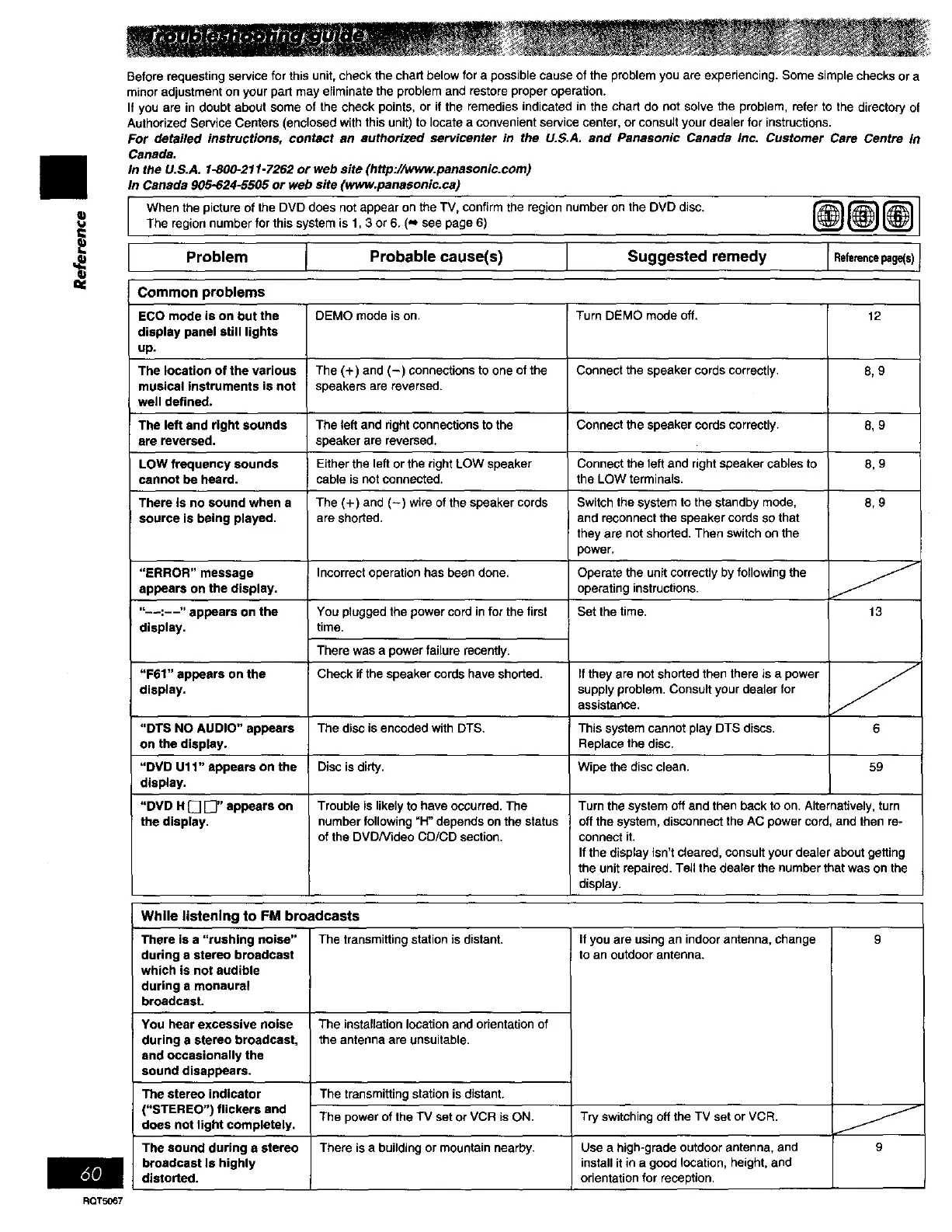
Before requesting service for this unit, check the chart below for a possible cause of the problem you are experiencing. Some simple checks or a
minor adjustment on your part may eliminate the problem and restore proper operation.
It you are in doubt about some of the check points, or if the remedies indicated in the chart do not solve the problem, refer to the directory of
Authorized Service Centers (enclosed with this unit) to locate a convenient service center, or consult your dealer for instructions.
For detailed instructions, contact an authorized servicenter in the U.S.A. and Panasonic Canada Inc. Customer Care Centre in
Canada.
In the U.S.A. 1-800-211-7262 or web site (http://www.panasonic.com)
In Canada 905-624-5505 or web site (www.panaeonic.ca)
When the picture of the DVD does not appear on the TV, confirm the region number on the DVD disc.
The region number for this system is 1, 3 or 6. (,',, see page 6)
Problem
Probable cause(s) I
Suggested remedy
@@[]
Referencepage(s)
Common problems
ECO mode is on but the
display panel still lights
up.
The location of the various
musical instruments is not
well defined.
The left and right sounds
are reversed.
LOW frequency sounds
cannot be heard.
There Is no sound when s
source is being played.
"ERROR" message
appears on the display.
"--:--" appears on the
display.
"F61" appears onthe
display.
"DTS NO AUDIO" appears
on the display.
"DVD Ul1" appears on the
display.
"DVD H [] [_" appears on
the display.
DEMO mode is on.
The (+) and (-) connections to one of the
speakers are reversed.
The left and dght connections to the
speaker are reversed.
Either the left or the right LOW speaker
cable is not connected.
The (+) and (-) wire of the speaker cords
are shorted.
Incorrect operation has been done.
You plugged the power cord in for the first
time.
There was a power failure recently.
Check if the speaker cords have shorted.
The disc is encoded with DTS.
Disc is dirty.
Turn DEMO mode off.
Connect the speaker cords correctly.
Connect the speaker cords correctly.
Connect the left and right speaker cables to
the LOW terminals.
Switch the system to the standby mode,
and reconnect the speaker cords so that
they are not shorted. Then switch on the
power,
Operate the unit correctly by following the
operating instructions.
Set the time.
If they ere not shorted then there is a power
supply problem. Consult your dealer for
assistance.
This system cannot play DTS discs.
Replace the disc.
Wipe the disc clean.
Trouble is likely to have occurred. The
number following "H" depends on the status
of the DVDNideo CD/CD section.
12
8,9
8,9
8,9
8,9
13
6
59
Turn the system off and then back to on. Alternatively, turn
off the system, disconnect the AC power cord, and then re-
connect it.
If the display isn't cleared, consult your dealer about getting
the unit repaired. Tell the dealer the number that was on the
display.
While listening to FM broadcasts
There isa "rushing noise" The transmittingstationis distant,
during e stereo broadcast
which is not audible
during e monaural
broadcast.
You hear excessive noise
during a stereo broadcast,
and occasionally the
sound disappears.
The stereo indicator
("STEREO") flickers and
does not light completely.
The sound during e stereo
broadcast Is highly
distorted.
The installation location and orientation of
the antenna are unsuitable.
The transmitting station is distant.
The power of the TV set or VCR is ON.
There is a building or mountain nearby.
If you are using an indoor antenna, change
to an outdoor antenna.
Try switching off the TV set or VCR.
Use a high-grade outdoor antenna, and
install it in a good location, height, and
orientation for reception.
RQT5067


 To Next Page
 Loading...











