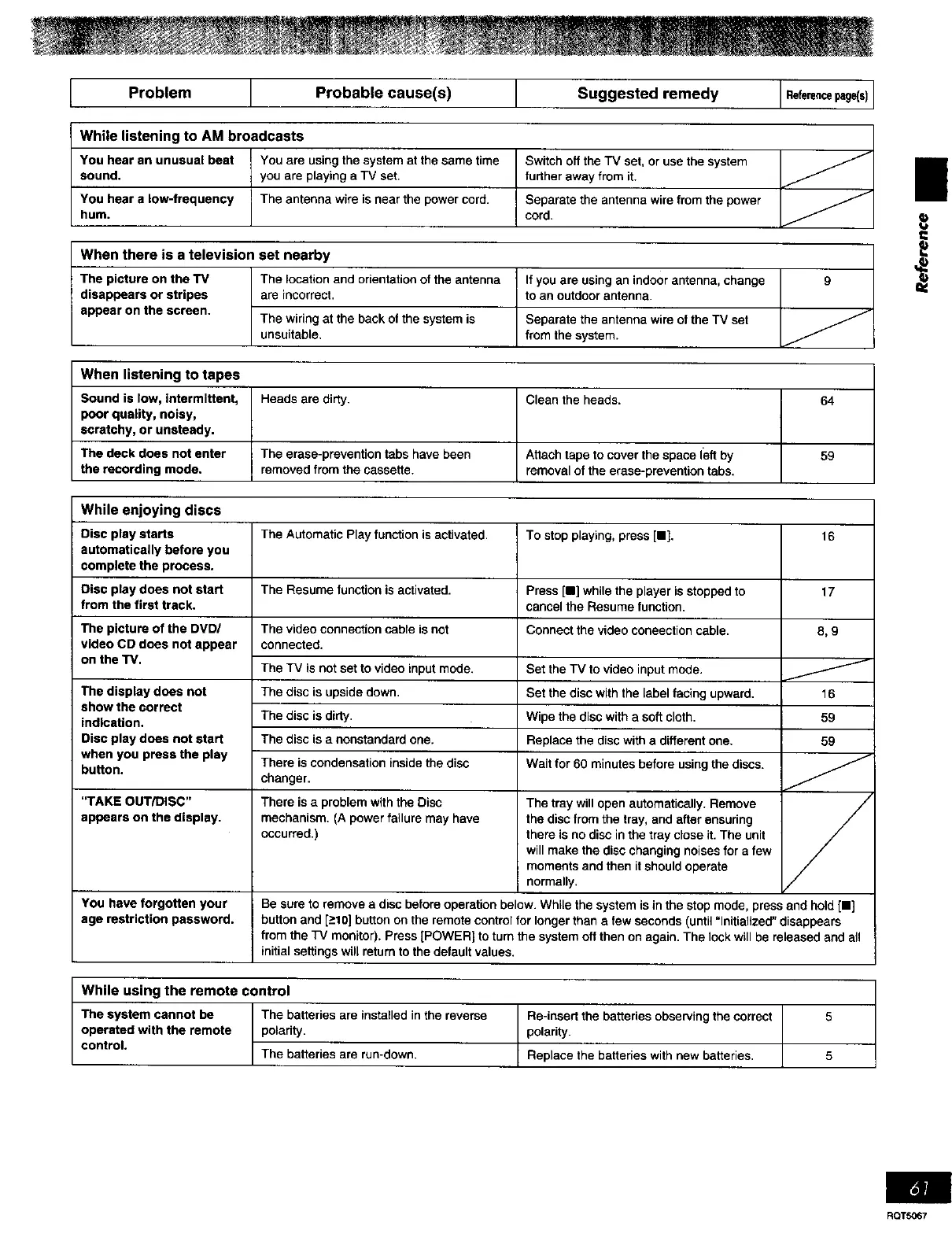
I Prob,emI P,obob,ecou,e s I SuggestedremedyI I
While listening to AM broadcasts
You hear an unusual beat You are using the system at the same time
sound, you are playing a TV set
You hear a low-frequency The antenna wire is near the power cord.
hum.
Switch off the TV set. or use the system
further away from it.
Separate theantenna wirefrom the power
cord.
When there is a television set nearby
The picture on the TV
disappears or stripes
appear on the screen.
The locationand orientationof the antenna
are incorrect,
The wiring at the back of the system is
unsuitable.
If you are using an indoor antenna, change
tO an outdoor antenna.
Separate the antenna wire of the TV set
from the system.
9
When listening to tapes
Sound is low, intermittent,
poor quality, noisy,
scratchy, or unsteady.
The deck does not enter
the recording mode.
Heads are dirty.
The erase-prevention tabs have been
removed from the cassette.
Clean the heads.
Attach tape to cover the space left by
removal of the erase-prevention tabs.
64
59
While enjoying discs
Disc play starts
automatically before you
complete the process.
Disc play does not start
from the first track.
The picture of the DVD!
video CD does not appear
on the TV.
The display does not
show the correct
indication.
Disc play does not start
when you press the play
button.
"TAKE OUT/DISC"
appears on the display.
The Automatic Play function is activated.
The Resume function is activated.
The video connection cable is not
connected.
The TV is not set to video input mode.
The disc is upside down.
The disc is dirty.
The disc is a nonstandard one.
There is condensation inside the disc
changer.
There is a problem with the Disc
mechanism. (A power failure may have
occurred.)
To stop playing, press [11].
Press [11]while the player is stopped to
cancel the Resume function.
Connect the video coneection cable.
Set the TV to video input mode.
Set the disc with the label facing upward.
Wipe the disc with a soft cloth.
Replace the disc with a different one.
Wait for 60 minutes before using the discs.
The tray will open automatically. Remove
the disc from the tray, and after ensuring
there is no disc in the tray close it. The unit
will make the disc changing noises for a few
moments and then it should operate
normally.
16
17
8,9
J
16
59
59
/
You have forgotten your Be sure to remove a disc before operation below. While the system is in the stop mode, press and hold [11]
age restriction password, button and [->10]button on the remote control for longer than a few seconds (until "Initialized" disappears
from the TV monitor]. Press (POWER] to turn the system off then on again. The lock will be released and all
initial settings will return to the default values.
While using the remote control /
The system cannot be The batteries are installed in the reverse Re-insart the batteries observing the correct 5
operated with the remote polarity, polarity.
control. The batteries are run-down. Replace the batteries with new batteries, 5
|
RQTS067


 To Next Page
 Loading...











