EasyManua.ls Logo

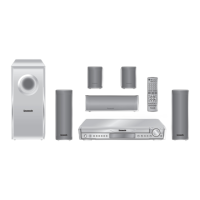
Panasonic SC-HT440 - User Manual

Panasonic SC-HT440
36 pages
Print Icon
To Next Page IconTo Next Page
Loading...
RQT8593-1P
P
PC
Operating Instructions
DVD Home Theater Sound System
Model No. SC-HT440
Region number
The player plays DVD-Video marked with labels containing the region
number1” or “ALL”.
Example:
§
For Canada only: The word “Participant” is used in place of the word
“Partner”.
Before connecting, operating or adjusting this product,
please read the instructions completely.
Please keep this manual for future reference.
If you have any questions contact
In the U.S.A.: 1-800-211-PANA (7262)
In Canada: 1-800-561-5505
1 ALL
2
4
1
As an ENERGY STAR Partner,
Panasonic has determined that
this product meets the ENERGY STAR
guidelines for energy efficiency.
®
®
[U.S.A.[and[Canada[
Wireless-ready
surround sound
Optional wireless surround
speaker connection.
U.S.A. and Canada
page
6
Advanced
progressive scan
Provides a smoother
and sharper image.
page
7
High-performance
sound effects
Sound quality enhancement,
Dolby Pro Logic II and more.
page
26
HT440En.book P age 1 Tuesday, January 24, 2006 10:55 AM

Questions and Answers

  • I
    ideanAug 13, 2025
    What to do if my Panasonic SC-HT440 Home Theater System is not responding to any buttons?
    • J
      Jeremy HallAug 13, 2025
      If your Panasonic Home Theater System isn't responding, try these steps: * Turn the unit off and then back on, as the issue might be due to lightning, static electricity, or another external factor. * If condensation has formed, wait 1 to 2 hours for it to evaporate. * Replace the batteries in the remote if they are depleted. * Ensure CD Mode is off by pressing and holding [—CD MODE]. * Check the video or speaker connections. * Verify the power and input settings of any connected equipment. * Make sure the disc has content recorded on it. * To reset to factory settings, while stopped and with “DVD/CD” as the source, press and hold [?] (Stop) on the main unit and [S10] on the remote until “Initialized” disappears from the television. Then, turn the unit off and on again.
  • K
    Kenneth RobinsonAug 20, 2025
    What to do if I hear distorted sound or noise from my Panasonic SC-HT440?
    • W
      William ManningAug 21, 2025
      If you're experiencing distorted sound or noise with your Panasonic Home Theater System, try the following: * Adjust the position of the FM or AM antenna. * Consider using an outdoor antenna. * Turn off the television or move it away from the unit. * Separate the antenna from other cables.
  • B
    Brian AndersonAug 25, 2025
    How to fix ghosting when progressive is on in Panasonic SC-HT440?
    • M
      Michelle ParkerAug 26, 2025
      If you're experiencing ghosting when progressive is enabled on your Panasonic Home Theater System: * Set “Video Output Mode” in Picture Menu to “480i”. You can also press and hold [CANCEL] to switch to “480i”. This issue can be caused by the DVD-Video editing method. * To ensure progressive output, select “480p” in “Video Output Mode” in Picture Menu. * Note that when progressive output is active, closed captions will not be displayed.
  • P
    palmerandrewAug 28, 2025
    Why is my Panasonic SC-HT440 automatically switching to standby mode?
    • T
      Traci ColemanAug 28, 2025
      If your Panasonic Home Theater System is automatically switching to standby mode, it might be due to the Sleep timer having reached its set time. Ensure the AC power supply cord is securely inserted.
  • T
    Theresa Watkins PhDSep 1, 2025
    Why is Point B automatically set on my Panasonic Home Theater System?
    • C
      Carly OrtizSep 1, 2025
      Point B is automatically set because the end of an item becomes point B when it is reached.
  • R
    Ronald ColemanSep 5, 2025
    How do I adjust subtitles on my Panasonic Home Theater System?
    • B
      benjaminwhiteSep 5, 2025
      To adjust subtitles on your Panasonic Home Theater System: * Adjust the position using the “Subtitle Position” setting in the Display Menu. * Display the subtitles by selecting “Subtitle” in the Main menu. * To resolve overlap, clear the subtitles.
  • M
    Michael MyersSep 9, 2025
    Why can't I add markers on my Panasonic SC-HT440 Home Theater System?
    • B
      Brian RileySep 9, 2025
      You cannot add markers if you are using DVD-RAM or if the disc’s elapsed play time does not appear on the unit’s display.
  • T
    travisedwardsNov 16, 2025
    Why is the picture on my Panasonic Home Theater System not displaying correctly?
    • P
      Peter WebbNov 16, 2025
      If the picture on your Panasonic Home Theater System isn't displaying correctly, consider these potential causes and solutions: * Ensure the unit is directly connected to the television, not through a video cassette recorder. * Move any mobile telephone chargers away from the unit, as they can cause disturbance. * If using an indoor television, switch to an outdoor antenna. * Move the television antenna wire away from the unit if it's too close. * Change “TV Aspect” in the “Video” tab. * Use the television to adjust the aspect ratio, or change “4:3 Aspect” in Display Menu. * Adjust the zoom setting using “Just Fit Zoom” or “Manual Zoom” in Display Menu. * Restore the zoom ratio to “k1.00” using “Manual Zoom” in Display Menu. * Set “Subtitle Position” in Display Menu to “...

Summary

Important Safety Instructions

Getting Started

Positioning the speakers

Guidance on optimal placement for front, center, and surround speakers for best sound.

Speaker connections

Instructions for correctly connecting speaker cables to the main unit for surround sound.

Audio and video connections

Details on connecting audio and video sources to the home theater system.

Radio and AC cord connections

Steps for connecting AM/FM antennas and the main power cord.

Performing QUICK SETUP

Guide to initial system setup using the on-screen display for basic configuration.

Playing Discs

Basic play

Step-by-step guide for playing audio and video discs using the main unit or remote.

Other Operations

Changing the player settings

Customizing player preferences like audio, video, subtitle languages, and menus.

Reference

Troubleshooting guide

Solutions for common problems and operational issues encountered with the unit.

Panasonic SC-HT440 Specifications

General IconGeneral
TypeHome Theater System
Total Power Output1000 W
Speaker Configuration5.1 Channel
Blu-ray PlayerNo
HDMI Inputs1
USB PlaybackYes
Audio Formats SupportedDolby Digital, DTS
Total Output Power1000 W
DVD PlayerYes
Progressive ScanYes
DTS DecoderYes

Related product manuals