EasyManua.ls Logo

Panasonic SC-HT520 - User Manual

Panasonic SC-HT520
40 pages
Print Icon
To Next Page IconTo Next Page
Loading...
GCSEB
E
GC GN
GS
EE
RQT7429-2B
Operating Instructions
DVD Home Theater Sound System
Model No. SC-HT878/SC-HT870
SC-HT520
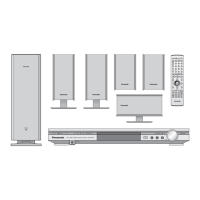
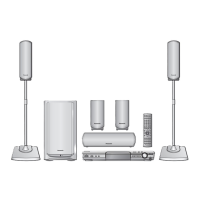
The illustration shows SC-HT520 for the United
Kingdom and Continental Europe.
Before connecting, operating or adjusting this product,
please read these instructions completely.
Please keep this manual for future reference.
Region number
The player plays DVD-Video marked with labels containing the
region number or “ALL”.
Example: [The\United\Kingdom\and\Continental\Europe[
[Note[
“EB” on the packaging indicates the United Kingdom.
Region Number
The United Kingdom, Continental Europe, the
Middle East, South Africa, Saudi Arabia and
Kuwait
2
Southeast Asia 3
Australia and N.Z. 4
Russia 5
2 ALL
3
5
2
Table of contents
Caution for AC Mains Lead. . . . . . . . . . . . . . . . . . 3
Accessories . . . . . . . . . . . . . . . . . . . . . . . . . . . . . . 3
Control reference guide . . . . . . . . . . . . . . . . . . . 14
Discs that can be played/Disc handling . . . . . . 15
Convenient functions . . . . . . . . . . . . . . . . . . . . . 18
Position memory/Zoom/Audio/Subtitle/
Quick replay/Page skip/Repeat play/
All group, random and program play
Using navigation menus . . . . . . . . . . . . . . . . . . . 20
Playing data discs/Playing HighMAT
TM
discs/Playing
the programs/Playing a play list
Using on-screen menus . . . . . . . . . . . . . . . . . . . 22
Changing the player settings . . . . . . . . . . . . . . . 24
The radio. . . . . . . . . . . . . . . . . . . . . . . . . . . . . . . . 26
Automatic presetting/Selecting the preset channels/
Manual tuning/RDS broadcasting/Optional antenna
connections
Sound field and sound quality . . . . . . . . . . . .28-30
Sound Field Control/Super Surround/Center Focus/
Dolby Pro Logic II/Speaker level adjustments/Down-
mixing/Subwoofer level/Custom Sound Memory
Other functions . . . . . . . . . . . . . . . . . . . . . . . . . . 31
Sleep timer/Enjoying Karaoke/Muting/
Using headphones
Operating other equipment. . . . . . . . . . . . . . . . . 32
Safety precautions. . . . . . . . . . . . . . . . . . . . . . . . 34
Maintenance. . . . . . . . . . . . . . . . . . . . . . . . . . . . . 34
Language code list . . . . . . . . . . . . . . . . . . . . . . . 34
Glossary . . . . . . . . . . . . . . . . . . . . . . . . . . . . . . . . 35
Specifications . . . . . . . . . . . . . . . . . . . . . . . . . . . 36
Troubleshooting guide . . . . . . . . . . . . . . . . . . . . 38
Getting started
Simple setup
STEP 1 Front and surround speaker
assembly. . . . . . . . . . . . . . . . . . . . . . . 4
Other speaker setup options . . . . . . 7
STEP 2 Locating . . . . . . . . . . . . . . . . . . . . . . . 8
STEP 3 Connecting speakers with the
subwoofer . . . . . . . . . . . . . . . . . . . . . 10
STEP 4 Video connections . . . . . . . . . . . . . . 12
STEP 5 Radio and system connection . . . . 13
STEP 6 The remote control. . . . . . . . . . . . . . 13
STEP 7 QUICK SETUP. . . . . . . . . . . . . . . . . . 14
Disc operations
Basic play . . . . . . . . . . . . . . . . . . . . . . . . . . . . . 16
Other operations
Reference
RQT7429-2B book.book 1 ペー 00  

Questions and Answers

  • D
    David DanielsAug 4, 2025
    How to control TV with Panasonic SC-HT520 Home Theater System remote?
    • M
      Matthew HernandezAug 4, 2025
      If you cannot operate the TV with your Panasonic Home Theater System remote, first press the [TV] button. Then, check the remote control code for your TV manufacturer.
  • T
    Tracy DavisAug 9, 2025
    What to do if the display is dark on my Panasonic Home Theater System?
    • S
      strongjonathanAug 9, 2025
      If your Panasonic Home Theater System displays a dark screen with messages like “NO PLAY”, “NO DISC”, “F61”, “DVD U11”, “ERROR”, or “DVD H??” (where ?? is a number), try the following: * Select “Bright” in “FL Dimmer” located within the “Others” tab. * Ensure you are using a compatible disc. * Make sure the disc is properly inserted and not blank. * Clean the disc if it's dirty. If the issue persists, turn the unit off and on again. If service numbers appear and don't clear, contact a qualified service person, noting the service number. Also, check the speaker cord connections, and if the problem continues, it may indicate a power supply issue, requiring consultation with a dealer.
  • L
    Luis DavisAug 13, 2025
    Why is the picture distorted on my Panasonic SC-HT520 Home Theater System?
    • T
      Tyler WolfeAug 13, 2025
      If you're experiencing picture distortion, incorrect picture size, faded colors, or menu display issues with your Panasonic Home Theater System, ensure the unit is directly connected to the TV, not through a VCR. Try adjusting the “TV Aspect” in the “Video” settings or using your TV's aspect ratio settings. You can also change the Zoom setting, restore the zoom ratio to a1.00, set “Subtitle Position” in Display Menu to “0”, and set “4:3 Aspect” in Display Menu to “Normal”. Turn off the TV’s zoom function. Mobile telephone chargers can cause some disturbance. If you are using a TV indoor antenna, change to an outdoor antenna. Also, make sure the television antenna wire is not too close to the unit. The unit and television must use the same video systems.
  • M
    Mary LewisAug 18, 2025
    Why my Panasonic SC-HT520 Home Theater System has no power?
    • L
      Leslie DouglasAug 19, 2025
      If your Panasonic Home Theater System isn't powering on, and it automatically switches to standby mode, ensure that the AC mains lead and system cable are securely inserted. Also, check if the Sleep timer is activated.
  • J
    James LopezAug 23, 2025
    Why can't I add markers on my Panasonic Home Theater System?
    • J
      Jennifer FlemingAug 23, 2025
      You cannot add markers with DVD-RAM or if the disc’s elapsed play time doesn’t appear on the unit’s display.
  • D
    Daniel JonesOct 28, 2025
    What to do if no button is working on my Panasonic Home Theater System?
    • S
      Samuel JamesOct 28, 2025
      If your Panasonic Home Theater System is not responding when you press any button, consider the following: * Ensure you are using compatible discs as listed in the operating instructions. * External factors like lightning or static electricity might be interfering. * If condensation has formed, wait 1 to 2 hours for it to evaporate. * Check the batteries in the remote control are correctly installed and not depleted; aim the remote at the sensor. * Verify the video or audio connections. * Check the power and input settings of connected equipment. * Confirm that a DVD-RAM has recorded content. * As a last resort, with the unit stopped and “DVD/CD” as the source, press and hold [?] on the main unit and [S10] on the remote until 'Initialized' disappears, then power cycle the ...

Summary

Getting Started and Setup

Caution for AC Mains Lead

Safety precautions for the AC mains lead, including fuse replacement and proper connection.

Accessories

List of included accessories with part numbers for identification.

Simple Setup Procedures

Front and Surround Speaker Assembly

Step 1: Assembling front and surround speakers, including attaching pipes and stands.

Other Speaker Setup Options

Instructions for attaching speakers to walls or fitting them onto stands.

Locating Speakers

Step 2: Positioning front, surround, center, and subwoofer speakers for optimal sound.

Connecting Speakers with the Subwoofer

Step 3: Connecting speaker cables to the subwoofer and main unit.

Video Connections

Step 4: Connecting the unit to a television using various video terminals.

Radio and System Connection

Step 5: Connecting antennas and the AC mains lead.

QUICK SETUP

Step 7: Guides users through initial necessary settings upon first use.

Playback and Control Features

Control Reference Guide

Overview of remote control buttons and their functions.

Basic Play

Standard procedure for playing discs, including power on, disc loading, and volume adjustment.

Convenient Functions

Special playback features like position memory, zoom, audio, subtitle, quick replay, and page skip.

Using Navigation Menus

Navigating data discs, HighMAT discs, programs, and play lists.

Using On-Screen Menus

Accessing and adjusting settings via the main menu, time, audio, and other settings.

Disc Information and Settings

Discs That Can Be Played

List of compatible disc types (DVD-RAM, DVD-Audio, DVD-Video, CD, etc.) and their formats.

Disc Handling

Instructions for cleaning discs and precautions for handling discs to prevent damage.

Changing the Player Settings

Configuring disc-related settings such as audio language, subtitle, menus, and ratings.

Radio Operations

Automatic Presetting

Automatically scans and stores up to 15 FM and AM radio stations.

Selecting the Preset Channels

Accessing stored radio stations using the numbered buttons.

Manual Tuning

Manually tuning to specific FM or AM frequencies.

RDS Broadcasting

Displaying text data transmitted by radio data system (RDS) signals.

Sound Field and Quality

Sound Field Control

Adjusting sound characteristics with various modes like HEAVY, CLEAR, SOFT, DISCO, LIVE, HALL.

Super Surround and Dolby Pro Logic II

Enhancing stereo sound with surround effects and converting stereo to surround sound.

Speaker Level Adjustments

Balancing speaker output levels for appropriate surround effects.

Custom Sound Memory

Storing up to 30 sound settings (one per disc) for recall.

Other Functions and Equipment

Sleep Timer and Muting

Setting the unit to turn off automatically and silencing audio output.

Enjoying Karaoke

Instructions for using the karaoke feature with microphones.

Using Headphones

Connecting and using headphones for private listening.

Operating Other Equipment

Connection examples and instructions for operating televisions, VCRs, and tape decks.

Safety and Troubleshooting

Safety Precautions

Guidelines for safe operation, placement, voltage, and handling of the unit and its components.

Troubleshooting Guide

Lists common problems and their solutions for power, functions, picture, sound, and menus.

Panasonic SC-HT520 Specifications

General IconGeneral
BrandPanasonic
ModelSC-HT520
CategoryHome Theater System
LanguageEnglish

Related product manuals