EasyManua.ls Logo

Panasonic SC-HT75 - User Manual

Panasonic SC-HT75
40 pages
Print Icon
To Next Page IconTo Next Page
Loading...
P PC PX GCP
DVD Home Theater Sound System
Operating Instructions
Model No. SC-HT95
SC-HT75
RQT6183-2P
Before connecting, operating or adjusting this product, please read
these instructions completely.
Please keep this manual for future reference.
AUDIO
/
VIDEO
As an ENERGY STAR
®
Partner, Panasonic has
determined that this product meets the ENERGY
STAR
®
guidelines for energy efficiency.
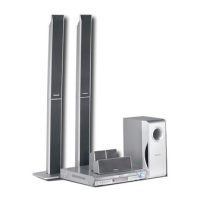
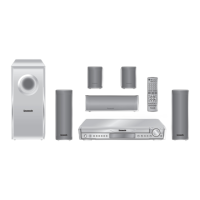
The illustration shows SC-HT75.
This unit responds to the region number in-
formation on DVD-Video. The unit can only
play DVD-Video if the region number of the
disc matches the region number of this unit.
See page 5 for details.
[For\U.S.A.\only]
The servicenter list and warranty can be
found on pages 38 and 39.

Table of Contents

Questions and Answers

  • U
    uprattAug 12, 2025
    What to do if my Panasonic SC-HT75 Home Theater System is not responding to buttons?
    • M
      Mark PerryAug 12, 2025
      If your Panasonic Home Theater System is not responding when buttons are pressed, or the remote control isn't working, it might be due to external factors like lightning or static electricity. To resolve this, reset the unit by pressing [Í] to switch it to standby mode and then back on. Alternatively, switch the unit to standby, disconnect the AC power supply cord, and then reconnect it.
  • P
    paulharrisAug 16, 2025
    Why does my Panasonic Home Theater System have sound issues?
    • Y
      Yolanda RodriguezAug 16, 2025
      If you are experiencing sound issues such as no sound or distorted sound with your Panasonic Home Theater System, check the speaker wire connections to ensure there are no shorts (bare wires touching). Also, avoid using speakers with an impedance lower than what is recommended for the unit. Ensure that the volume or power isn't straining the speakers, and the muting function is off. If the unit is in a hot environment, switch it off, identify and fix the cause, and then switch it back on.
  • M
    Michael MarksAug 19, 2025
    How to fix a distorted picture on my Panasonic SC-HT75?
    • G
      gjonesAug 19, 2025
      If your Panasonic Home Theater System is showing a distorted or no picture, ensure the television is properly connected and turned on. Verify that the TV's video input setting (e.g., VIDEO 1) is correct. If the 'PROGRESSIVE OUT' indicator is on, press the [PROGRESSIVE OUT] button to turn it off, as the unit does not output video signals from the VIDEO OUT and S-VIDEO OUT terminals when progressive out is enabled. Also, check the 'TV Aspect' setting in the Video menu of the ACTION screen to ensure it suits your television. If you are using an antenna, consider switching to an outdoor antenna.
  • B
    Brenda OrtizAug 23, 2025
    Why is my Panasonic Home Theater System humming during play?
    • T
      Tracy SmithAug 23, 2025
      If you hear humming during play with your Panasonic Home Theater System, it may be due to an AC power supply cord or fluorescent light being near the cables. Keep other appliances and cords away from the unit’s cables.
  • M
    Matthew JohnsonAug 27, 2025
    How to stop noise during radio listening on my Panasonic SC-HT75?
    • K
      Kelly SmithAug 27, 2025
      If you are experiencing noise during radio listening on your Panasonic Home Theater System, the stereo indicator is flickering, the sound is distorted, or you hear a beat sound, adjust the position of the FM or AM antenna. Alternatively, try using an outdoor antenna. Also, try turning off the television or separating it from the unit.
  • T
    Todd RodgersAug 30, 2025
    What does it mean when my Panasonic SC-HT75 Home Theater System displays 'No Disc'?
    • R
      richard44Aug 31, 2025
      If your Panasonic Home Theater System's display is off and showing messages like ‘NO PLAY,’ ‘NO DISC,’ ‘F61,’ ‘DVD U11,’ ‘ERROR,’ ‘DVD H??,’ or ‘TAKE OUT DISC,’ it could be due to several reasons. Ensure you are inserting a disc that the unit can play and that it is inserted correctly. If there is no disc inserted, insert one. If the disc is dirty, wipe it with a soft cloth.
  • D
    dthompsonSep 4, 2025
    Why is there no sound from the subwoofer on my Panasonic SC-HT75?
    • J
      josephjustinSep 4, 2025
      If you are not getting any sound from the subwoofer of your Panasonic Home Theater System, check that the subwoofer volume has not been set to '0'.
  • E
    Erika RiveraSep 7, 2025
    How to turn on the on-screen display for my Panasonic SC-HT75 Home Theater System?
    • A
      arielgonzalesSep 7, 2025
      If the on-screen display is not showing, the On-Screen Menu Icons are not fully displayed, or the disc’s menu is in a different language on your Panasonic Home Theater System, go to the Display settings in the ACTION menus and select 'On' for 'On-Screen Messages'. To change the menu language, go to Disc in the ACTION menus and select your preferred language for 'Menus'.

Summary

Getting Started

Accessories Included

Lists and identifies all supplied accessories for the system.

Important Safety Instructions

Detailed safety precautions for installation, placement, and general use.

Disc Information

Details on playable discs, region management, and disc compatibility.

Disc Handling Precautions

Guidelines for handling discs to prevent damage and ensure proper playback.

Simple Setup Procedures

Speaker Placement and Connection

Guide to positioning and connecting front, center, surround, and subwoofer speakers.

Speaker Cords

Instructions for attaching speaker stickers and connecting speaker wires.

Television Connection

Connecting to Your TV

How to connect the unit to your television using various video outputs.

Antennas and Power Supply

Antenna Connection

Instructions for connecting FM and AM antennas for optimal reception.

AC Power Connection and Voltage Setting

Guidance on connecting the AC power cord and setting the correct voltage.

Remote Control Operation

Remote Control Usage

How to install batteries and use the remote control effectively.

TV Screen Type Selection

Selecting TV Aspect Ratio

Setting the TV aspect ratio (4:3, 16:9) for optimal picture display.

Panasonic SC-HT75 Specifications

General IconGeneral
TypeHome Theater System
Total Power Output1000W
Speaker Configuration5.1 Channel
Number of Speakers6
DVD PlaybackYes
DVD PlayerYes
BluetoothNo
USB PlaybackYes
FM TunerYes
Total Output Power1000W
Progressive ScanYes
Video UpconversionNo
Radio TunerFM
HDMI Output1
Surround SoundYes
Weight (Main Unit)5.5 kg
Supported MediaDVD, CD
Surround Sound FormatsDolby Digital
InputsHDMI
OutputsComposite
Digital Audio InputOptical

Related product manuals