EasyManua.ls Logo

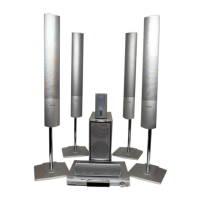
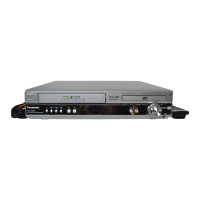
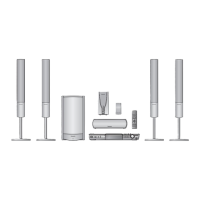
Panasonic SC-HT850 - User Manual

Panasonic SC-HT850
40 pages
Print Icon
To Next Page IconTo Next Page
Loading...
R
DVD Home Theater Sound System
Operating Instructions
Model No. SC-HT850
PHONES
DOWN UP
VOLUME
OPEN/CLOSE
DVD HOME THEATER SOUND SYSTEM SA-HT850
Í
/
I
RDS SFC SELECTOR
SUBWOOFER
AV SYSTEM
SLEEP
FL DISPLAY
DIMMER
PLAY MODE
MIX 2CH
REPEAT
P.MEMORY CANCEL
SKIP
CH
TOP MENU
DISPLAY
VOLUME
MUTING
SSS PL C.FOCUS
CSM SFC
SUBWOOFER
LEVEL
FM MODE
SETUP
ZOOM GROUP AUDIO
RETURN
TV VOL
s
TV VOL
r
DIRECT
NAVIGATOR
PLAY LIST
MENU
SLOW/SEARCH
S
10/
-/--
123
456
78
0
9
TV/AV
TUNER/BAND DVD/CD
TV VCR/AUX
ENTER
CH SELECT
TEST
A
U
D
I
O
/
V
I
D
E
O
Region number supported by
this unit
Region numbers are allocated to this unit and
software according to where they are sold.
The region number of this unit is “2”.
The unit will play DVD-Video marked with
labels containing “2” or “ALL”.
Example:
Before connecting, operating or adjusting this
product, please read these instructions completely.
Please keep this manual for future reference.
2
ALL
3
5
2
RQT7026-B
E
7026en.book1ページ2003年2月17日 月曜日 午後3時30分

Table of Contents

Questions and Answers

  • S
    Steve LawsonJul 31, 2025
    Why is there no sound coming from my Panasonic SC-HT850?
    • C
      cgarciaJul 31, 2025
      If your Panasonic Home Theater System produces no sound, distorted sound, or a humming noise during playback, verify the speaker wire connections to ensure there are no shorts (bare wires touching). Also, ensure the volume is turned up and muting is off. If you are using speakers with an impedance lower than the unit's rating or straining the speakers with excessive volume, switch off the unit, correct the cause, and then switch it back on. Keep AC mains leads and fluorescent lights away from the subwoofer, as proximity can cause humming. If the unit is in a hot environment, ensure proper ventilation.
  • K
    Kara FernandezAug 7, 2025
    Why is my Panasonic Home Theater System not turning on?
    • C
      Caitlin WilliamsAug 7, 2025
      If your Panasonic Home Theater System has no power, make sure the AC mains lead and system cable are securely inserted. The unit may have been switched to standby by the sleep timer.
  • M
    Mark JenkinsAug 22, 2025
    How to turn on the on-screen display for my Panasonic SC-HT850 Home Theater System?
    • J
      Jennifer GarnerAug 22, 2025
      If your Panasonic Home Theater System has no on-screen display, or the GUI screen is not fully displayed, go to Display in the SETUP menus and select 'On' for 'On-Screen Messages'. If the disc’s menu is in a different language, go to Disc in the SETUP menus and choose your preferred language for 'Menus'.
  • R
    rogershepherdNov 14, 2025
    How to fix a distorted picture on my Panasonic SC-HT850?
    • B
      Beth NicholsNov 15, 2025
      If your Panasonic Home Theater System displays a distorted or no picture, first check the connection to your TV and ensure that the TV is turned on and set to the correct video input. You may also need to adjust the 'TV Aspect' setting in the SETUP menus to suit your television, or use your TV to change the aspect ratio. Make sure the unit is connected directly to the TV, not through a video cassette recorder. You can also try changing the size with the variable zoom function or checking the settings in the GUI screen’s Picture Menu. If you are using an antenna, make sure that the location and orientation of the antenna are correct. Also, separate the antenna wire of the television from the unit. Change the zoom ratio to 'k1.00'. With the GUI screen, change 'Subtitle Position' to '0' or ch...

Summary

Safety Precautions

Laser Product Warning

Warns about hazardous radiation exposure from laser components.

Fire and Electric Shock Hazard Prevention

Advises against exposing the unit to moisture, liquids, or heat sources.

Ventilation and Placement Guidelines

Stresses proper ventilation and avoiding confined spaces to prevent overheating.

Getting Started

Basic Setup Steps

Outlines the sequence of steps for initial system assembly and connection.

Simple Setup: Speaker Assembly

Assembling Speaker Units

Step-by-step guide for attaching speaker units to their stands and bases.

Simple Setup: Speaker Placement

Optimal Speaker Positioning

Guides on where to place front, center, and surround speakers for best sound.

Simple Setup: Speaker Connections

Connecting Speakers to Subwoofer

Details how to connect front, surround, and center speakers to the subwoofer unit.

Simple Setup: Connecting to Television

Simple Setup: Final Connections

Connecting Subwoofer, Antennas, and Power

Details connecting the subwoofer, AM/FM antennas, and AC mains lead.

Quick Setup Configuration

Initial Setup Steps

Step-by-step guide to perform initial setup using the on-screen menu.

TV Type and Aspect Ratio Settings

How to configure TV type and aspect ratio for optimal viewing.

Remote Control Reference

Remote Control Functions

Detailed listing of remote control buttons and their corresponding functions.

Main Unit Controls and Indicators

Explains the buttons, indicators, and ports on the main unit.

Basic Disc Playback

Starting Disc Playback

How to close the disc tray and start playback of WMA, MP3, or CD discs.

Adjusting Volume and Playback Controls

Using volume controls, pause, and stop functions during playback.

Advanced Playback Features

Position Memory and Resume Function

How to save and resume playback from a specific point on a disc.

Disc Navigation and Control

Skipping, Searching, and Slow Motion

Instructions for skipping tracks, fast forwarding, rewinding, and slow-motion playback.

Convenient Disc Playback Functions

Repeat Play Modes

Explains how to use repeat play for tracks, chapters, or entire discs.

A-B Repeat for Specific Sections

How to set and repeat a specific section between two points (A and B).

Advanced Play Modes

All Group and Program Play

How to play all groups or create custom programs for playback.

Random Playback

How to play tracks or titles in a random order.

Playback Customization

Marking and Recalling Playback Points

How to mark specific points on a disc for easy return.

Audio and Subtitle Control

Radio Tuning and Presets

Radio Broadcasting and Sound Field Modes

Dolby Digital and DTS Playback

Information on playing Dolby Digital and DTS encoded sources.

Sound Field Adjustments

Speaker Level Adjustments

How to adjust individual speaker volume levels for balanced sound.

Sound Customization

Sound Field Control Options

Selecting various sound field presets like HEAVY, CLEAR, SOFT, etc.

System Settings

Advanced Settings and Configuration

Adjusting Speaker Delay Times

Setting delay times for center and surround speakers for optimal sound.

Troubleshooting

Power and Operation Problems

Solutions for issues like no power, no response, or remote control problems.

Troubleshooting and Maintenance

Glossary and Safety

General Safety Precautions

Important safety guidelines regarding placement, voltage, and handling.

Technical Specifications

Amplifier and Tuner Specifications

Detailed technical data for the amplifier and FM/AM tuners.

Speaker and Disc Section Specifications

Technical details for speakers, disc playback, and signal output.

Panasonic SC-HT850 Specifications

General IconGeneral
EqualizerYes
RMS rated power1000 W
Audio output channels5.1 channels
Satellite speakers RMS power740 W
Number of optical discs1 discs
Optical disc player typeDVD recorder
Weight2200 g
Dimensions (WxDxH)430 x 68 x 359.2 mm
Surround speaker weight16400 g
Surround speaker dimensions (WxHxD)248 x 417 x 476.6 mm
Weight and Dimensions IconWeight and Dimensions
Subwoofer weight3700 g
Center speaker weight1500 g
Subwoofer dimensions (WxDxH)250 x 1160 x 247 mm
Center speaker dimensions (WxDxH)320 x 93 x 97 mm

Related product manuals