19
RQT0A66
19
MAX9000.7000.5000_GS_en
External equipment
Preparation
• Disconnect the AC mains lead.
• Switch off all equipment and read the appropriate
operating instructions.
Note:
Components and cables are sold separately.
Using the auxiliary input
You can connect a VCR, DVD player etc. and listen to the
audio through this system.
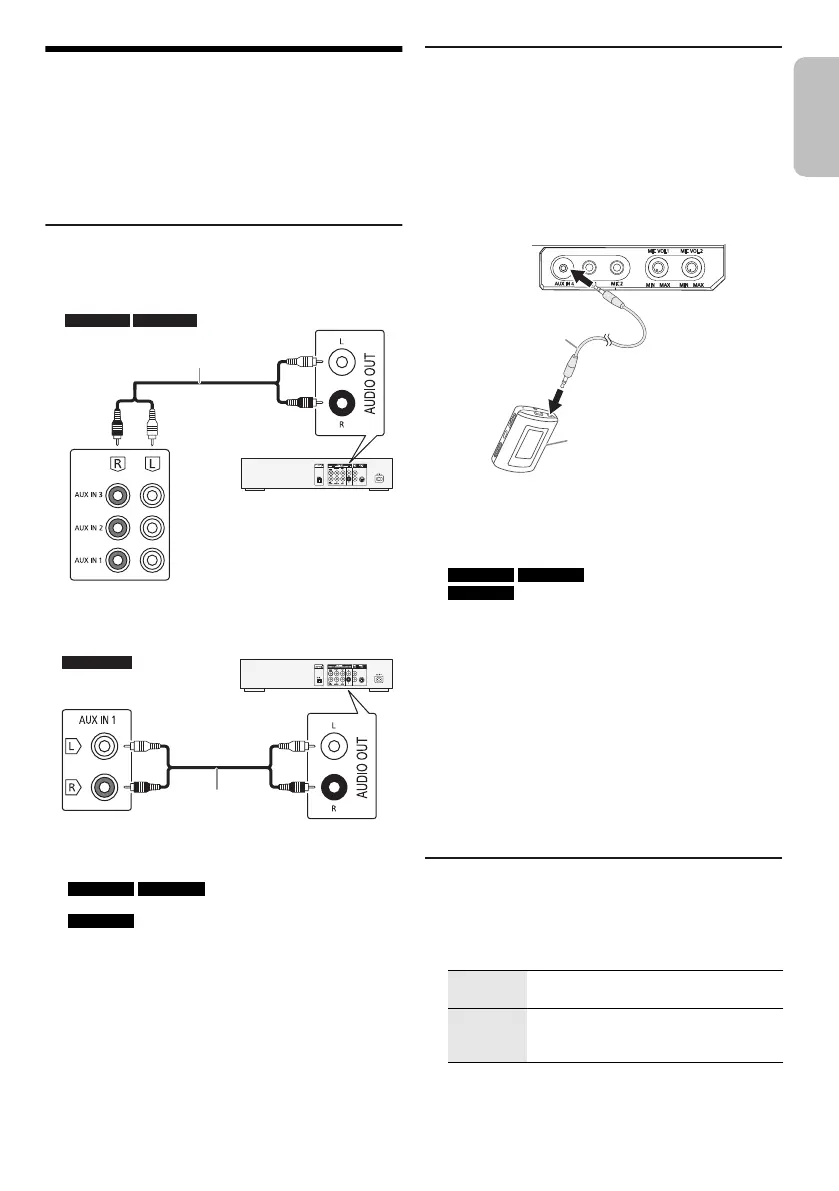
1 Connect the external equipment.
2 Press [CD/RADIO/AUX] to select
SC-MAX9000 SC-MAX7000 : “AUX 1”, “AUX 2” or
“AUX 3”.
SC-MAX5000 : “AUX 1”.
3 Play the external equipment.
Note:
• If you want to connect equipment other than those
described, refer to the audio dealer.
• Sound distortion can occur when you use an adapter.
Connecting a portable audio equipment
You can play music from a portable audio equipment.
Preparation
• Switch off the equaliser (if any) of the portable audio
equipment to prevent sound distortion.
• Decrease the volume of the system and the portable
audio equipment before you connect or disconnect the
portable audio equipment.
1 Connect the portable audio equipment.
Plug type: Ø 3.5 mm stereo
2 Press [CD/RADIO/AUX] to select
SC-MAX9000 SC-MAX7000 : “AUX 4”.
SC-MAX5000 : “AUX 2”.
3 Play the portable audio equipment.
To adjust the input level
1 Press [PLAY MENU] to select “INPUT LEVEL”.
2 Press [Y, U] to select “NORMAL” or “HIGH” and
then press [OK].
Note:
• You cannot adjust the input level during recording.
• Select “NORMAL” if the sound is distorted during “HIGH”
input level.
• Read the operating instructions of the portable audio
equipment for details.
AUX mode
1 Press [PLAY MENU] to select “AUX MODE”.
2 Press [Y, U] to select the mode and then press
[OK].
Rear panel of
this main unit
Rear panel of
this main unit
Audio cable
(not supplied)
Audio cable
(not supplied)
DVD player
(not supplied)
DVD player
(not supplied)
MODE 1
(default)
Select this mode to use the Karaoke
effect function.
MODE 2 Select this mode when watching TV,
movies or using an external player with
Karaoke features.
Audio cable
(not supplied)
Portable audio equipment
(not supplied)
GS_RQT0A66-G_en.fm Page 19 Friday, March 11, 2016 1:23 PM








 To Next Page