17
RQT0B21
17
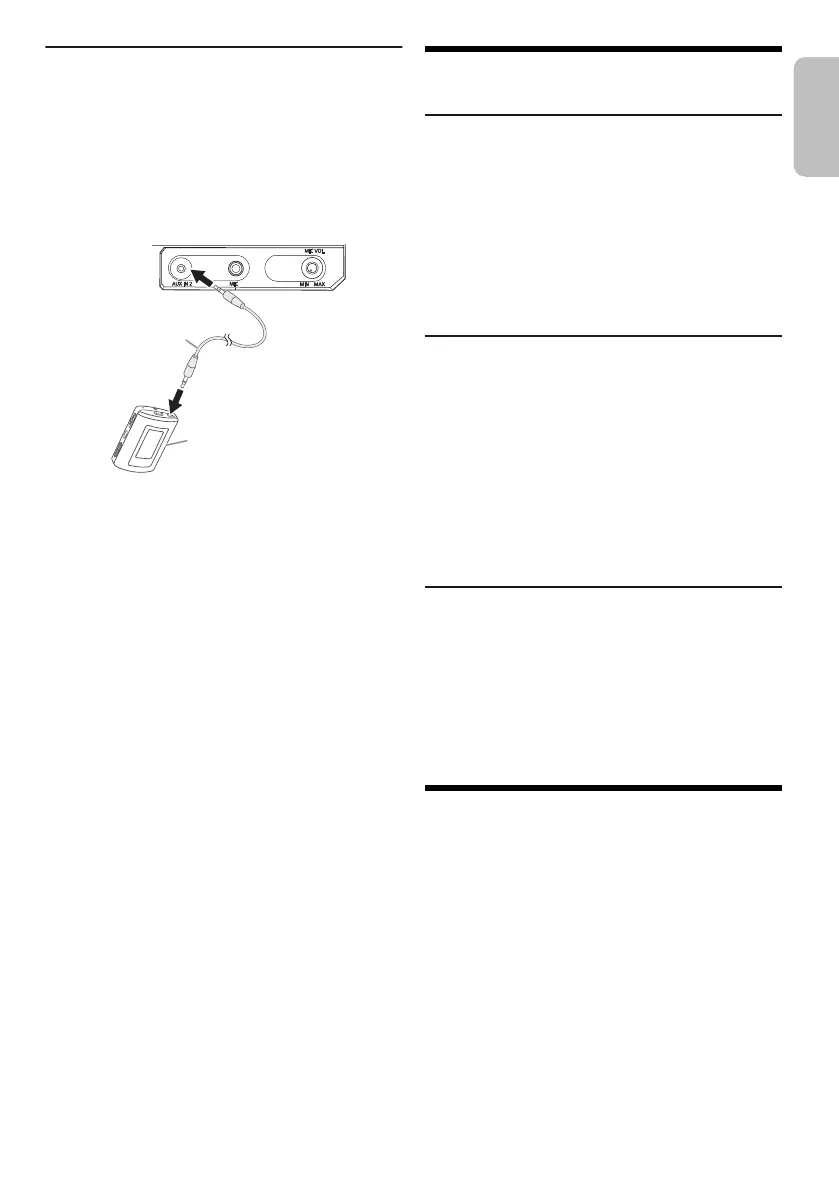
Connecting a portable audio equipment
You can play music from a portable audio equipment.
Preparation
• Turn off the equalizer (if any) of the portable audio
equipment to prevent sound distortion.
• Lower the volume of the system and the portable audio
equipment before you connect or disconnect the
portable audio equipment.
1 Connect the portable audio equipment.
Plug type: Ø 3.5 mm (
1
/
8
") stereo
2 Press [RADIO/AUX] to select “AUX 2”.
3 Play the portable audio equipment.
To adjust the input level
1 Press [PLAY MENU] to select “INPUT LEVEL”.
2 Press [Y, U] to select “NORMAL” or “HIGH” and
then press [OK].
Note:
• Select “NORMAL” if the sound is distorted during “HIGH”
input level.
• Read the operating instructions of the portable audio
equipment for details.
Others
Auto off
This system automatically turns off when you do not use
it for approximately 20 minutes.
1 Press [SETUP] to select “AUTO OFF”.
2 Press [Y, U] to select “ON” and then press [OK].
To cancel, select “OFF”.
Note:
This function does not work when you are in radio source or
when a Bluetooth
®
device is connected.
Bluetooth
®
standby
This function automatically turns on the system when you
establish a Bluetooth
®
connection from a paired device.
1 Press [SETUP] to select “BLUETOOTH STANDBY”.
2 Press [Y, U] to select “ON” and then press [OK].
To cancel, select “OFF”.
Note:
Some devices may take longer to respond. If you are
connected to a Bluetooth
®
device before turning off the
system, wait for a minimum of 5 seconds before connecting
to this system from your Bluetooth
®
device again.
Software version
You can check the software version of the system.
1 Press [SETUP] to select “SW VER.” and then press
[OK].
The software version is shown.
2 Press [OK] again to exit.
Maintenance
To clean this system, wipe with a soft, dry cloth.
• Never use alcohol, paint thinner or benzine to clean this
system.
• Before using chemically treated cloth, read the
instructions that came with the cloth carefully.
Audio cable
(not supplied)
Portable audio equipment
(not supplied)
PP_RQT0B21-Y_en.fm Page 17 Monday, March 21, 2016 1:15 PM




 To Next Page